The app worked on my machine. API_BASE_URL lived in .env.local, the route handler called the API, and the page rendered. I added the same variable in the Amplify console, pushed the branch, and watched a clean build finish in a few minutes. Then the first request to the deployed site failed. The route handler was calling undefined/orders.
Nothing was wrong with the code, and the variable was right there in the console. If your Amplify environment variables are not working in Next.js either, you have probably hit the same gap: Amplify Hosting treats the build and the running app as two separate places, and by default your variables only exist in the first one.
In this article, we will look at why that happens, how to confirm it is your problem, the fix AWS recommends, and what to do instead when the value is a secret.
Why It Happens: The Build Is Not the Runtime
When you deploy a Next.js SSR app, Amplify Hosting does two different jobs. First, it runs your build commands inside a build container. Then it deploys the output to Amplify’s SSR compute, which serves real requests.
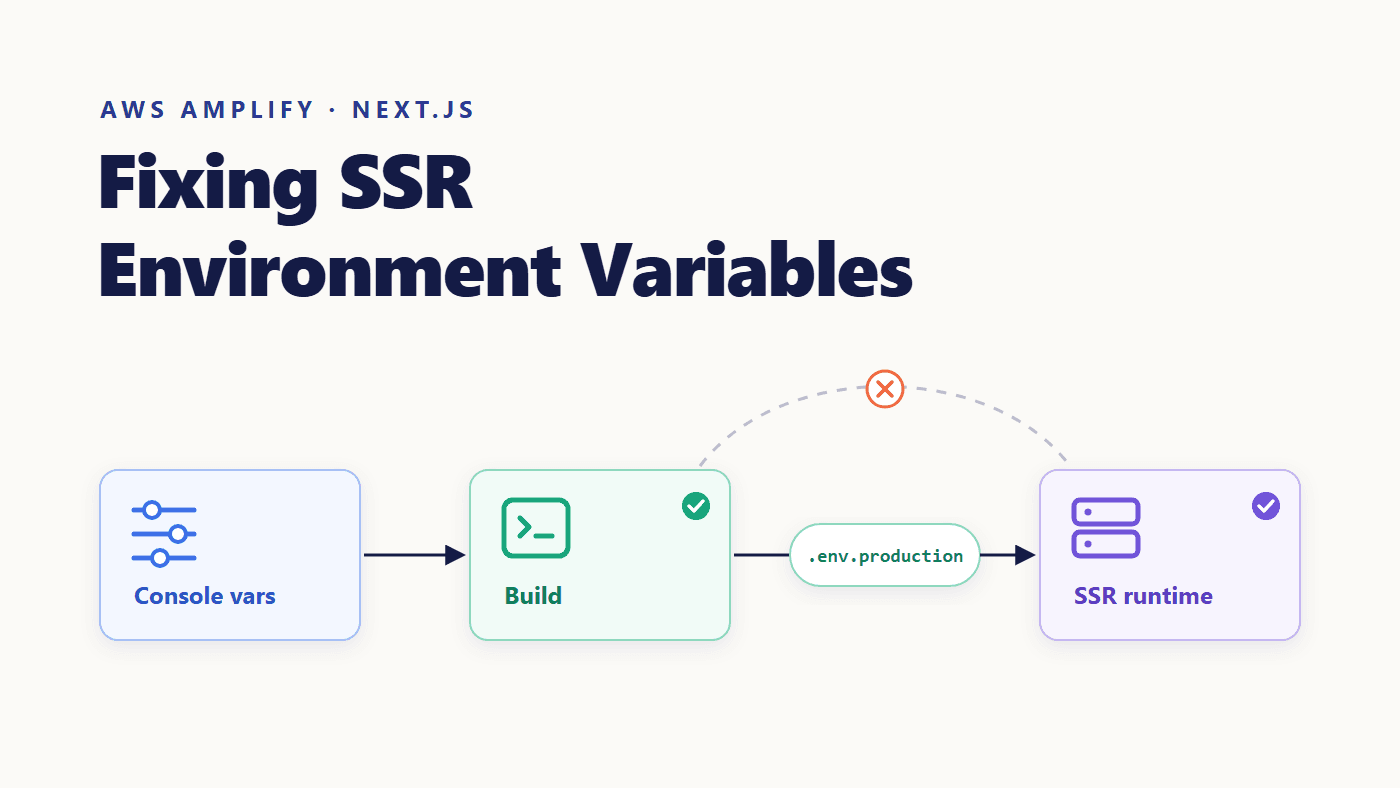
Variables you add in the Amplify console are injected into the build container. They are not forwarded to the server runtime. According to the AWS documentation, this is intentional: a Next.js server component does not get those variables by default, to protect any secrets your app uses during the build phase.
Amplify console variables
        │
        ↓
  Build container  ──── npm run build  ✔ variable exists
        │
        ↓   (not forwarded)
  SSR compute  ──── process.env.API_BASE_URL  ✘ undefined
Next.js adds a second layer to this. Variables prefixed with NEXT_PUBLIC_ are inlined into the JavaScript bundle during next build, so their values are frozen at build time. Every other variable is only available on the server, read from process.env when the code runs. That is why the Amplify env variables runtime problem hits server-side code and usually leaves your public variables alone.
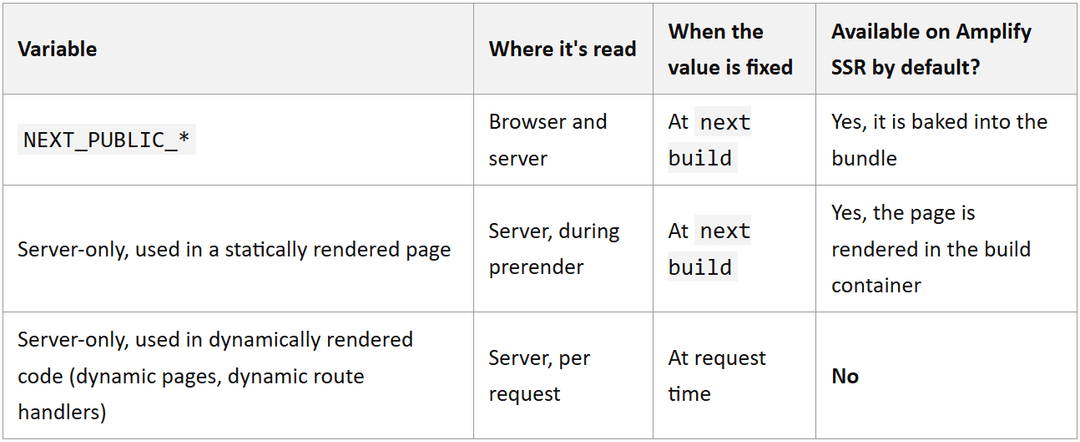
The middle row explains a confusing symptom. A page that Next.js prerenders during the build can read the variable just fine, because the prerender runs where the variable exists. Dynamically rendered code reads it at request time, during SSR compute, and gets nothing.
Confirming This Is Your Problem
Before changing anything, check that you’re looking at this issue and not a typo. You are likely hitting it if:
- the variable works locally but is
undefinedonly in the deployed app NEXT_PUBLIC_variables work, but server-only ones don't- static pages are fine, while route handlers or dynamic pages fail
A quick way to confirm is to log whether the variable exists, never its value:
// app/api/env-check/route.ts
export const dynamic = 'force-dynamic'; // run per request, not at build time
export async function GET() {
  console.log('API_BASE_URL set:', Boolean(process.env.API_BASE_URL));
  return Response.json({ ok: true });
}
Deploy, call /api/env-check, and check the output in the Amplify console under Monitoring → Hosting compute logs (the logs live in Amazon CloudWatch). If it prints false, keep reading.
The Fix: Write the Variables to .env.production in amplify.yml
Next.js loads .env.production automatically when it runs in production. So the fix is to take the variables you need from the build environment and write them into that file before the build starts. Amplify packages the file with the app, and the server can read the values when it receives traffic.
Here is the pattern AWS documents in your amplify.yml build specification:
version: 1
frontend:
  phases:
    preBuild:
      commands:
        - npm ci
    build:
      commands:
        - env | grep -e API_BASE_URL >> .env.production
        - env | grep -e NEXT_PUBLIC_ >> .env.production
        - npm run build
  artifacts:
    baseDirectory: .next
    files:
      - '**/*'
  cache:
    paths:
      - node_modules/**/*
      - .next/cache/**/*
The two new lines do all the work:
- env | grep -e API_BASE_URL >> .env.production
env prints every variable in the build container as NAME=value. grep keeps the matching lines, and >> appends them to .env.production. After this line, the file contains API_BASE_URL=https://api.example.com.
- env | grep -e NEXT_PUBLIC_ >> .env.production
This one copies every variable with the NEXT_PUBLIC_ prefix in one go. Both lines must come before npm run build, because the file has to exist when Next.js builds the app.
One refinement is worth making. grep -e API_BASE_URL matches any line that contains that text, so a variable named LEGACY_API_BASE_URL would be copied too. If you want exactly the variables you name, anchor the pattern:
- env | grep -E '^(API_BASE_URL|APP_ENV)=' >> .env.production
If your Next.js app sits inside a monorepo, write the file into the app’s root, not the repository root. The AWS example for an Nx monorepo with the app root apps/app uses >> apps/app/.env.production.
Verifying the Fix
Commit the amplify.yml change and let Amplify run a new build. This matters beyond the first deployment too. The values are captured when the build runs, so if you change a variable in the Amplify console later, nothing changes in the running app until you redeploy.
Once the build finishes, call /api/env-check again. The compute logs should now show true, and the real route should reach your API. You can delete the check route afterwards.
Don’t Use This for Secrets
This fix is right for configuration: API base URLs, feature flags, environment names. It is the wrong place for API keys, database passwords, or tokens.
AWS is direct about this. The same documentation page strongly recommends against storing credentials or sensitive information in environment variables, because any user with access to the deployment artifacts can read them. The Amplify Gen 2 docs on secrets and variables warn that environment variables are rendered in plain text in build artifacts. Writing a secret into .env.production puts it exactly there.
For server code that needs AWS resources or secrets, AWS recommends an SSR Compute role. It is an IAM role that you attach under App settings → IAM roles → Compute role in the Amplify console. Its trust policy must allow amplify.amazonaws.com to assume it. The role gives your SSR functions temporary credentials, so no long-lived keys go into any file.
With the role in place, the server can fetch a secret at runtime. For example, it can read from Systems Manager Parameter Store:
// lib/get-secret.ts (server-only)
import { SSMClient, GetParameterCommand } from '@aws-sdk/client-ssm';
const ssm = new SSMClient({ region: 'us-east-1' }); // your region
let cached: string | undefined;
export async function getPaymentKey() {
  if (cached) return cached;
  const res = await ssm.send(
    new GetParameterCommand({ Name: '/myapp/prod/payment-key', WithDecryption: true })
  );
  cached = res.Parameter?.Value;
  return cached;
}
Grant the role only ssm:GetParameter on that parameter, plus kms:Decrypt if the parameter uses a customer-managed KMS key. One more detail from the docs: if your repository is public and uses auto-branch creation or pull request previews, attach the role at the branch level instead of as the app-wide default.
Common Mistakes
- Forgetting to redeploy. Console changes do not reach a running app. Every change needs a new build.
- Expecting
NEXT_PUBLIC_values to update on their own. They are inlined at build time and stay frozen until the next build. - Matching too broadly. An unanchored
grepcan copy variables you never meant to ship. - Writing to the wrong folder. In a monorepo,
.env.productionmust sit in the app root. - Shipping secrets. If a leaked value would hurt, it belongs behind the compute role, not in
.env.production.
Conclusion
Amplify SSR environment variables stop being mysterious once you picture the two places your app lives. The build container sees everything you set in the console. SSR Compute sees only what you deliberately pass across. Writing non-secret configuration into .env.production in amplify.yml passes it across. Keeping secrets behind an SSR Compute role makes sure the things that should never cross don't.
If you’re new to how the pieces of Amplify fit together, What is AWS Amplify? is a good place to start.