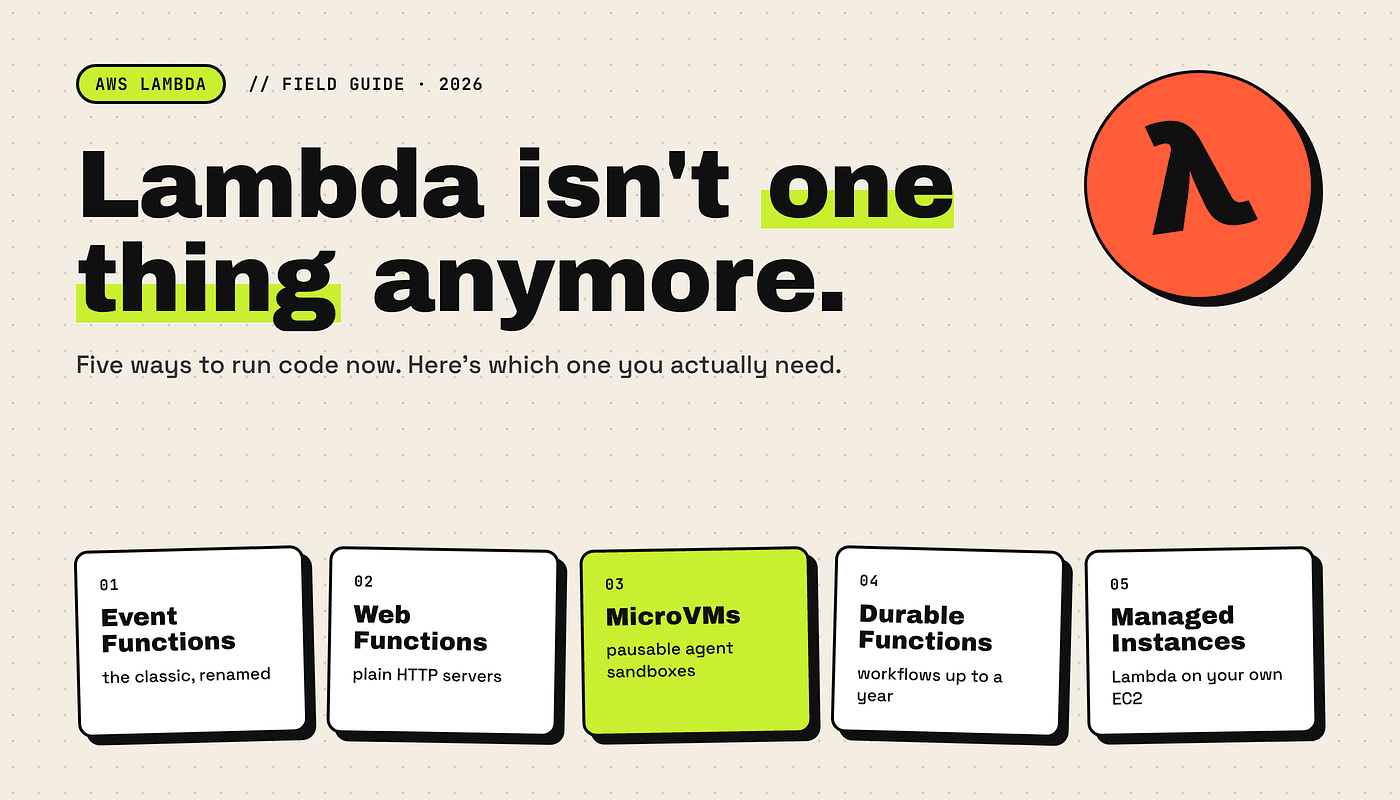
AWS Lambda now comes in five forms: Event Functions, Web Functions, MicroVMs, Durable Functions, and Managed Instances. If you haven’t looked at it since 2024, it’s a very different service today.
Alexy Grabov’s What is going on with Lambda? covers the AWS strategy behind this shift. This post is the practical companion: what each new Lambda does and when you’d actually use it.
What Lambda used to be
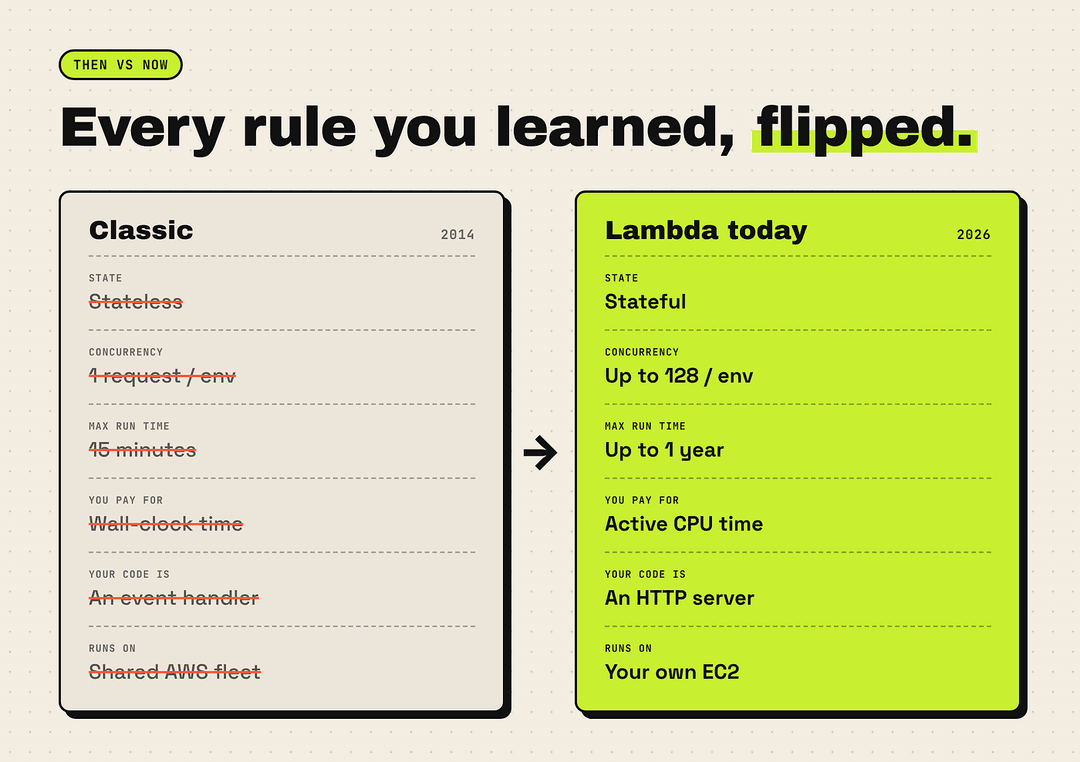
If you learned Lambda before 2025, you probably memorized the same rules I did:
- Stateless—nothing survives between invocations
- One request at a time per execution environment
- 15 minutes max—then you’re cut off
- Pay for wall-clock time, even while you’re just waiting
- Need state or a server? Go to ECS, EKS, or EC2
Those rules were the whole identity of serverless. And over the last year, AWS has rewritten nearly every one of them.
The short version
Lambda now covers three compute primitives built on Firecracker microVMs, plus a couple of big add-ons that bend the old rules even further:
- Event Functions: classic Lambda, renamed. Use it when you’re reacting to S3, SQS, or EventBridge events.
- Web Functions: a normal HTTP server, serverless-style. Use it for Express, Hono, Fastify, or Next.js apps.
- MicroVMs: a personal, pausable VM. Use it when an AI agent needs a sandbox to run code and keep files.
- Durable Functions: Step Functions inside your code. Use it when a workflow waits hours, days, or even months.
- Managed Instances: Lambda running on your own EC2. Use it at a large, predictable scale when you want EC2 pricing.
- Tenant Isolation Mode: a safety guarantee, not a new primitive. Use it for multi-tenant SaaS.
Now let’s go through them one by one.
1. Event Functions: the Lambda you already know
What changed: only the name.
What we used to call “a Lambda function” is now officially an Event Function. Same single-request model, same event sources, same wall-clock billing. Your existing code and deployments don’t need to change.
The rename matters for one reason: it tells you event-driven glue code is now just one part of what Lambda does, not the whole story.
Use it for:
- File processing: resizing images or parsing CSVs dropped into S3
- Queue consumers: working through SQS messages
- Scheduled jobs: cron-style tasks via EventBridge
2. Web Functions: finally, a web app without the adapter dance
If you’ve ever squeezed an Express app into Lambda, you know the pain: wrapper libraries, API Gateway in front, cold starts on every traffic spike, and paying full price while your function sat idle waiting on a database or an LLM response.
Web Functions remove most of that. Your code is just a regular HTTP server listening on a port—no adapters.
// This is the whole idea: a plain server, nothing Lambda-specific
import express from "express";

const app = express();

app.get("/health", (req, res) => res.json({ ok: true }));

app.listen(process.env.PORT || 8080);
Two changes under the hood make this a big deal:
- Multi-concurrency: one warm environment can serve up to 128 requests at the same time, so steady traffic rarely hits a cold start
- Active CPU billing: you pay for the CPU time your code actually burns (plus the memory of the warm environment), not for the seconds spent waiting
That second point is huge for AI apps. If your endpoint streams tokens from Amazon Bedrock for 15 seconds, most of that is idle I/O, and with Web Functions, it costs you very little. You also get multi-region replication and latency-based routing out of the box.
Use it for:
- Full-stack apps: Next.js or any framework that wants to own its server
- APIs with slow upstreams: anything waiting on LLMs, third-party APIs, or heavy queries
- Streaming responses: chat UIs and long-lived connections
3. MicroVMs: a sandbox your AI agent can live in
This is the one that breaks the old rules most dramatically.
Lambda MicroVMs give you a dedicated, Firecracker-isolated virtual machine with a full OS (Amazon Linux 2023 or your own Dockerfile) and its own HTTPS endpoint supporting HTTP/2, gRPC, and WebSockets.
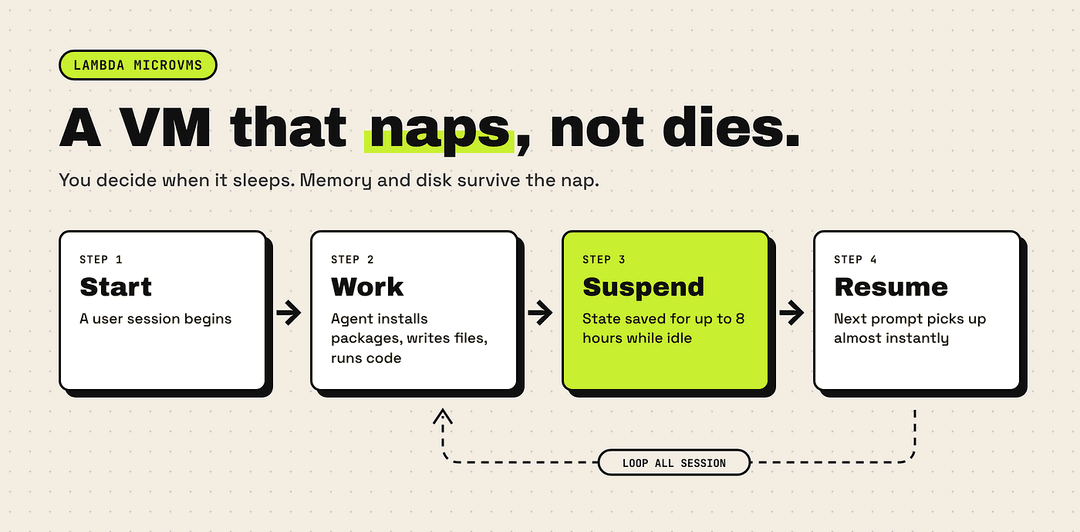
The key difference: you control the lifecycle, not AWS.
- Start a MicroVM when a user session begins.
- Let an agent work: install packages, write files, run untrusted code
- Suspend it when the user goes idle, keeping memory and disk intact for up to 8 hours
- Resume it almost instantly on the next prompt.
“That is not a stateless function. That is a serverless pet VM.” — Alexy Grabov
Use it for:
- Coding agents: tools that write, run, and debug code over a long session
- Code execution sandboxes: running user-submitted or AI-generated code safely
- Interactive environments: notebooks, playgrounds, per-user dev boxes
4. Durable Functions: long workflows without leaving your code
Before, if a process needed multiple steps, retries over hours, or a human approval in the middle, you’d move it to Step Functions and model it as a state machine.
Durable Functions build a checkpoint-and-replay engine straight into your Lambda code. Your function can mark steps, pause to wait for a callback, and shut down completely while it waits, so you pay nothing for compute during the wait. When the callback arrives, it picks up exactly where it stopped. A single run can last up to one year.
AWS also raised the limits this year: up to 30,000 durable operations per run (from 3,000) and 1 MB checkpoints (four times larger). That’s enough room to carry a full agent conversation history between steps.
Use it for:
- Human-in-the-loop flows: approvals, reviews, sign-offs
- Agent loops: plan → call tool → wait → repeat, hundreds of times
- Long business processes: onboarding, order fulfillment, reminders spread over weeks
If you want to go deeper, Alexy has a hands-on Durable Functions walkthrough worth bookmarking.
5. Managed Instances: when Lambda runs on your own servers
Yes, the name is ironic. Lambda Managed Instances run your functions on dedicated EC2 instances inside your own AWS account and VPC. AWS still handles patching, routing, and scaling, so it still feels like Lambda.
What you gain:
- Multi-concurrency per environment
- Graviton4 hardware and custom CPU-to-memory ratios
- Longer timeouts: up to 90 minutes
- No cold starts on a warm fleet
- EC2 pricing tools: Savings Plans and Reserved Instances
This solves a very familiar story: a startup begins on Lambda, grows, sees the bill climb, and spends months rewriting everything for Kubernetes. With managed instances, you can keep your Lambda code and change where it runs instead.
Use it for:
- High, predictable traffic where per-request pricing hurts
- Workloads needing specific hardware or memory ratios
- Teams that want to avoid a full migration to containers
Bonus: Tenant Isolation Mode
Not a new primitive, but a big win for SaaS builders. Previously you had two bad choices: share environments across customers and risk data leaking between them, or deploy a separate function per customer and drown in operations.
Now you pass a tenant ID with the request or event, and Lambda guarantees that an environment warmed up for one tenant is never reused for another. It works across SQS, Kinesis, and EventBridge too.
So which one should you use?
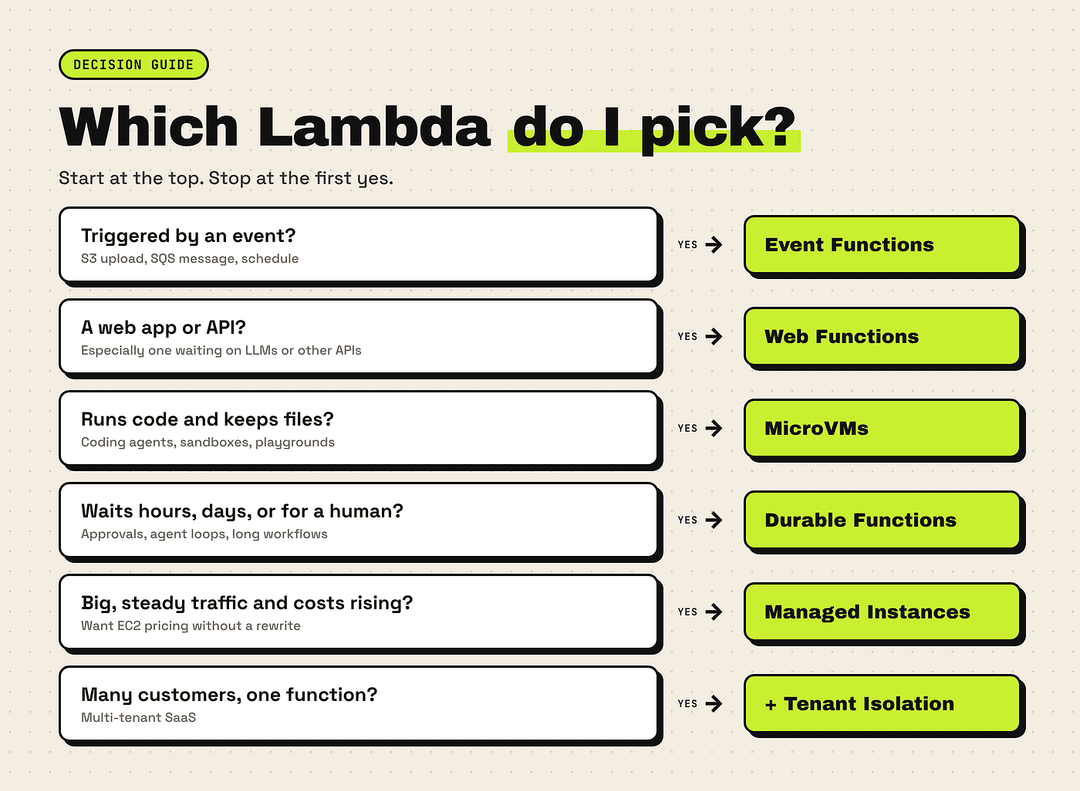
Here’s the quick decision path I’d follow:
- Is it triggered by an event (file upload, queue message, schedule)? → Event Functions
- Is it a web app or API, especially one that waits on other services? → Web Functions
- Does it need to run arbitrary code and keep files across a session? → MicroVMs
- Does it wait for hours, days, or humans between steps? → Durable Functions
- Are you at a steady, large scale and watching costs? → Managed Instances
- Serving multiple customers from one function? → Add Tenant Isolation Mode
Why AWS is doing this
The honest answer is AI agents. Classic Lambda was a poor fit for them in almost every way:
- Billing: waiting 25 seconds on an LLM meant paying for 25 seconds of compute.
- Time limits: agents that loop, wait, and retry don’t fit into 15 minutes.
- Statelessness: coding agents need a real environment with files and packages
Each new flavor fixes one of those. At the same time, AWS is answering developer-first platforms that grew by solving exactly these problems—Vercel and Cloudflare for web apps, Temporal and Inngest for workflows, and E2B and Modal for sandboxes—but doing it under a brand every developer already knows.
Final thoughts
If “serverless” means the strict rules from 2014, then Lambda has moved on. But I don’t think most of us ever cared about those rules for their own sake. What we wanted was simple: write business logic, skip the server babysitting, and pay in a way that matches the workload.
That’s what Lambda is becoming: less a single “function” service and more AWS’s default entry point for compute, whether you’re handling an S3 event, serving a Next.js app, or giving an AI agent its own machine.
Next time someone says, "Just put it in a Lambda," the right follow-up question is, "Which one?"
References
- What is going on with Lambda? by Alexy Grabov, AWS Builder Center
- Announcing AWS Lambda Web Functions, AWS News Blog
- AWS Lambda MicroVMs, AWS What’s New
- Introducing AWS Lambda Managed Instances, AWS News Blog
- AWS Lambda Tenant Isolation Mode, AWS What’s New
- Lambda Durable Functions: hands-on technical overview by Alexy Grabov
If this helped, give it a clap and follow for more practical breakdowns on cloud and AI.