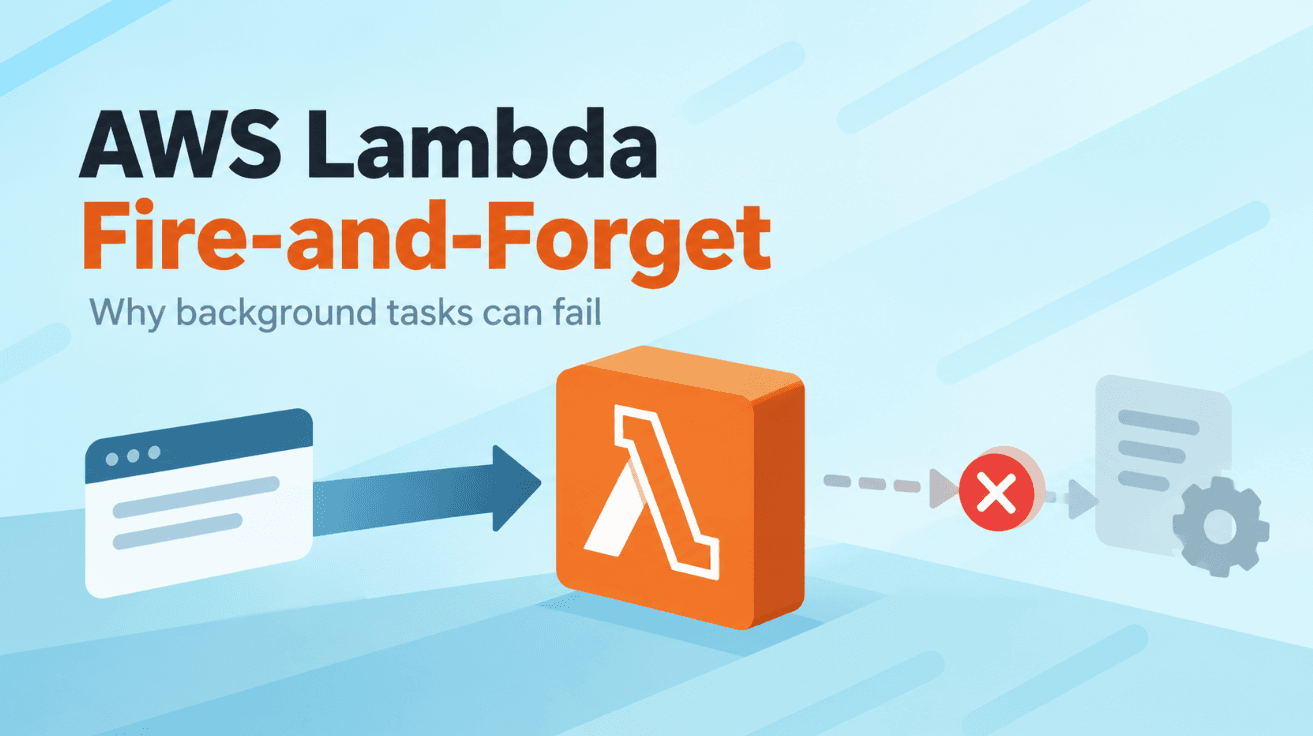
That background promise might never finish, even when your code looks perfectly fine.
Imagine you’re building an API with AWS Lambda. After saving some data, you need to perform an additional task, such as copying a file to S3 or notifying another service. Since you don’t want to delay the response, you decide to run it in the background.You write something like this:
copyFileToArchive(fileKey).catch((error) => {
  console.error("Archive failed:", error);
});
There is no await, and you've even added .catch() to handle errors. Everything looks fine, right?
But here’s the problem. AWS Lambda doesn’t guarantee that this background operation will finish after your handler returns. Your API might respond successfully while the task remains incomplete, without even triggering the error handler.To understand why, let’s look at how AWS Lambda handles unfinished asynchronous operations.
What Actually Happens When a Lambda Function Returns?
In a traditional Node.js server, your application usually runs as a long-lived process. When an HTTP request finishes, the server continues running and can process other requests or pending asynchronous operations.AWS Lambda uses a different execution model. When a request arrives, Lambda runs your handler inside an execution environment that provides the resources needed to execute your code. Your handler processes the request and eventually returns a response.
Once the invocation finishes, Lambda can freeze the execution environment. This means pending timers, callbacks, and background operations can be suspended rather than continuing automatically after the response. They don’t automatically continue running just because you started them.
AWS explains this behavior in its Lambda execution environment documentation.
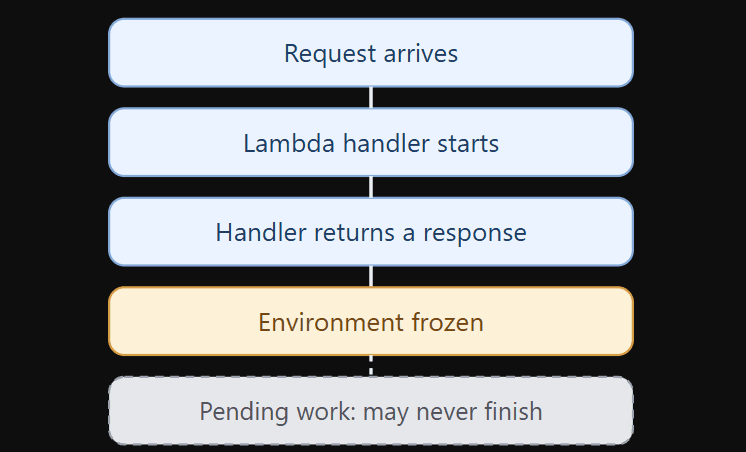
What happens to an unfinished promise?
Illustration of the standard Lambda handler lifecycle. Pending work may resume if the environment is reused, but completion is not guaranteed.Now imagine another request arrives a few seconds later. Lambda might reuse the same execution environment, allowing previously suspended background operations to resume. However, if the environment is never reused, the unfinished work may never complete.
This creates a particularly frustrating problem. Your code can appear to work during local development or repeated testing but behave inconsistently when deployed. You may see successful API responses without the expected background results, and because the promise never settled, your .catch() handler may have nothing to report.
You may see successful API responses without seeing the expected background results.And because the background promise never settled, your .catch() handler may have nothing to report.
A Simple Example That Shows the Problem
Let’s imagine you are building an application where users upload documents.When a user uploads a file, your backend saves its information in a database. After that, the application should copy the uploaded file to a separate S3 bucket for archiving.The archive is useful, but you don’t want an archive failure to make the entire upload request fail.
You might write the Lambda handler like this.
export const handler = async (event: UploadEvent) => {
  await saveFileRecord(event);

copyFileToArchive(event.fileKey).catch((error) => {
    console.error("Archive failed:", error);
  });
return {
    statusCode: 200,
    body: JSON.stringify({
      message: "File uploaded successfully",
    }),
  };
};
At first glance, everything looks fine. The database operation is awaited, the archive operation has error handling, and the user receives a quick response. However, the problem becomes clear when we look at what happens after copyFileToArchive() is called.
The handler doesn’t wait for the copy to finish. It immediately returns the response, and if the S3 copy is still pending when Lambda freezes the environment, the operation may remain incomplete.The mistake isn’t that we wanted the archive operation to be independent. The mistake is assuming that not awaiting a promise makes it a reliable background task.These are two very different things.
The First Fix Is Simpler Than You Think
If the archive operation only takes a short amount of time, we may not need a queue or another AWS service. Instead, we can simply await the operation and handle its failure without failing the main request.
export const handler = async (event: UploadEvent) => {
  await saveFileRecord(event);
try {
    await copyFileToArchive(event.fileKey);
  } catch (error) {
    console.error("Archive failed:", error);
  }
return {
    statusCode: 200,
    body: JSON.stringify({
      message: "File uploaded successfully",
    }),
  };
};
Now the handler waits until the archive attempt finishes.
If the archive succeeds, everything continues normally. If it fails, the error is logged, and the handler can still return a successful response for the primary operation.
However, this approach comes with a tradeoff. Awaiting the archive operation adds its execution time to the API response. If the copy takes several seconds, the user may notice the delay, and if the operation requires retries, simply logging an error may not be sufficient. And if the archive operation is important enough to require retries, logging an error and continuing may still not be sufficient.That brings us to the next question.What if we want to return the response immediately while still making sure the additional work gets processed?
When You Really Need Background Processing
This is where services such as Amazon SQS become useful. Instead of starting an asynchronous operation inside the Lambda handler and hoping it finishes, we can send a message to a queue. The queue holds the work until another Lambda function processes it.
Consider the same document upload example. The first Lambda saves the file record and sends an archive request to SQS. Once the message has been accepted, the API can return a response, while a second Lambda receives the message and performs the actual S3 copy.
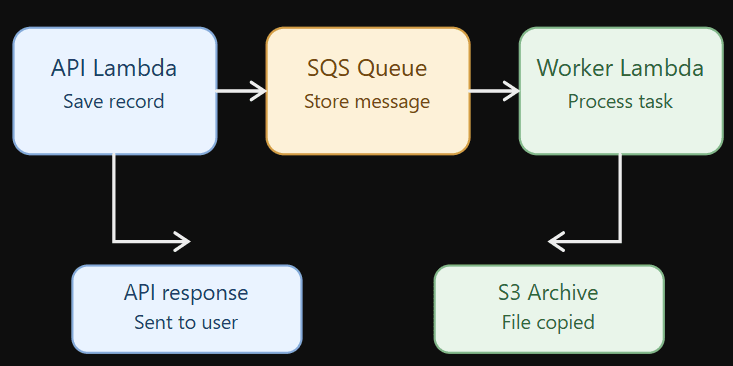
A more reliable background processing flow
The important difference is that the pending work is no longer stored only in the original Lambda’s memory.It has been handed to another service.
Here is a simplified TypeScript example using AWS SDK v3.
import { SQSClient, SendMessageCommand } from "@aws-sdk/client-sqs";

const sqs = new SQSClient({});
export const handler = async (event: UploadEvent) => {
  await saveFileRecord(event);
  await sqs.send(
    new SendMessageCommand({
      QueueUrl: process.env.ARCHIVE_QUEUE_URL!,
      MessageBody: JSON.stringify({
        fileKey: event.fileKey,
      }),
    })
  );
  return {
    statusCode: 202,
    body: JSON.stringify({
      message: "Upload saved; archive requested",
    }),
  };
};
Notice that we are still using await.
This time, however, we are not waiting for the entire archive operation. We are only waiting for SQS to accept the message.The worker Lambda can process the archive separately.
import type { SQSEvent } from "aws-lambda";

export const handler = async (event: SQSEvent) => {
  for (const record of event.Records) {
    const { fileKey } = JSON.parse(record.body);

await copyFileToArchive(fileKey);
  }
};
If processing fails, Lambda’s SQS integration can retry the message according to the queue and event source configuration. For production systems, you should also configure a dead-letter queue, suitable visibility timeout, and monitoring.There is another important detail.
SQS uses at-least-once delivery, so a message can be processed more than once. Your archive operation should therefore be idempotent, meaning that processing the same request again should not create an incorrect result.This design requires more infrastructure than a simple function call, but it provides a much better foundation for background work that matters.
What About Tasks That Need to Wait?
So far, our example has been relatively simple. We save a record and perform an additional operation.But some workflows are more complicated.Imagine an application that temporarily reserves a resource for a user. The reservation should automatically expire after 60 seconds if it isn’t confirmed.
A developer might try something like this.
async function reserveTemporarily(id: string) {
  await createReservation(id);

 await new Promise((resolve) =>
    setTimeout(resolve, 60_000)
  );
 await releaseReservation(id);
}
The logic is easy to understand.
Create the reservation, wait for one minute, and release it.But where is the waiting happening?Inside the function’s execution environment.If that environment stops running before the timer completes, the release operation might never happen.
And unlike a missed analytics event, this can leave your application in an incorrect state.The reservation exists, but the cleanup never happens.This is why long-running workflows should not depend on an in-memory timer surviving across serverless invocations.
Instead, we should record what needs to happen and when it needs to happen.For example, Amazon SQS supports delayed messages of up to 15 minutes. We can use a delayed message to request the release operation later.
For more complex workflows, AWS Step Functions provides a Wait state and execution tracking. EventBridge Scheduler is another option for scheduling work at a future time.The main idea remains the same.Don’t make your Lambda remember unfinished work in memory. Store the responsibility somewhere that can survive the Lambda execution.
Does That Mean Fire-and-Forget Is Always Wrong?
Not necessarily. Sometimes you genuinely have work that is optional, such as sending a non-critical analytics event or warming a cache. If that operation doesn’t finish, your application’s main behavior is unaffected.
Some serverless and edge platforms also provide background execution mechanisms such as waitUntil(), which can extend processing beyond the response.These mechanisms are useful within their documented execution limits, but they should not automatically be treated as durable workflow engines.AWS Lambda also provides ways to continue processing after returning a response, including asynchronous invocation and specialized runtime or extension patterns.
The question isn’t simply whether you can run code after sending a response. The more important question is whether your application can tolerate that work being interrupted or lost. For an optional analytics event, perhaps it can. But for releasing a reservation, recording a payment, or updating important business data, losing that work could create serious problems.
How Do You Choose the Right Approach?
You don’t need a complicated architecture for every asynchronous function. The right solution depends on how long the work takes, how important it is, and what should happen when it fails.
- Situation
- Better approach
- A quick task that should finish before returning
awaitwith appropriate error handling- Background work that should be retried
- Amazon SQS with a worker Lambda
- Work that must run at a future time
- EventBridge Scheduler
- Multiple steps with delays and dependencies
- AWS Step Functions or Lambda Durable Functions
- Separate Lambda processing without blocking the caller
- Asynchronous Lambda invocation with failure handling
There is also an important distinction between successfully submitting work and successfully completing it.For example, when your API sends a message to SQS, that means the message has been accepted by the queue. It does not mean the archive operation has finished.
If your application needs to display whether archiving has completed, you should track that status separately.And for critical operations, you may need a durable record of the work alongside the original business transaction, so a failure between saving the record and publishing the message cannot silently lose the task.
A Few Things Worth Checking in Your Own Lambda Functions
Before deploying a Lambda function that performs asynchronous operations, review how those operations are handled.
- Are important promises awaited before the handler returns?
- Are failures handled without accidentally hiding important errors?
- Does any task depend on a long
setTimeout()orsleep()? - Is background work handed to a durable service when necessary?
- Can queued tasks safely run more than once?
- Are retries, dead-letter queues, and monitoring configured?
- Can you tell whether a background task actually completed?
These questions are simple, but they can reveal problems that ordinary testing might not catch.
Final Thoughts
When we first learn asynchronous JavaScript, we often think of await as something that makes our code wait. So when we want an operation to happen in the background, removing await feels like a natural solution. However, serverless applications introduce another responsibility. We need to think not only about when a promise starts, but also about whether the execution environment will still be available to finish it.
A background operation that works during testing isn’t necessarily a reliable background operation. Sometimes the right answer is to await it, while other situations require a message queue or a workflow service that remembers what needs to happen next.
Whatever approach you choose, the goal is the same: If the work matters, don’t leave its completion to the lifetime of a Lambda execution environment.Whatever approach you choose, the goal is the same.If the work matters, don’t leave its completion to the lifetime of a Lambda execution environment.