One of the most talked-about Lambda updates at re:Invent 2025 is Lambda Durable Functions.
Until now, we’ve mostly used Lambda in a stateless manner. While execution environments could be reused for best-effort caching, Lambda did not provide guaranteed or durable state sharing across invocations, except in specific cases such as Lambda Tumbling Windows with streaming event sources. (DynamoDB streams & Kinesis).
With the introduction of Lambda Durable Functions, Lambda now fully supports stateful processing by handling all the underlying complexity for us.
In this blog post, I’ll take a deep dive into Lambda Durable Functions and walk through an example to show how they work.
Creating a Lambda Durable Function
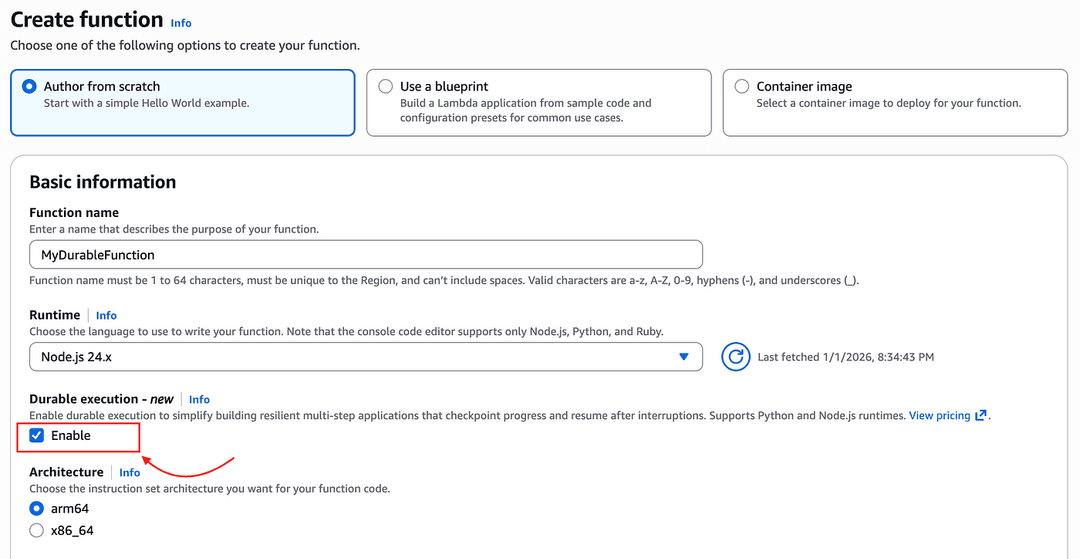
We can now enable Durable Execution mode when creating a Lambda function, as shown below.
The Lambda function code looks a bit different compared to a regular Lambda function.
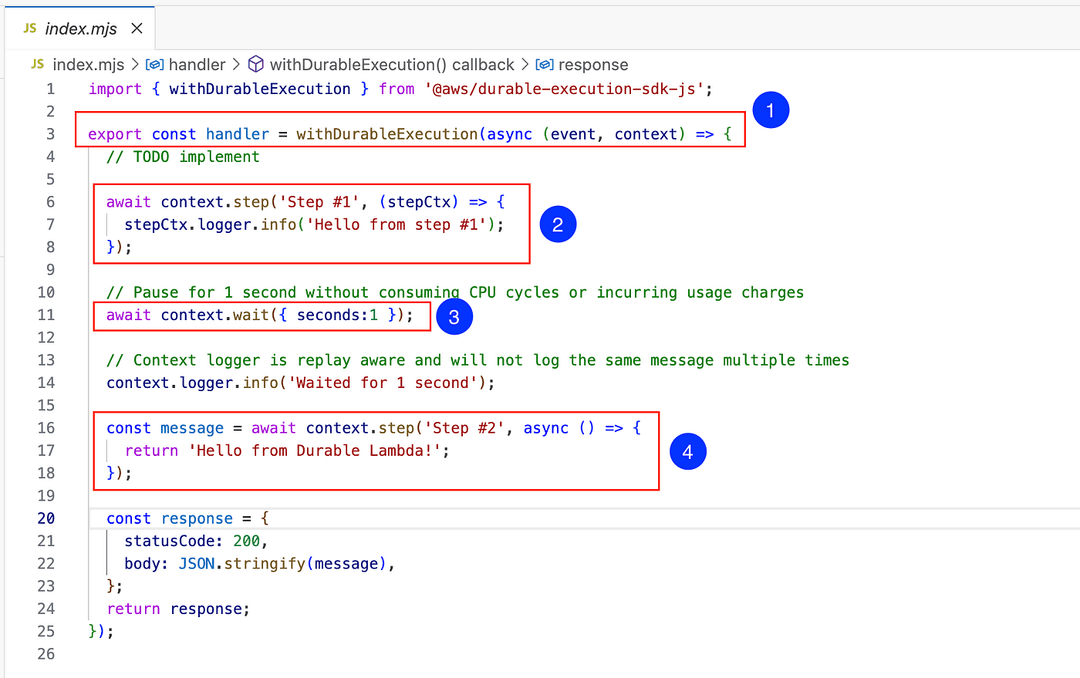
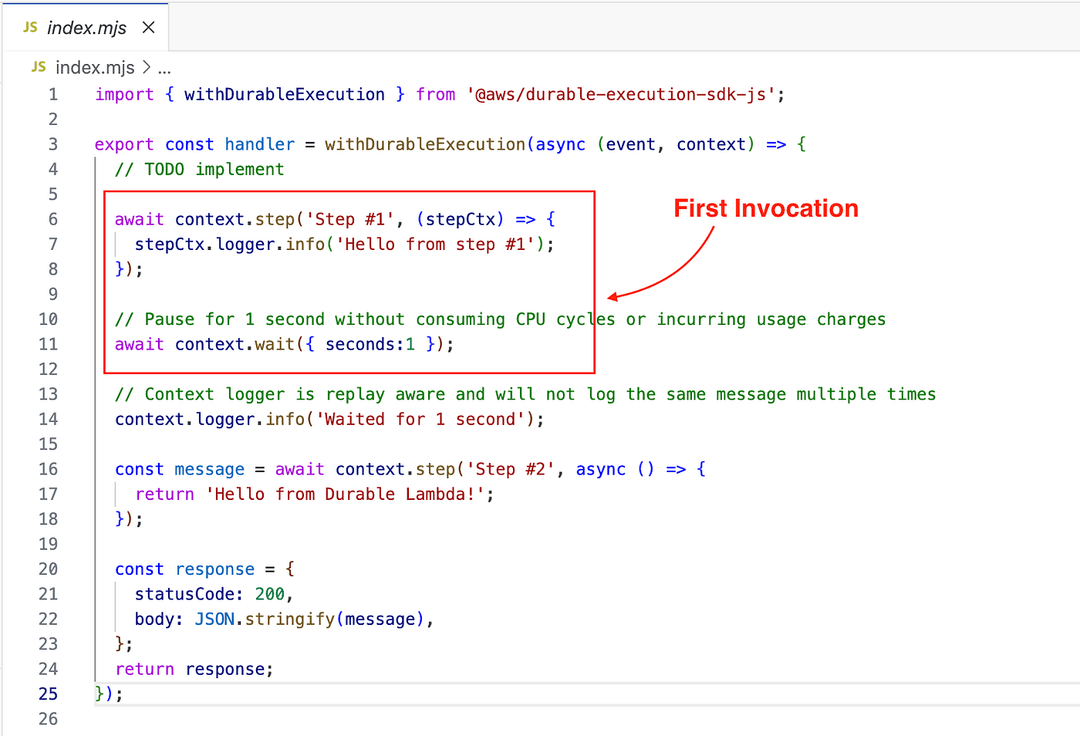
The Lambda handler now includes a wrapper function called withDurableExecution (1), which comes from the @aws/durable-execution-sdk-js SDK built by AWS to support durable operations and state management behind the scenes.
For example, you can write business logic inside the durable operation context.step (2) block, and as soon as it is executed, an automatic checkpoint is created.
Similarly, the durable operation context.wait (3) suspends the execution of the Lambda for the given amount of time without incurring compute charges. Before suspending the execution, it also creates an automatic checkpoint.
What’s the purpose of Checkpointing? 🤔
So, the reason we would enable durable execution for a Lambda function, instead of using a regular Lambda function, is to enable stateful processing in AWS Lambda.
For example, now we can build order processing workflows with human approval in the middle using Lambda Durable Functions.
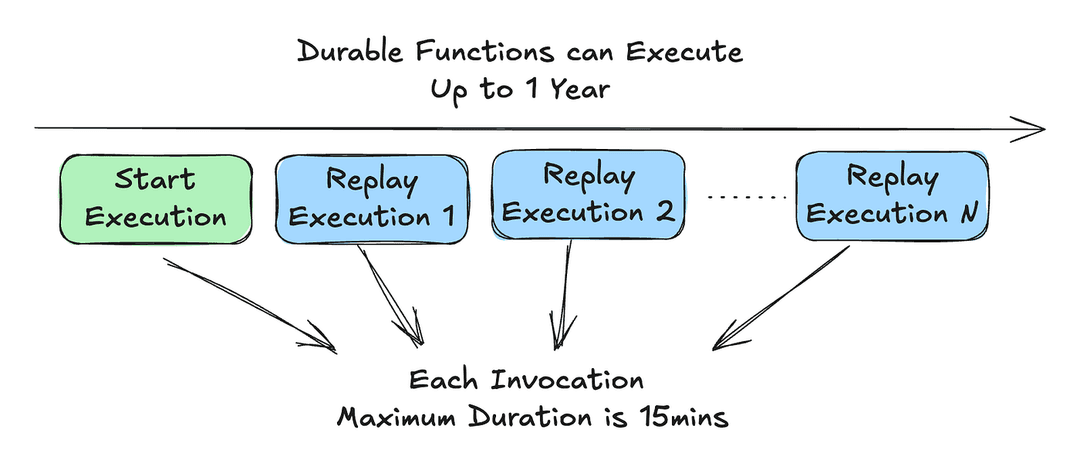
As we know, Lambda functions run in ephemeral containers (microVM) and are not long-running like ECS services (Docker containers and more). A Lambda function has a maximum timeout of 15 minutes, which also applies to Durable Functions.
However, Durable Functions can execute up to one year for asynchronous invocations. (We’ll discuss the other invocation types later).
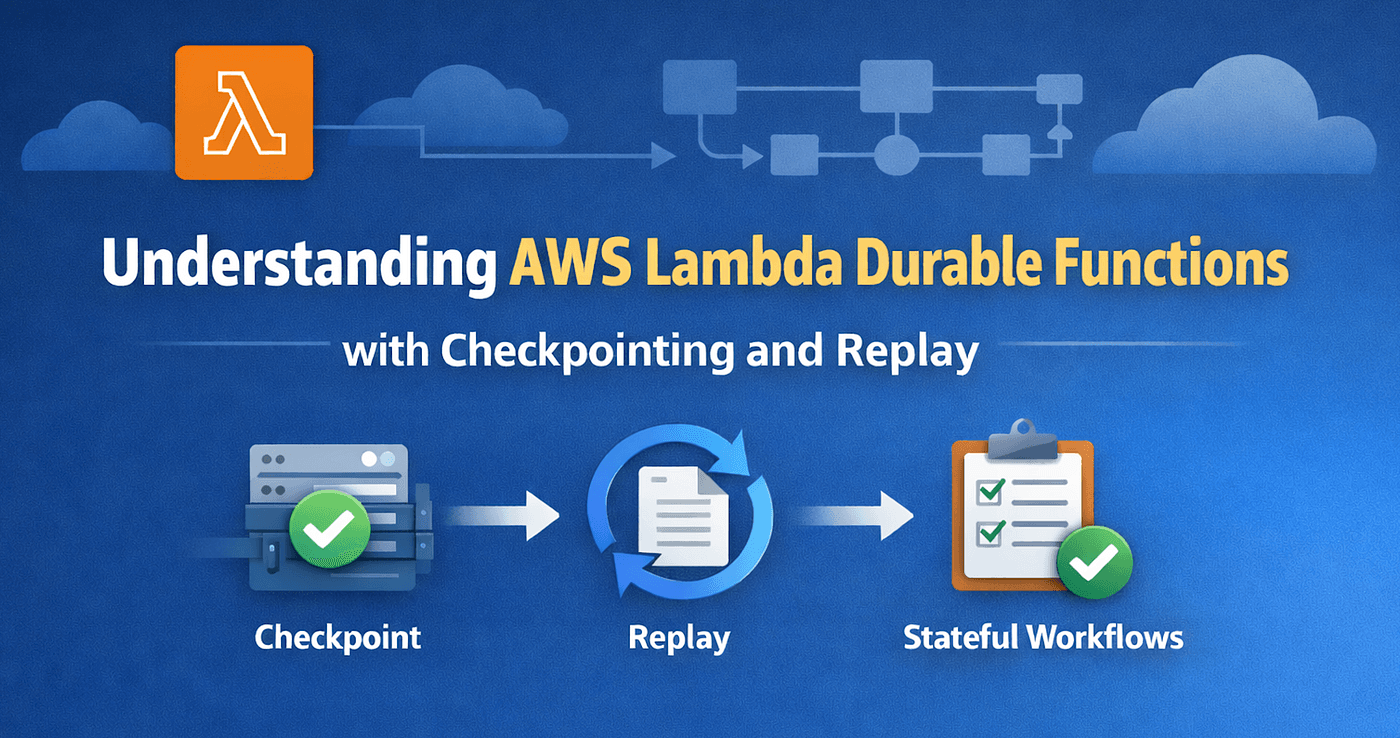
So, what enables a Lambda Durable Function to perform stateful processing for up to one year? You guessed it right, it’s the process of Checkpointing and Replay.
Durable Execution
When you run the Durable Function in Figure 02, you will see the response as follows.
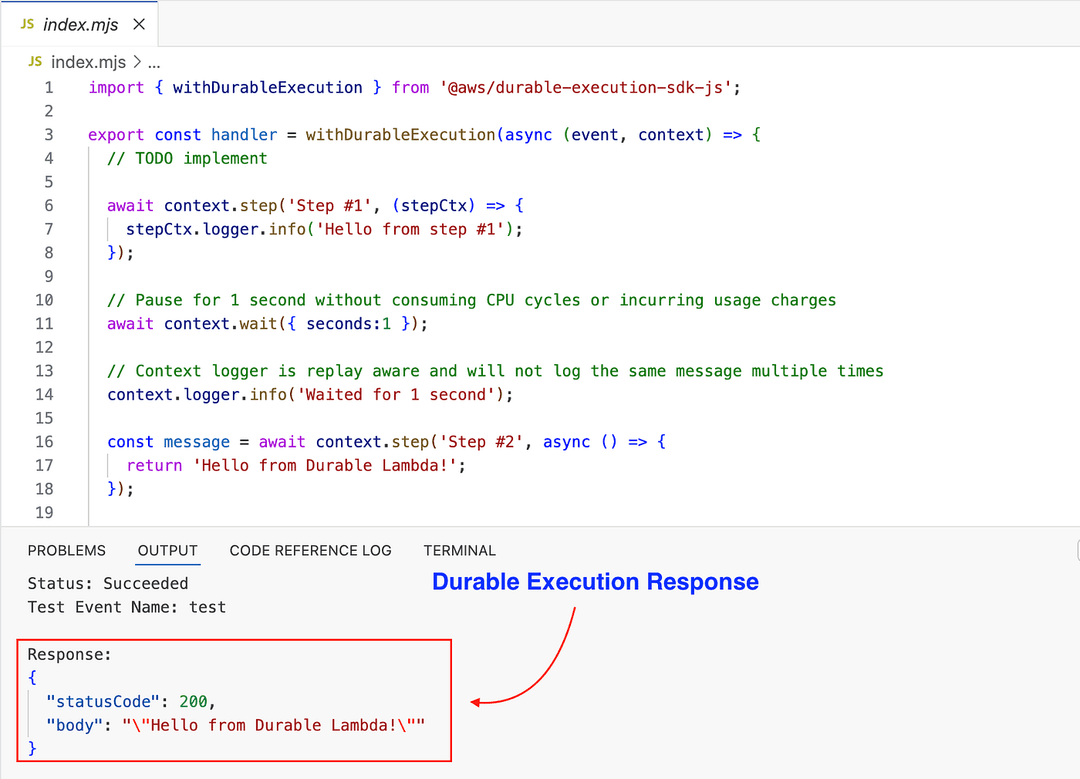
Did AWS Lambda execute the code from top to bottom and return the response like a regular Lambda function? It seems so, right?
Let’s have a look at the “invocations” CloudWatch metric for this invocation. I invoke it only once using the AWS Lambda console, but I can see Two Invocations !
Let’s look at the CloudWatch logs to better understand what’s going on.
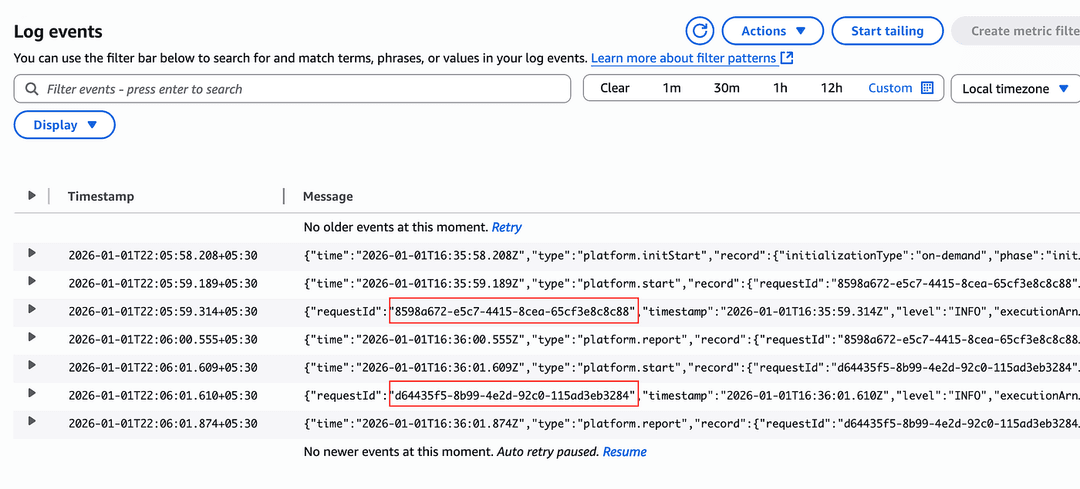
I can clearly see two different request IDs in the log stream, which indicates that the Lambda function was invoked twice.
A Durable Execution can span across multiple Lambda invocations as it progress through checkpoints, waits and replays.
First Invocation (Start Execution)
We are using the Durable Function logger utility to write logs in each step (see line 7 below).
I can see only the “Hello from step #1” log line in the first invocation.
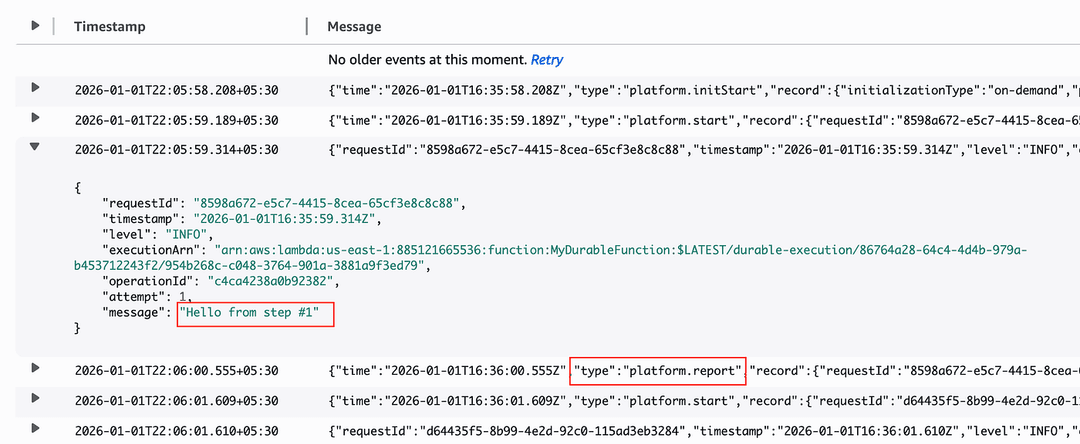
Then, at line 11, it executes the context.wait durable operation. The wait operation suspends the execution to prevent compute charges during the wait period. You can see this in the log line that includes (platform.report), followed by the second invocation (platform.start) after the 1-second wait period (06:01).
Second Invocation (Replay Execution)
During the second invocation, i can only see the “Waited for 1 second” log line in the CloudWatch logs.
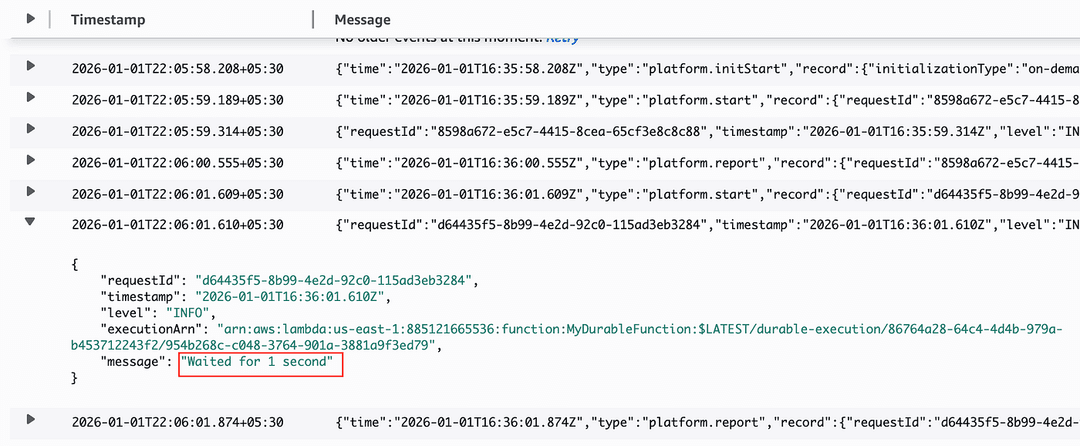
Did it execute only that line during the second invocation?
No. The code is executed from top to bottom again.
However, since Lambda found two successful checkpoints, context.step (at line 6) and context.wait (at line 11), it skipped the execution of any logic inside these blocks to prevent duplicate code execution.
This is where durable execution behaves very differently from a regular Lambda.
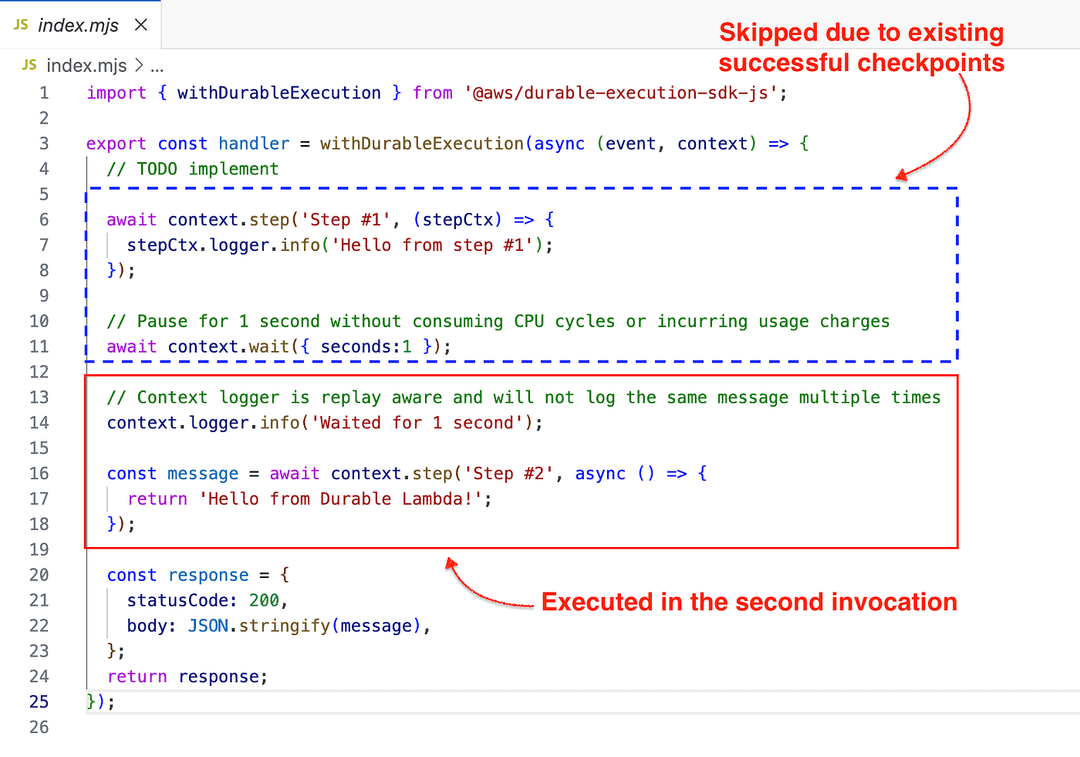
What actually happened?
The sample Durable Lambda function code we executed has two durable step operations, with one durable wait operation in between
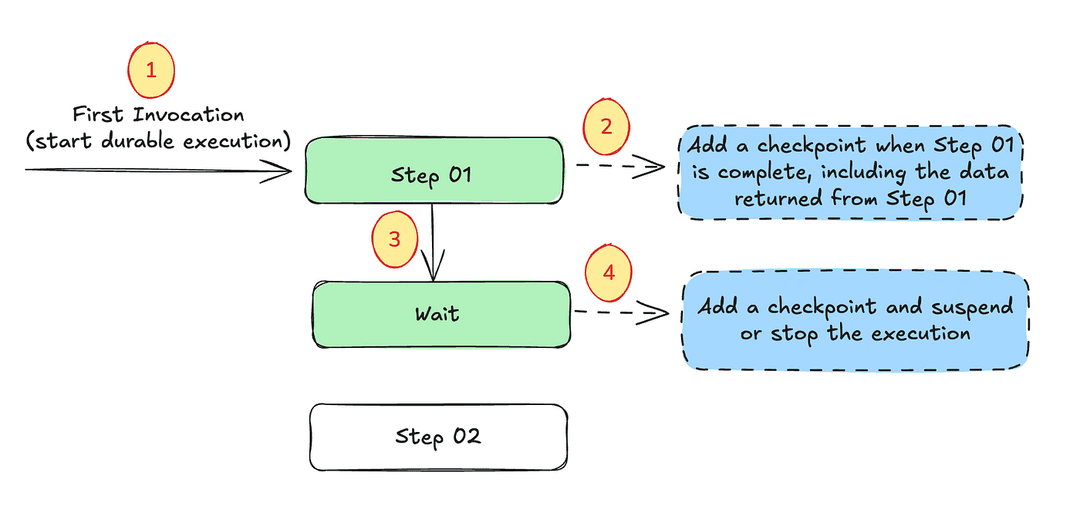
When a regular Lambda is invoked, we call it a Lambda execution. When a Durable Lambda is invoked, it is called a Durable Lambda execution
Step Operation
We started the Durable Lambda invocation from the AWS console. As shown in Figure 10, Lambda first executed Step 01. Once it completed successfully, AWS Lambda automatically created a checkpoint by calling the checkpoint API behind the scenes.
Lambda includes the return data from Step 01 (if any) in the checkpoint (see the checkpoint data example below)
{
  operationId: "1",           // Sequential ID
  operationType: "STEP",      // STEP, WAIT, INVOKE, etc.
  operationName: "Step #1",
  status: "SUCCEEDED",        // STARTED, SUCCEEDED, FAILED, PENDING
  result: { ... }             // The actual return value
}
In Step 01, since we didn’t return anything, the result is null
Wait Operation
Then the Lambda proceeds to the next durable operation, which is the Wait operation. Durable Functions have three types of wait operations:
- context.wait() — This is the one we used above. You can set a specific duration to wait (for example, 1 second, 10 minutes, 1 month, etc.)
- context.waitForCallback() — This generates a callback ID, which can be sent to a downstream service. That service (e.g., another Lambda function) can then send a signal with the SendDurableExecutionCallbackSuccess API with the callback ID. (Or send the failure signal). Once AWS Lambda receives the API call, it replays the Lambda function.
- context.waitForCondition() — This allows you to provide a check function(e.g., Polling an external endpoint) and a configuration for the polling strategy for the delays between checks.
An important thing to remember about the wait operation is that you are not charged during the waiting period. Even with context.waitForCondition(), Lambda does not charge you during the delays between checks.
To prevent charges during the wait, Lambda has to stop the execution. Therefore, when the Lambda enters a wait operation, it adds a checkpoint and suspends the execution.
So, When the wait period is over, AWS Lambda invokes the function again. This is why we see two invocations in the invocation metrics in Figure 04.
Replay Execution
The second invocation is called the Replay Execution. In fact, a Durable Function can have many subsequent replay executions depending on the use case.
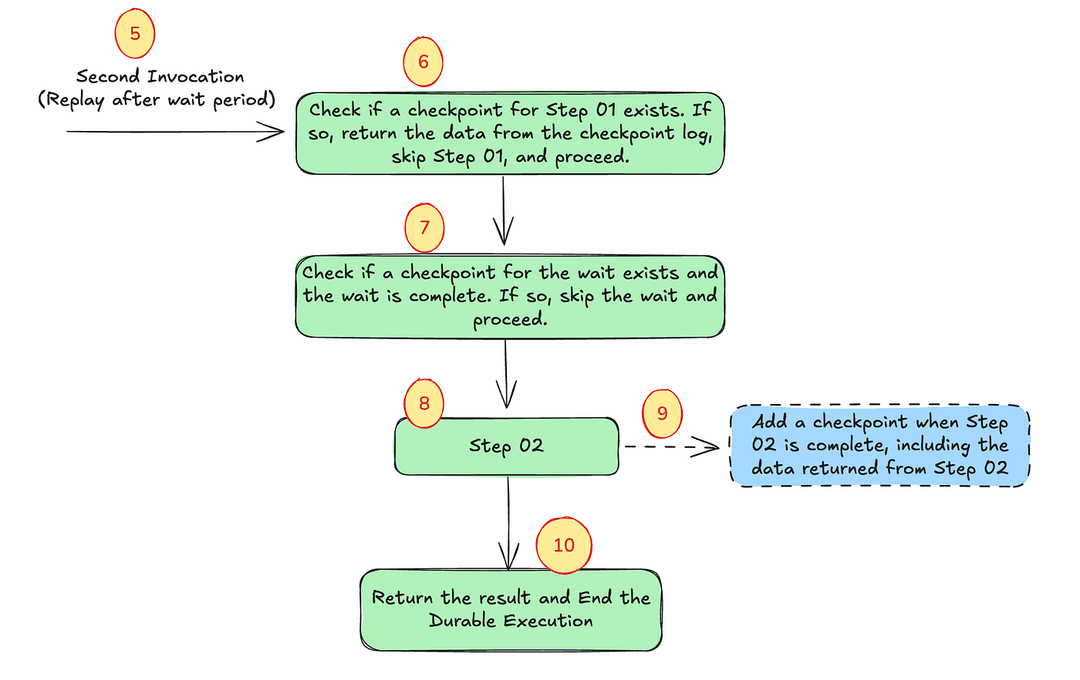
In the above example, the replay execution is triggered by the completion of the wait period. There are other ways a replay execution can be triggered, which we’ll discuss shortly.
During a replay execution, Lambda checks for existing checkpoints before processing any step or wait operations.
For example, in the figure above, before executing Step 01, Lambda checks for an existing Step 01 checkpoint (6) and finds one from the initial execution. As a result, Lambda skips executing the logic inside the Step 01 block and returns the result from the checkpoint, if any. In this example, since Step 01 did not return any value, Lambda simply skips the step.
Similarly, before executing the wait operation, Lambda again checks for an existing checkpoint (7) and the status of the wait operation. Since the wait status is SUCCEEDED, Lambda skips the wait step and proceeds to Step 02.
Because Step 02 was not executed during the initial execution, Lambda does not find any checkpoint for Step 02. Therefore, it executes the logic inside Step 02 normally.
After Step 02, it returns the results and ends the Durable Execution. (See the response in Figure 3).
Resiliency in Lambda Durable Functions
So far, we discussed the happy path. How does Lambda Durable Functions handle failures?
I simulated an error in Step 01.
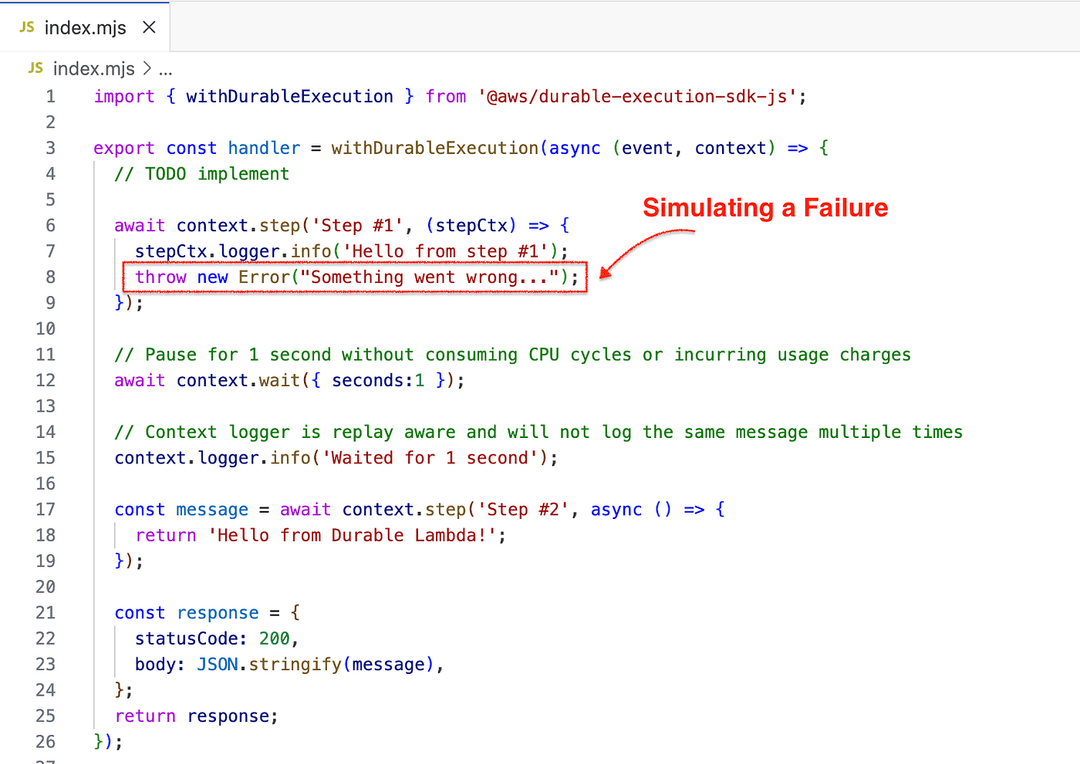
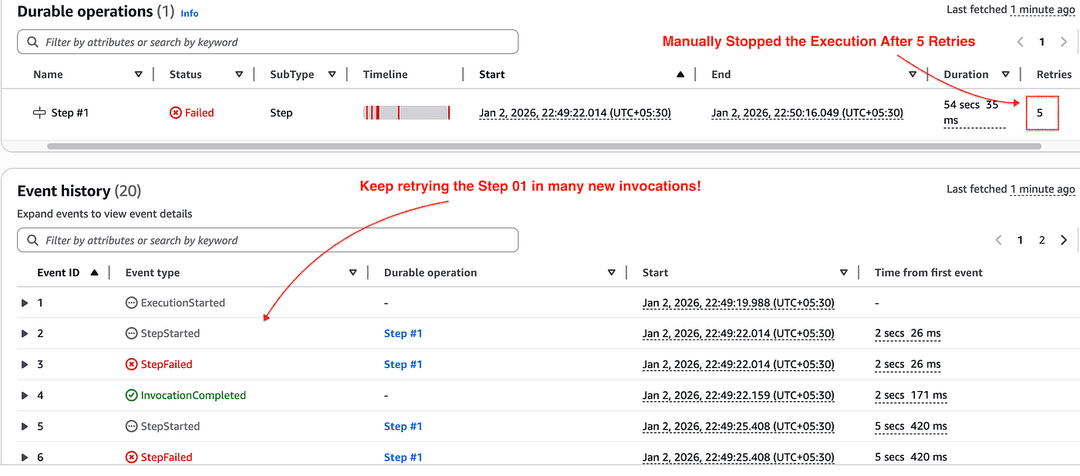
When I execute the Durable Function, I can see that it keeps retrying by repeatedly invoking the function through replay execution.
When a step fails, Lambda creates a checkpoint for the retry and suspends the function. On the next invocation, the step is retried using the configured backoff delay.
I manually stopped the durable execution to handle retries in a better way.
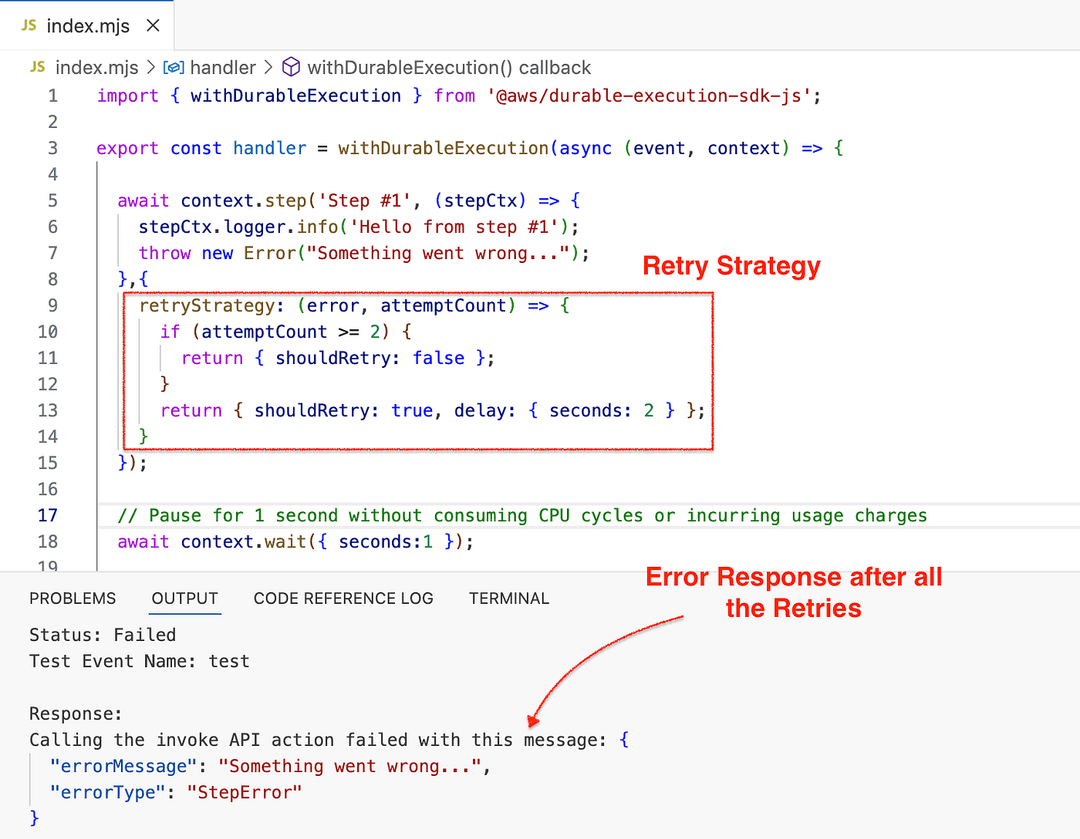
We can add a custom retry strategy to a step as follows.
In this example, the custom retry strategy retries the step with a two-second delay (you can also configure exponential backoff) for up to two retries. If Step 01 is still unsuccessful after the second retry, it throws an exception and terminates the durable execution (see Figure 14).
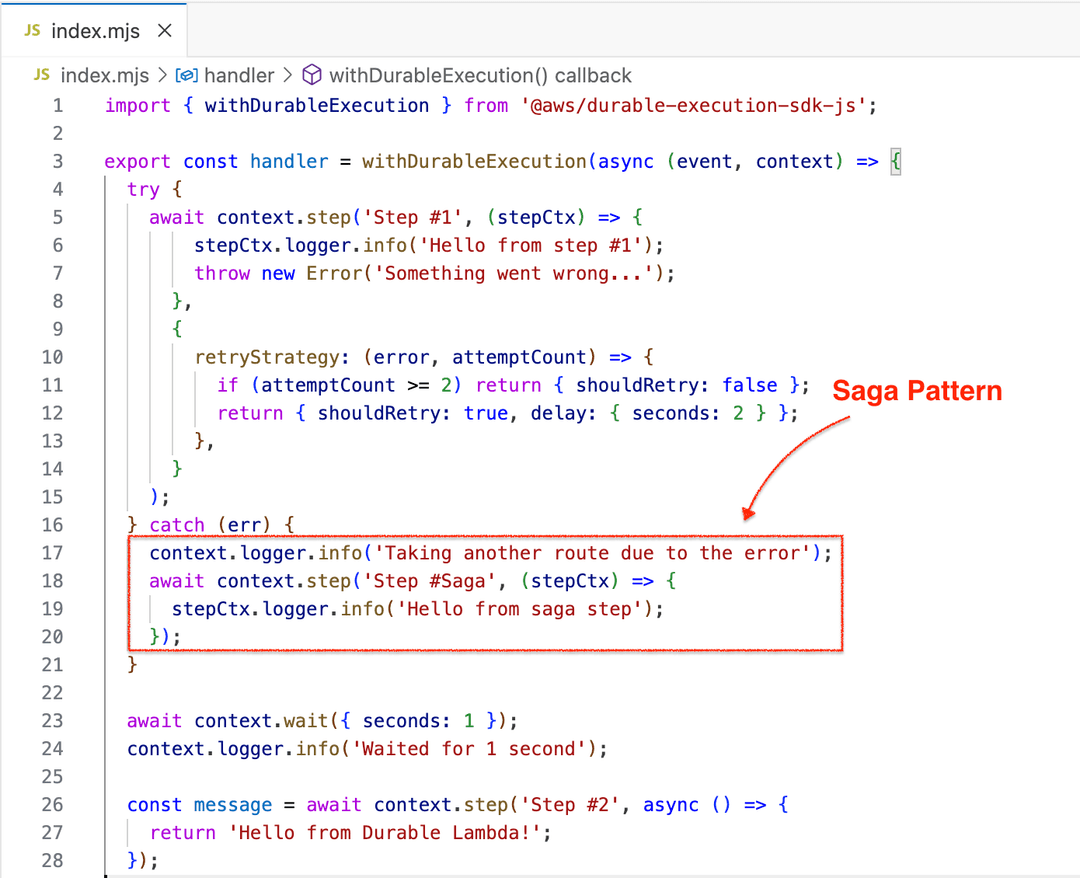
We can also implement the Saga pattern by capturing the exception thrown after the retries and executing a compensating step (see the example below).
I hope you now have a better understanding of Lambda Durable Functions and how they work.
Invocation Types & Duration Limits
Durable Functions support all Lambda invocation types. However:
- Asynchronous invocations → up to 1 year
- Synchronous & Event Source Mapping invocations → 15 minutes
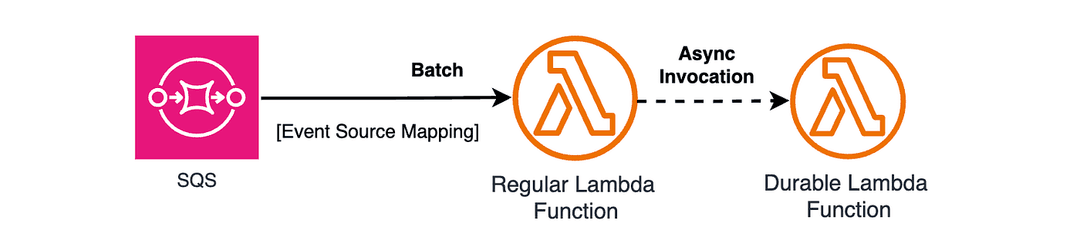
You can work around this limitation by invoking a Durable Function asynchronously from a regular Lambda.
See the following example:
import { LambdaClient, InvokeCommand } from '@aws-sdk/client-lambda';
import { SQSEvent } from 'aws-lambda';
import { createHash } from 'crypto';

const lambda = new LambdaClient({});

export const handler = async (event: SQSEvent) => {
  // Invoke durable function asynchronously with execution name
  await lambda.send(new InvokeCommand({
    FunctionName: 'arn:aws:lambda:us-east-1:123456789012:function:my-durable-function:1',
    InvocationType: 'Event',
    Payload: JSON.stringify({
      executionName: event.Name,
      event: event
    })
  }));

  return { statusCode: 200 };
};
Production Usage
So far, we have discussed different aspects of Lambda Durable Functions. If you are planning to use Durable Functions in production, you should also consider the following areas, which are not covered in this blog post:
- Best Practices for Lambda Durable Functions
- Monitoring Durable Functions
- Lambda Durable Function Pricing
Conclusion
In the AWS world, we often think of Step Functions for stateful processing. But with Lambda Durable Functions, we now have another powerful serverless option that enables stateful workflows using familiar Lambda code and programming languages.
☕ Support My Work 😊
Enjoyed this article? Buy me a coffee and support more practical AWS content: https://buymeacoffee.com/mjmrz
🔗 Connect with Me
- LinkedIn: http://www.linkedin.com/in/mjmrz
- YouTube: https://www.youtube.com/@EnlearAcademy
- YouTube (Sinhala): https://www.youtube.com/@manojbfernando