On the surface, everything looked fine. Our Lambda functions ran without problems. However, behind those functions, the CloudFormation stack that managed them was steadily growing.
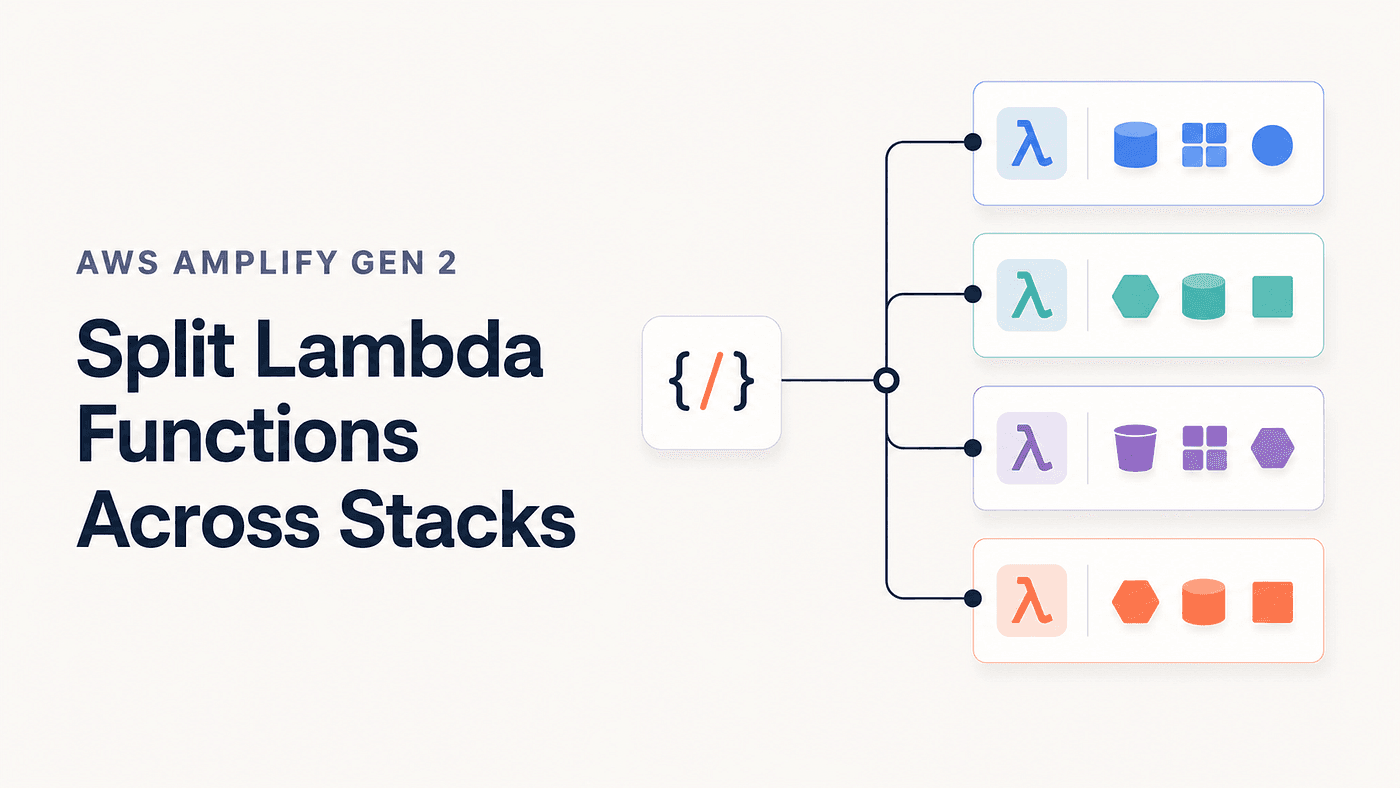
By default, Amplify places Lambda functions in the function resource group. As the project grows, more functions and their supporting resources accumulate in the same stack. Eventually, the stack becomes larger, harder to manage, and more likely to approach CloudFormation limits.
Our project eventually reached this point. Amplify allows each function to declare a resourceGroupName, but adding this property manually to every resource.ts file spreads the grouping rules across the codebase. Every developer must remember which group to use and enter its name correctly.
We moved that decision into a custom defineFunction wrapper. Developers can still configure the runtime, architecture, memory, timeout, and handler entry as usual. The wrapper automatically uses the function name to select the appropriate resource group and resolves the handler from the correct directory.
This is a project-level convention, not a built-in Amplify auto-grouping feature. You can adapt the following rules to match the structure of your own backend.
What We Are Building
After the wrapper is introduced, an individual function definition can remain simple:
// amplify/functions/get-orders/resource.ts
import { defineFunction } from '@shared/lib/define-function';

export const getOrders = defineFunction({
  name: 'get-orders',
  runtime: 22,
  architecture: 'arm64',
  memoryMB: 512,
  timeoutSeconds: 30,
});
Each Amplify resource group is deployed as a separate stack under the backend’s root stack. A custom group such as get-functions is separate from the default function stack; it is not created inside it.
Why Split Functions Across Resource Groups?
- Avoid CloudFormation limits: Instead of keeping every Lambda function in the default
functionstack, the wrapper distributes them across separate resource-group stacks. This prevents one stack from becoming too large or reaching its resource and template-size limits. - Reduce the scope of stack updates: When a function changes, the update remains inside a smaller resource-group stack. It reduces the amount of infrastructure affected by the change.
- Make infrastructure easier to maintain: Separate stacks make it easier to locate related functions, review infrastructure changes, and troubleshoot deployment issues.
- Let developers focus on development: The centralized wrapper automatically selects the correct stack. Developers do not need to define
resourceGroupNamemanually or monitor the size of each stack while creating functions.
Choose a Stable Placement Policy First
Before creating the wrapper, define a stable rule for placing functions into resource groups. the function should not move between groups unexpectedly.
For this approach, it is better to use the function name as the source of truth for stack placement. The name is clearly visible in the function’s resource.ts file and provides the wrapper with one predictable value for selecting a group.
Because the name controls the function’s placement, keep it stable and use a consistent format such as lowercase kebab-case. Changing the name later may move the function to a different resource group.
In my project, I first check the function-name prefix:
get-→get-functionspublic-→public-functionscreate-→create-functionsupdate-→update-functionslist-→list-functions
For example, get-orders is assigned to get-functions, while create-report is assigned to create-functions.
If the function name does not have a recognized prefix, the wrapper checks its first letter and uses one of four fallback groups:
- Names starting with
atof→other-functions-1 - Names starting with
gtol→other-functions-2 - Names starting with
mtor→other-functions-3 - Names starting with
stoz→other-functions-4
For example:
assign-worksheet  → other-functions-1
group-subjects    → other-functions-2
process-document  → other-functions-3
sync-user-data    → other-functions-4
These rules are based on my project’s naming convention, so you can adjust them to match your own backend. The main goal is to keep function placement predictable and stable. Clear dependency boundaries are more important than placing an equal number of functions in every group.
Recommended Project Structure
Keep the grouping policy and its tests in one shared folder:
amplify/
├── backend.ts
├── functions/
│   └── get-orders/
│       ├── handler.ts
│       └── resource.ts
└── shared/
    └── lib/
        ├── define-function.ts
        └── define-function.test.ts
Implement the Complete Wrapper
The wrapper needs Amplify’s original function factory and the FunctionProps type.
// amplify/shared/lib/define-function.ts
import {
  defineFunction as amplifyDefineFunction,
} from '@aws-amplify/backend';
import type { FunctionProps } from '@aws-amplify/backend-function';
import path from 'node:path';
import { fileURLToPath } from 'node:url';

const AUTO_ASSIGN = new Set<FunctionProps['resourceGroupName']>([
  undefined,
  'function',
]);

const PREFIX_GROUPS = [
  'get',
  'public',
  'create',
  'update',
  'list',
] as const;

const LETTERS_PER_BUCKET = 6;
const LAST_BUCKET_INDEX = 3;

const FUNCTION_NAME_PATTERN =
  /^[a-z][a-z0-9]*(?:-[a-z0-9]+)*$/;

const RESOURCE_FRAME =
  /\(?((?:file:\/\/\/|[A-Za-z]:[\\/]|\/).*?[\\/]resource\.[cm]?[jt]s):\d+:\d+\)?$/;

function resolveGroup(name: string): string {
  if (!FUNCTION_NAME_PATTERN.test(name)) {
    throw new Error(
      `Invalid function name "${name}". ` +
        'Use lowercase kebab-case, for example "get-orders".',
    );
  }

  const prefix = PREFIX_GROUPS.find((value) =>
    name.startsWith(`${value}-`),
  );

  if (prefix) {
    return `${prefix}-functions`;
  }

  const alphabetIndex =
    name.charCodeAt(0) - 'a'.charCodeAt(0);

  const bucket = Math.min(
    Math.floor(alphabetIndex / LETTERS_PER_BUCKET),
    LAST_BUCKET_INDEX,
  );

  return `other-functions-${bucket + 1}`;
}

function getCallerDirectory(stack?: string): string {
  const location = stack
    ?.split('\n')
    .map((line) =>
      line.trim().match(RESOURCE_FRAME)?.[1],
    )
    .find((value): value is string => Boolean(value));

  if (!location) {
    throw new Error(
      'Could not resolve the calling resource.ts file. ' +
        'Update the stack-frame parser for this runtime or use an absolute entry.',
    );
  }

  const filename = location.startsWith('file:')
    ? fileURLToPath(location)
    : location;

  return path.dirname(filename);
}

export function defineFunction(
  config: FunctionProps & { name: string },
) {
  const configuredEntry = config.entry ?? './handler.ts';

  const entry = path.isAbsolute(configuredEntry)
    ? configuredEntry
    : path.resolve(
        getCallerDirectory(new Error().stack),
        configuredEntry,
      );

  const resourceGroupName = AUTO_ASSIGN.has(
    config.resourceGroupName,
  )
    ? resolveGroup(config.name)
    : config.resourceGroupName;

  return amplifyDefineFunction({
    ...config,
    entry,
    resourceGroupName,
  });
}

export const __testing = {
  getCallerDirectory,
  resolveGroup,
};
The wrapper treats an omitted group and the default value function as requests for automatic placement. This makes gradual migration easier when older function definitions already contain:
resourceGroupName: 'function'
Any other explicit value takes priority. For example, resourceGroupName: 'data' remains data, even when the function name begins with get-.
If your project needs an explicit way to keep a function inside the default function group, do not use function as the automatic marker. Remove it from AUTO_ASSIGN or introduce a separate project-level opt-out value.
Why the Wrapper Must Resolve the Handler Entry
The entry property tells Amplify where to find the Lambda handler file. For example:
entry: "./handler.ts"
Amplify documents that a relative entry is resolved from the file where defineFunction is called.
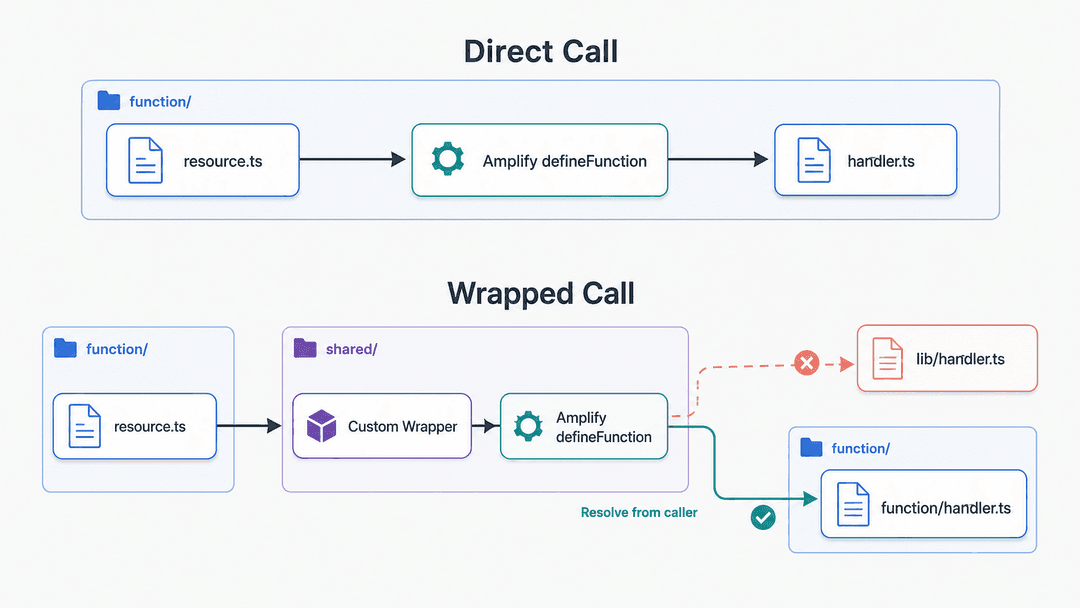
When resource.ts calls Amplify directly, this works as expected:
get-orders/resource.ts → Amplify defineFunction → get-orders/handler.ts
However, the custom wrapper adds another file between resource.ts and Amplify:
get-orders/resource.ts → shared/lib/define-function.ts → Amplify defineFunction
Amplify may now treat the wrapper file as the caller. If the wrapper passes ./handler.ts without changing it, Amplify could search for the handler in the wrapper’s directory:
shared/lib/handler.ts
That is the wrong location, To prevent this, the wrapper identifies the resource.ts file that originally called it. It then converts the relative handler entry into an absolute path before passing it to Amplify. This ensures that Amplify always receives the exact location of the correct handler.
Use the Wrapper in a Function
Function definitions remain simple:
// amplify/functions/get-orders/resource.ts
import { defineFunction } from '@shared/lib/define-function';
export const getOrders = defineFunction({
  name: 'get-orders',
  runtime: 22,
  architecture: 'arm64',
  memoryMB: 512,
  timeoutSeconds: 30,
});
The get- prefix sends this function to get-functions. Runtime, memory, architecture, timeout, and other normal function settings continue to work as before.
Test Before Moving Existing Functions
The wrapper is shared infrastructure code. A small change to its rules can move several functions into different stacks.
Before using it in production, test:
- Every supported prefix
- Every alphabetical fallback range
- Invalid function names
- Explicit
resourceGroupNameoverrides - Default and custom handler entries
-
- Absolute handler entries
- Handler resolution in both local and CI environments
Moving an existing function to another group changes which CloudFormation stack owns its resources. Depending on the synthesized changes, CloudFormation may replace the Lambda function, IAM role, permissions, log group, or related resources. Always inspect the generated templates or CloudFormation change set before deploying the move.
Begin with one low-risk function in a sandbox environment. Inspect the generated templates or CloudFormation change set before deployment. After deploying, verify the function’s ARN, triggers, permissions, logs, alarms, and external integrations.
Is This Pattern Right for Your Project?
This wrapper is useful when manual placement has become repetitive, the default function stack is difficult to inspect, and your project already uses stable naming conventions.
It may be unnecessary for a backend with only a few functions. It is also a poor fit when stack ownership cannot be inferred safely from names or when most functions depend heavily on several other resource groups.
Conclusion
As an Amplify backend grows, stack placement should not remain something every developer has to remember. A centralized defineFunction wrapper turns that repeated decision into one visible and testable policy.
You do not need to reorganize the entire backend at once. Start with one low-risk function. Confirm that it is placed in the expected group, resolves the correct handler, and retains its triggers and permissions. Once the approach is reliable, introduce it gradually across the rest of the backend.
The result is more than smaller function stacks. You get a backend that grows predictably — one that remains easier to review, maintain, and understand whenever the next Lambda function is added.