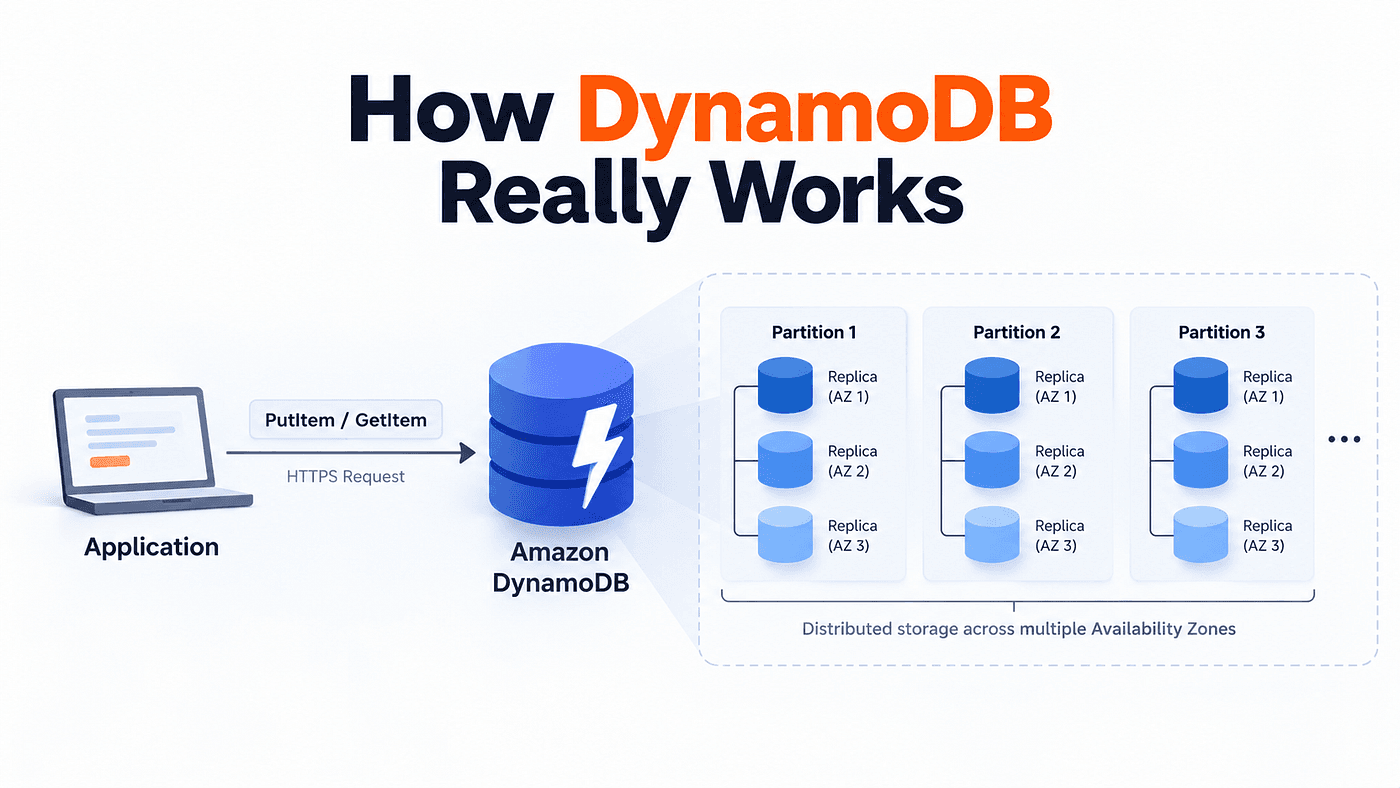
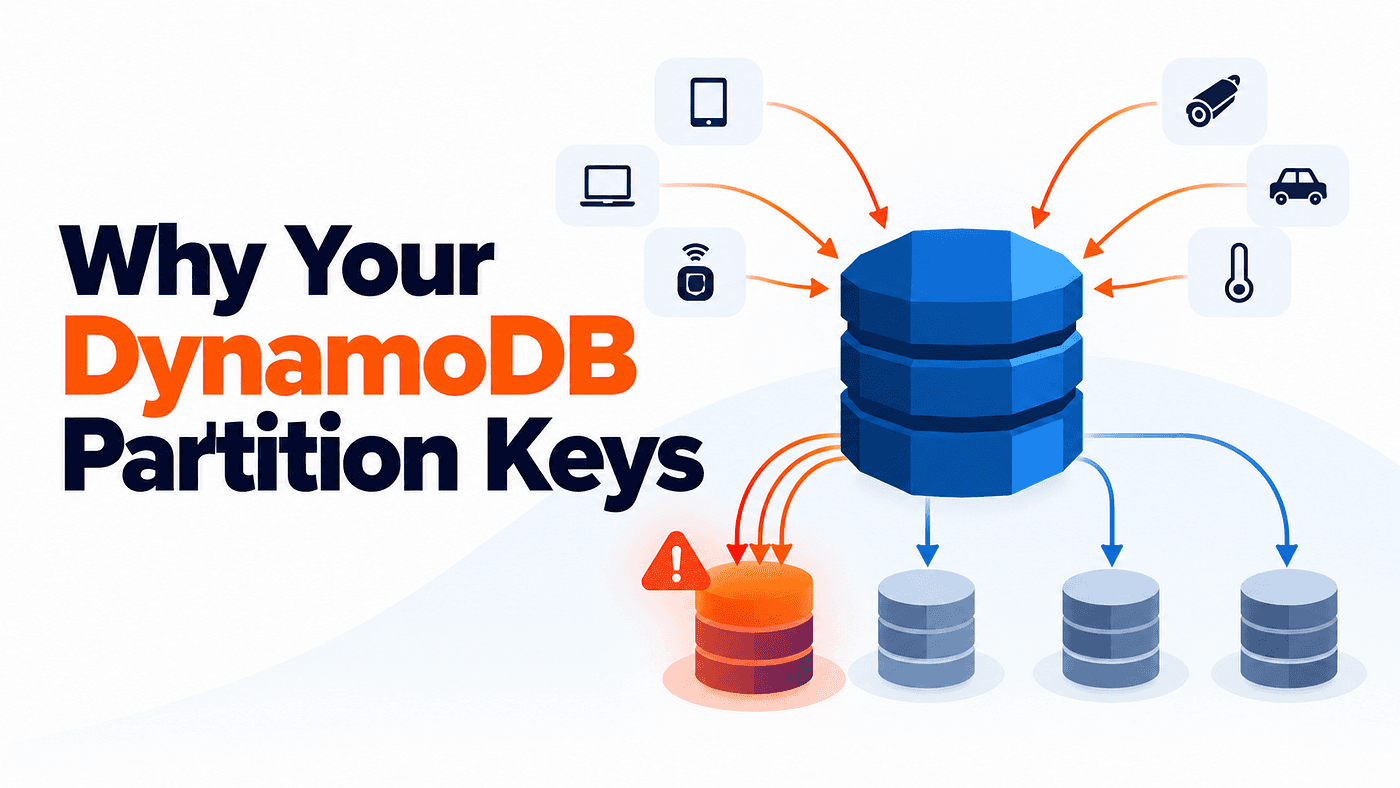
Your application is getting busier. More customers are placing orders, more devices are sending events, and your DynamoDB table is handling a growing workload. Then some requests start getting throttled. You check the table’s capacity, expecting it to be exhausted, but there still seems to be room available. So why would DynamoDB reject requests when the table still has capacity left?
The missing detail is where those requests are going. DynamoDB distributes data across physical partitions, but your application’s traffic may not reach those partitions evenly. If most requests keep targeting the same partition key value, one part of the table can become overloaded while the rest still has capacity to spare.
This is why choosing a partition key means thinking beyond uniqueness. The key also influences where your workload goes.
A Partition Key Is Not a Physical Partition
To understand what is happening, it helps to separate two ideas that are easy to mix up: a partition key and a physical partition. A partition key is part of the data model you design, while a physical partition is an internal storage unit managed by DynamoDB. When DynamoDB receives an item, it takes the partition key value and passes it through an internal hash function. The result helps determine where that item belongs in DynamoDB’s internal key space.
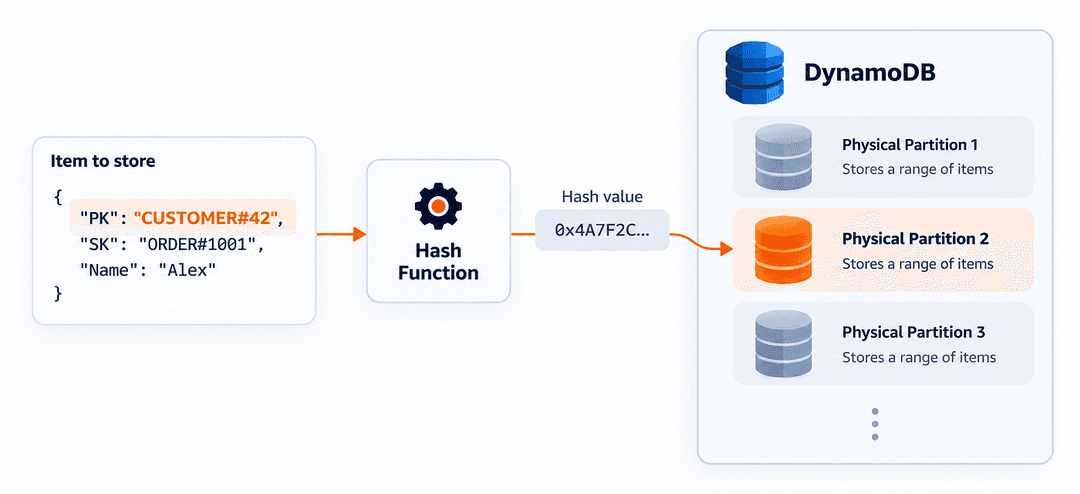
You never choose those physical partitions yourself. DynamoDB handles their creation, placement, and splitting behind the scenes. Your application works with logical keys, while DynamoDB manages the physical storage underneath them.
Consider a simple customer table:
PK             SK
CUSTOMER#42    PROFILE
CUSTOMER#42    ORDER#1001
CUSTOMER#42    ORDER#1002
Here, CUSTOMER#42 is the partition key. PROFILE, ORDER#1001, and ORDER#1002 are sort keys. Items that share the same partition key form what DynamoDB calls an item collection. From your application's point of view, they belong together, allowing you to query a customer and retrieve related information using one logical partition key.
But that does not mean the entire item collection must stay on one physical partition forever. If the table does not have a Local Secondary Index (LSI), DynamoDB can split an item collection across physical partitions under suitable conditions. This distinction becomes important when thinking about how DynamoDB handles growing workloads.
How Partition Keys and Sort Keys Work Together
Imagine your application stores customer orders in DynamoDB. One simple approach is to use the order ID as the partition key, such as PK = ORDER#1001. This is called a simple primary key, where each partition key value must be unique. It works well when your application mainly needs to find individual orders using their IDs.
But what if you frequently need to retrieve all orders belonging to one customer? Instead of identifying every order through a separate partition key, you could group the orders under the customer ID and use a sort key to distinguish them. DynamoDB supports this through a composite primary key, where the combination of partition key and sort key must be unique.
For example, your table might contain:
PK             SK
CUSTOMER#42    ORDER#2026-01-05#1001
CUSTOMER#42    ORDER#2026-04-12#1032
CUSTOMER#42    ORDER#2026-09-18#1144
Now all three orders share the same partition key, but each has a different sort key. This makes it convenient to retrieve the customer’s orders using a DynamoDB Query. You provide the exact partition key value CUSTOMER#42 and can narrow the results using sort key conditions such as BETWEEN or begins_with. Because the sort keys contain dates in a consistent format, they also help keep the orders arranged chronologically within that customer.
The important thing is that these two designs serve different access patterns. A simple primary key works well when you mainly retrieve individual items by their IDs, while a composite primary key lets you group related items and retrieve them together.
Why DynamoDB Hot Partitions Happen
Imagine your application collects events from thousands of devices. Since you often need to retrieve events for a particular day, you decide to use the date as the partition key and the event timestamp as the sort key.
PK = 2026-10-18
SK = EVENT#timestamp
At first, this looks like a reasonable design. All events for the same day are grouped together, making them easy to query. But as more devices start sending events, every new write request targets the same partition key value, 2026-10-18. DynamoDB routes these writes to the physical partition responsible for the corresponding data. Even though the sort keys are different, the incoming write traffic is concentrated around one logical key.
Why does that matter? Because DynamoDB’s physical partitions have their own throughput limits. A physical partition can support up to 3,000 read capacity units (RCUs) per second and 1,000 write capacity units (WCUs) per second. For example, 1,000 WCUs can support approximately 1,000 standard writes per second for items up to 1 KB, while larger items consume more capacity per write.
Now imagine, conceptually, that incoming write requests are distributed across four physical partitions:
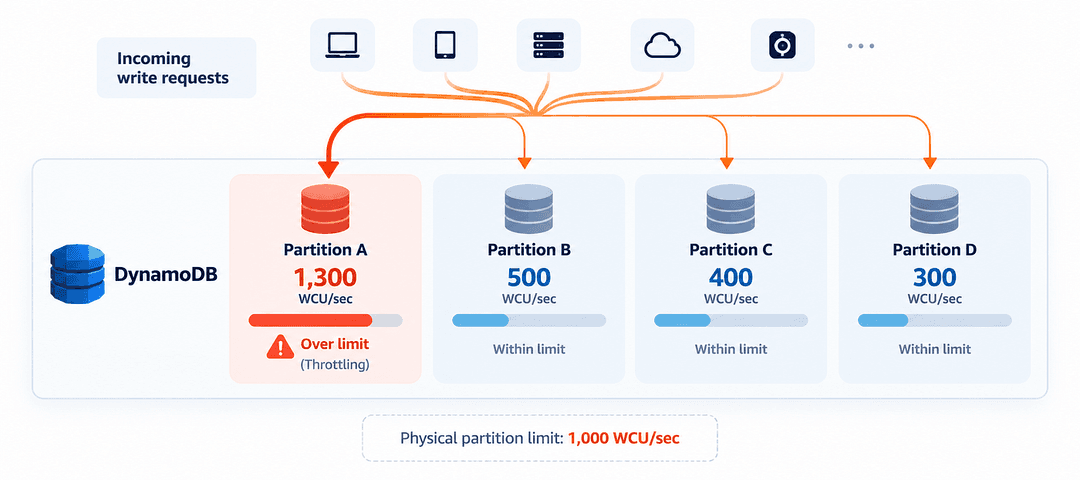
These numbers represent the capacity demanded by incoming requests, not necessarily the throughput successfully processed. The total demand is only 2,500 WCUs per second, so the table may still have capacity available overall. But Partition A is receiving requests requiring 1,300 WCUs per second, exceeding its 1,000 WCU-per-second limit. As a result, some writes directed there can be throttled while the other partitions still have unused capacity.
This is how a hot physical partition can occur. When too many read or write requests target the same part of the table, that partition can reach its throughput limit. DynamoDB can sometimes split hot workloads to distribute traffic, but that is not always enough. For example, when sort keys continuously increase with time, new writes may keep concentrating at the newest end of the data, making automatic splitting less effective.
Even a table with millions of unique partition key values can experience hot partitions if most requests target only a few of them. What matters is not just how many keys exist, but how the traffic is distributed across them.
Good DynamoDB Partition Key Design Starts With Traffic
Consider an application that stores thousands of customer orders. If each order has its own partition key, the data might look like this:
ORDER#100001
ORDER#100002
ORDER#100003
ORDER#100004
As customers place orders, each new write request targets a different partition key value, giving DynamoDB more opportunities to distribute the write workload. But there is a trade-off. If you need to retrieve all orders for a particular customer or within a date range, using only the order ID makes those queries harder to perform efficiently.
Now consider grouping items by a shared value, such as their status:
PK = ACTIVE
SK = ITEM#1001

PK = ACTIVE
SK = ITEM#1002
This makes querying active items convenient, but imagine thousands of new items being written with PK = ACTIVE. Since all those write requests target the same partition key value, the workload becomes concentrated. If the write rate grows beyond what the physical partitions serving that key can handle, throttling can occur. The same issue can happen with dates, customer IDs, or tenant IDs when one value receives too many requests.
So should every item have a unique partition key? Not necessarily. Even using UUIDs for better distribution can make related data harder to query efficiently. The goal is to balance efficient access patterns with traffic distribution. A good partition key should support how your application queries data while giving DynamoDB enough actively used key values to handle growing traffic.
When to Use Write Sharding in DynamoDB
Remember the event system where every new event uses the same date as its partition key? This makes daily queries convenient, but when thousands of events arrive, all those write requests target the same logical key, PK = 2026-10-18. If the write traffic becomes too concentrated, one solution is write sharding.
Instead of sending every write to the same partition key value, you divide the writes across several values by adding a shard suffix:
2026-10-18#0
2026-10-18#1
2026-10-18#2
...
2026-10-18#9
Now the application spreads writes across ten logical partition key values instead of one, giving DynamoDB more opportunities to distribute the workload. The shard can be chosen randomly or calculated using a deterministic hash, such as stable_hash(eventId) % 10, so the same event ID always maps to the same shard. However, ten logical shards do not necessarily mean ten separate physical partitions.
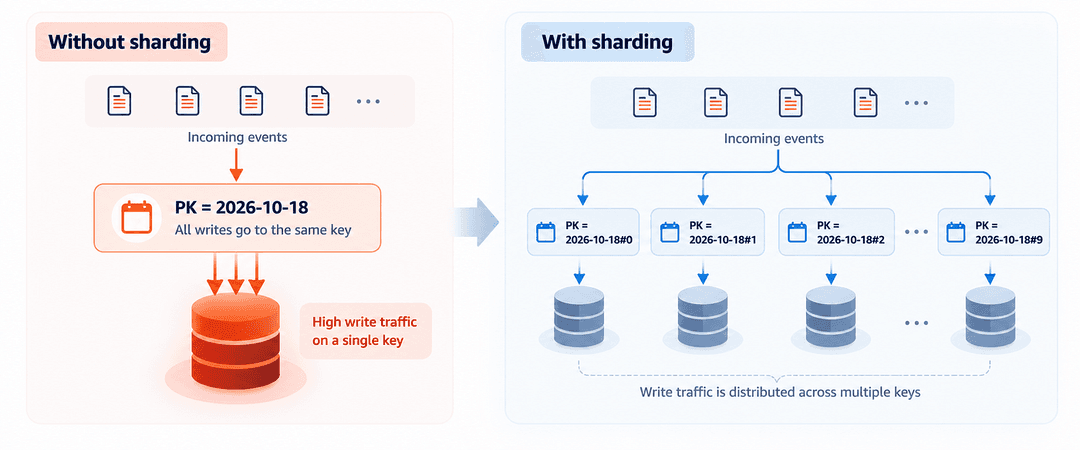
But there is a trade-off. Before sharding, retrieving all events for a particular date required querying one partition key. After sharding, the application may need to query all ten shard values and combine the results. Write sharding helps distribute heavy write traffic, but it adds complexity to reads, so it is most useful when the workload genuinely needs that extra distribution.
DynamoDB Can Help, but Key Design Still Matters
DynamoDB does not simply leave you to manage uneven traffic yourself. It uses adaptive capacity to help handle workloads where some partitions receive more requests than others. Under suitable conditions, DynamoDB can also split hot partitions to distribute the workload more effectively.
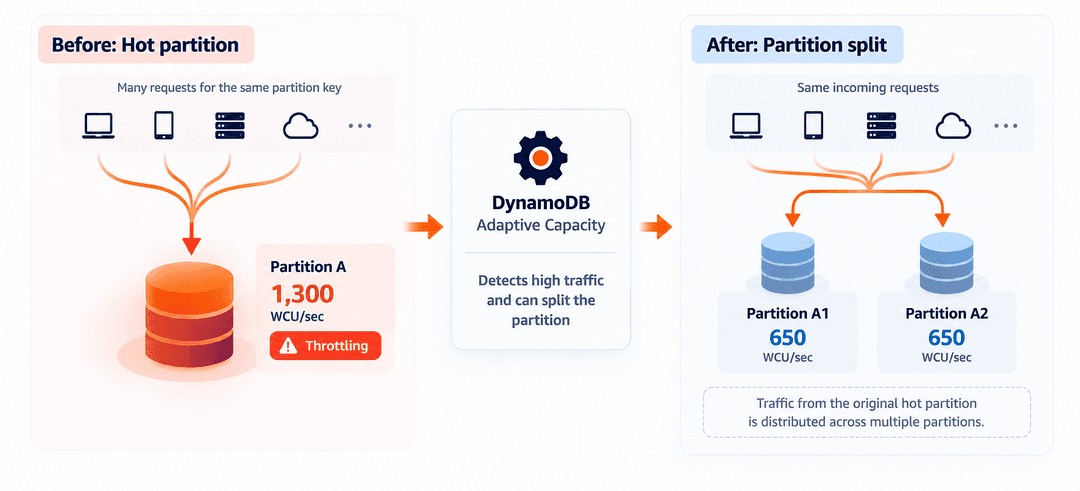
However, these mechanisms have limitations. For example, a Local Secondary Index prevents DynamoDB from splitting an item collection across physical partitions, and continuously increasing sort keys can make splitting less effective for write-heavy workloads. Using on-demand capacity also does not remove the underlying physical partition throughput limits.
This means you do not need to manually solve every possible scaling problem from the beginning, but you should still understand your workload. DynamoDB manages the infrastructure automatically, while your partition key design influences how effectively that infrastructure can handle growing traffic.
Design for Where the Traffic Will Go
A good DynamoDB partition key is not necessarily the one with the most unique values or the simplest structure. It is the one that supports your application’s access patterns while allowing the workload to scale efficiently.
Every key design involves trade-offs. Grouping related items makes queries easier, but it can also concentrate traffic. Spreading data across more key values improves distribution, but may make some queries more complex. The goal is to find the right balance based on how your application reads and writes data.
As your application grows, keep one question in mind: “How will my application access this data when traffic increases?” In DynamoDB, key design is also traffic design.