Imagine your application sends a PutItem request to DynamoDB. A few milliseconds later, you get a success response. Simple, right? From your application's point of view, you sent some data, and DynamoDB stored it.
But what actually happened during those few milliseconds? DynamoDB had to figure out where that item belongs, route the write to the correct partition, and replicate the data. What if your application reads that same item immediately after writing it? Will DynamoDB always return the latest value? The answer depends on whether you use an eventually consistent read or a strongly consistent read.
Once you understand what happens behind this simple request, DynamoDB becomes much easier to understand. Partition keys, replication, hot partitions, access patterns, and consistency stop feeling like separate rules. They start to make sense as connected parts of the same system.
A Different Way of Thinking
If you come from PostgreSQL, MySQL, or another relational database, you may be used to starting with the data itself. You create tables for users, orders, and products, connect them with relationships, and later write queries to retrieve whatever information the application needs.
DynamoDB makes you think differently. Instead of asking only, “What data do I need to store?”, you also need to ask, “How will my application retrieve this data?” DynamoDB doesn't provide runtime joins like a relational database, so how you plan to read your data becomes a key part of the design.
For example, if you are storing orders, your application may need to find one order, list all orders for a customer, or find orders with a certain status. These are access patterns, and you usually design your partition keys, sort keys, and indexes around them. So in DynamoDB, you are not only deciding what your data looks like. You are also deciding how your application will reach it efficiently.
How DynamoDB Distributes Data
From your application’s point of view, a DynamoDB table looks like one large resource. You send requests to it without thinking about servers, disks, or physical storage locations. Behind the scenes, however, DynamoDB distributes data across physical partitions managed by AWS, and your application doesn't choose those partitions directly.
Imagine you store this item:
{
  "UserID": "USER#1001",
  "Name": "Alex",
  "Email": "alex@example.com"
}
If UserID is the partition key, DynamoDB takes the value USER#1001 and uses it as input to an internal hash function. The result helps DynamoDB determine the physical partition responsible for that item.
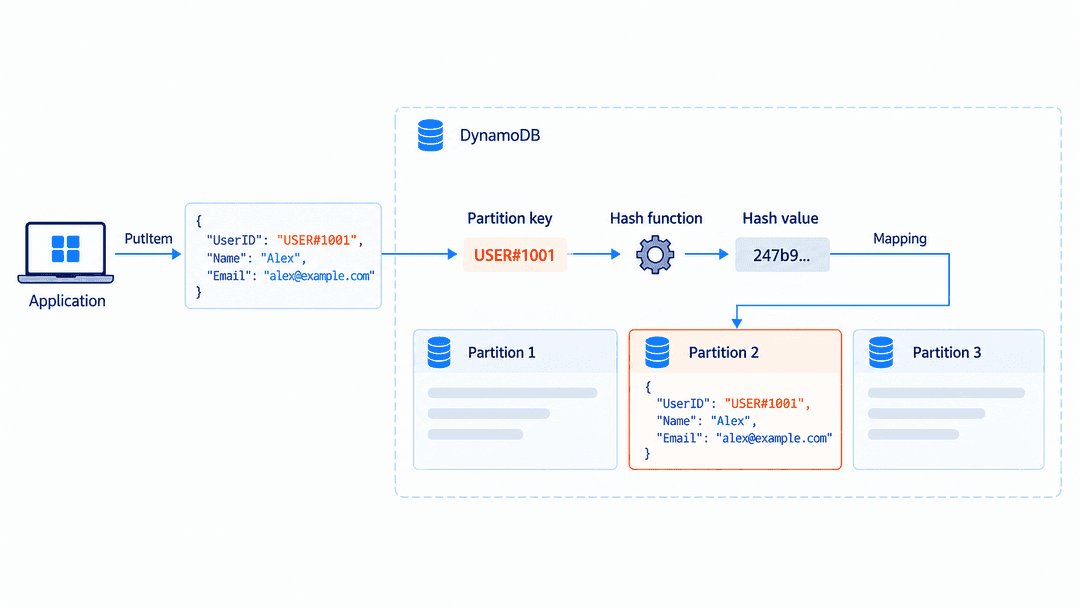
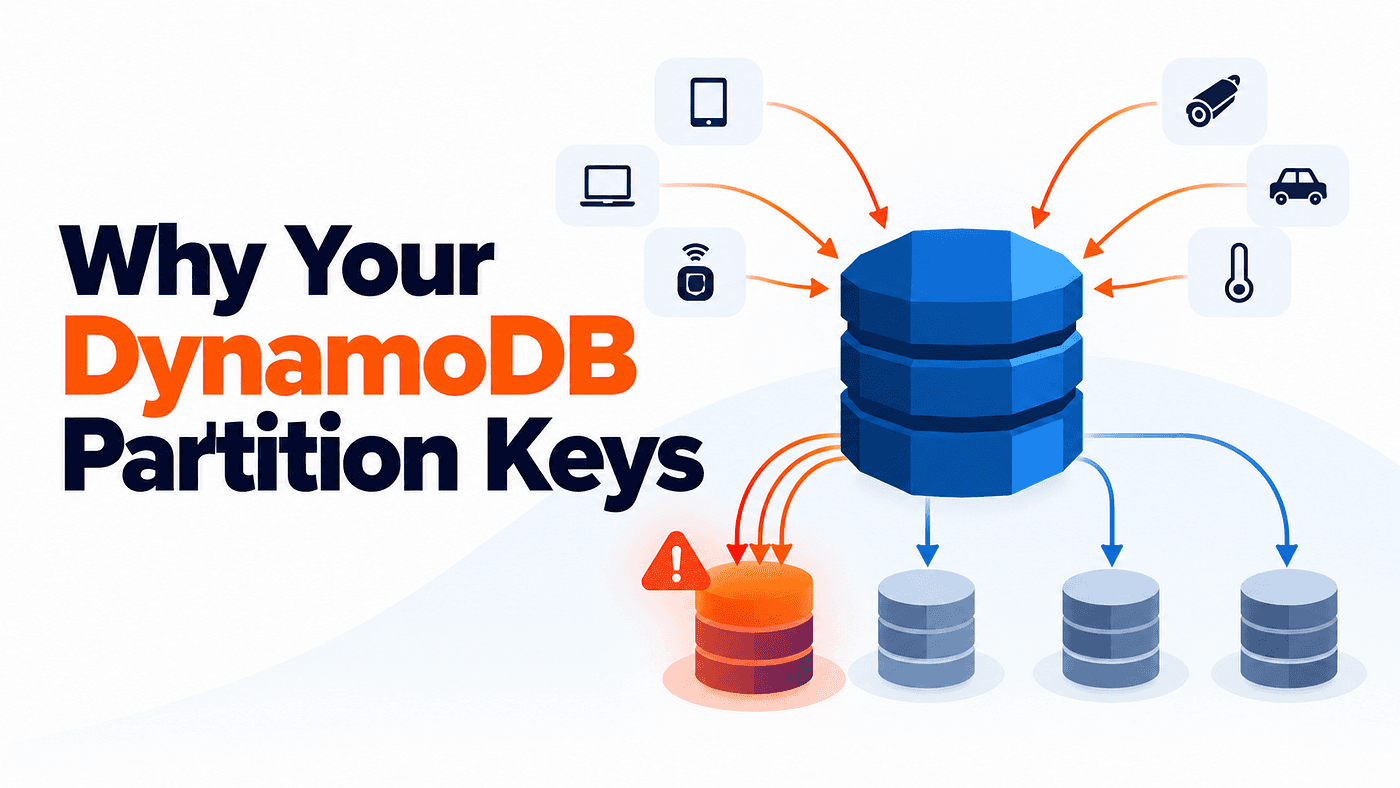
This is why the partition key is more than just an identifier. It also influences where the data goes and where the traffic for that data goes. A partition key can make perfect sense for your data model and still become a performance problem if too much traffic targets the same key value. This is how hot-key and hot-partition problems can begin.
How DynamoDB Routes a Request
Now imagine your application wants to retrieve the user we just stored. It sends a request like this:
dynamodb.get_item(
    TableName="Users",
    Key={
        "UserID": {"S": "USER#1001"}
    }
)
Your application only needs to know the table and the key. It does not need to know which server contains the data, which Availability Zone it is in, or which physical partition is responsible for the item.
At a high level, the request moves through DynamoDB like this:
DynamoDB uses its internal partition information to route the request toward the storage responsible for that item. This separation is important because AWS can split partitions, move data, replace infrastructure, or recover from failures without your application needing to track any of those changes. Your code continues to use the same DynamoDB API.
How DynamoDB Replicates Data
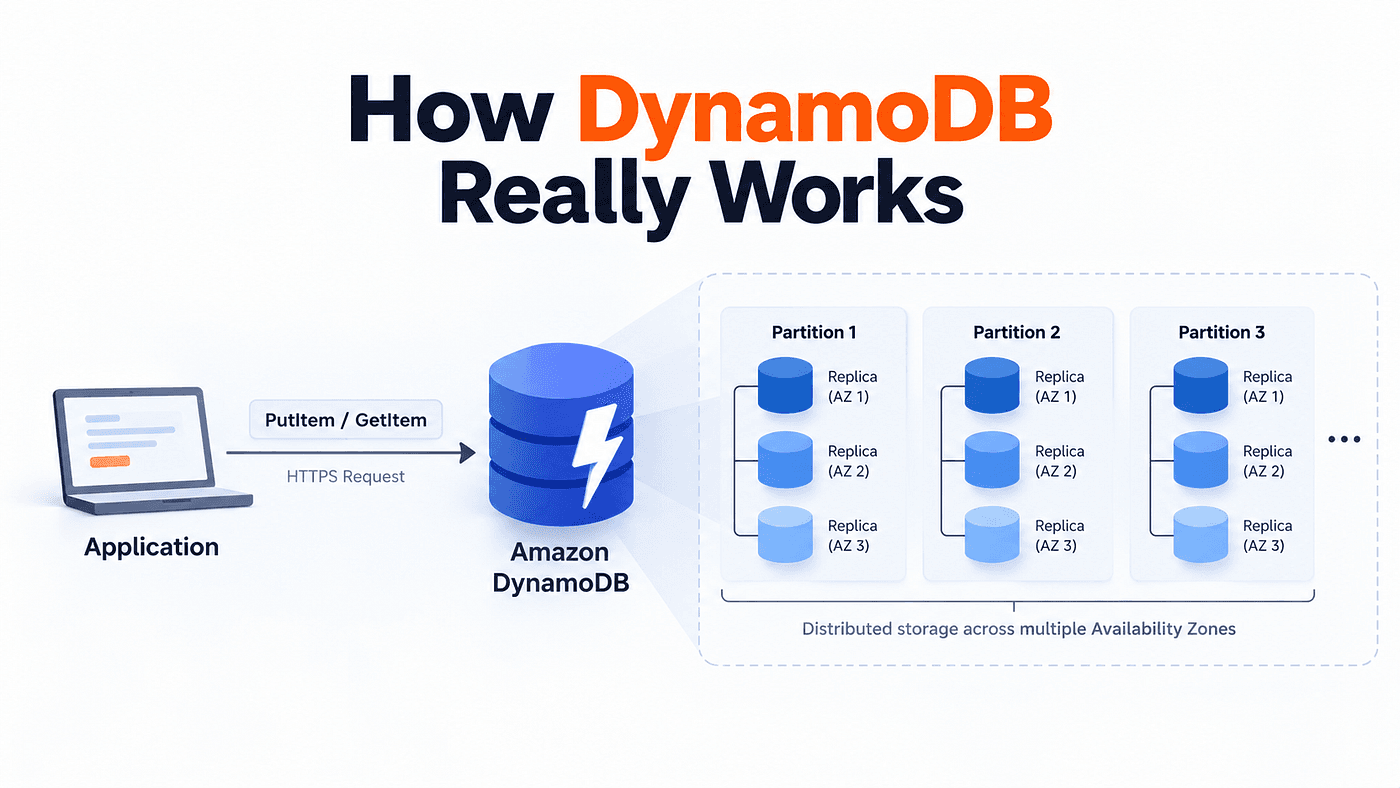
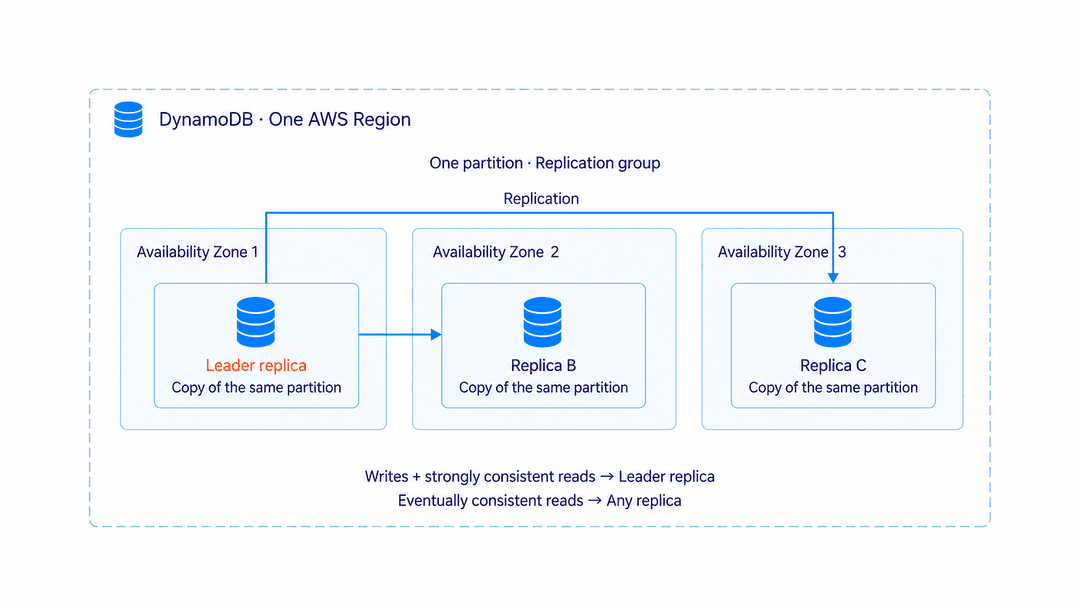
Finding the correct partition is only part of what DynamoDB has to do. The data in a partition is not stored on only one storage node. DynamoDB keeps multiple copies across different Availability Zones within the same Region.
A simple mental model looks like this:
Think of these copies as a replication group. One replica acts as the leader. In AWS’s published DynamoDB architecture, the leader coordinates writes and serves strongly consistent reads, while any replica can serve eventually consistent reads.
The other replicas maintain copies of the same data, so DynamoDB does not depend on a single storage node. If part of the infrastructure fails, other copies are still available.
This replication improves resilience and also explains why DynamoDB offers different read-consistency options. The replica that serves a read depends on the consistency mode your application requests.
What Happens During a Write
Suppose an Orders table uses UserID as the partition key and OrderID as the sort key. Your application sends this request:
dynamodb.put_item(
    TableName="Orders",
    Item={
        "UserID": {"S": "USER#1001"},
        "OrderID": {"S": "ORDER#001"},
        "Status": {"S": "PROCESSING"}
    }
)
DynamoDB first determines which partition is responsible for the key. Once the request reaches the correct partition, the leader replica coordinates the write across the replication group.
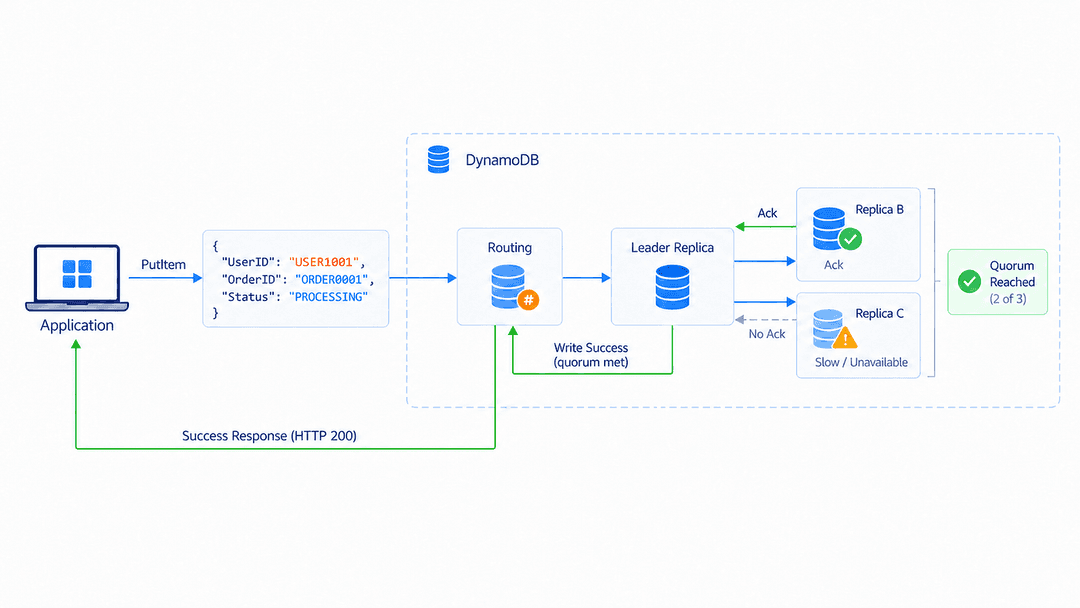
The important idea here is quorum. When DynamoDB receives a write, it does not treat the write as successful after only one copy has stored it. The leader coordinates the write across the replication group and waits until enough replicas have successfully persisted it.
In the three-replica model described by AWS, this means a majority of the replicas must confirm the write before DynamoDB can return success. It does not need to wait for every replica to finish, but it also does not rely on only one replica.
This gives DynamoDB a balance between durability and availability. Even if one replica is slow or temporarily unavailable, the write can still succeed as long as the required quorum is reached. From the application’s point of view, it still looks like a normal PutItem request followed by a success response, while DynamoDB handles the replication underneath.
What Happens During a Read
Now go back to the earlier question. What happens if your application reads an item immediately after writing it?
When DynamoDB acknowledges the write, a quorum has already persisted it, but that does not mean every replica has finished applying the latest update at exactly the same moment. With an eventually consistent read, DynamoDB can serve the request from any replica in the replication group. Most of the time, that replica may already have the latest value, but if it is still catching up, the read can temporarily return an older version.
With a strongly consistent read, DynamoDB uses the leader replica, which provides a stronger guarantee that the read reflects the latest successful writes within the supported consistency scope.
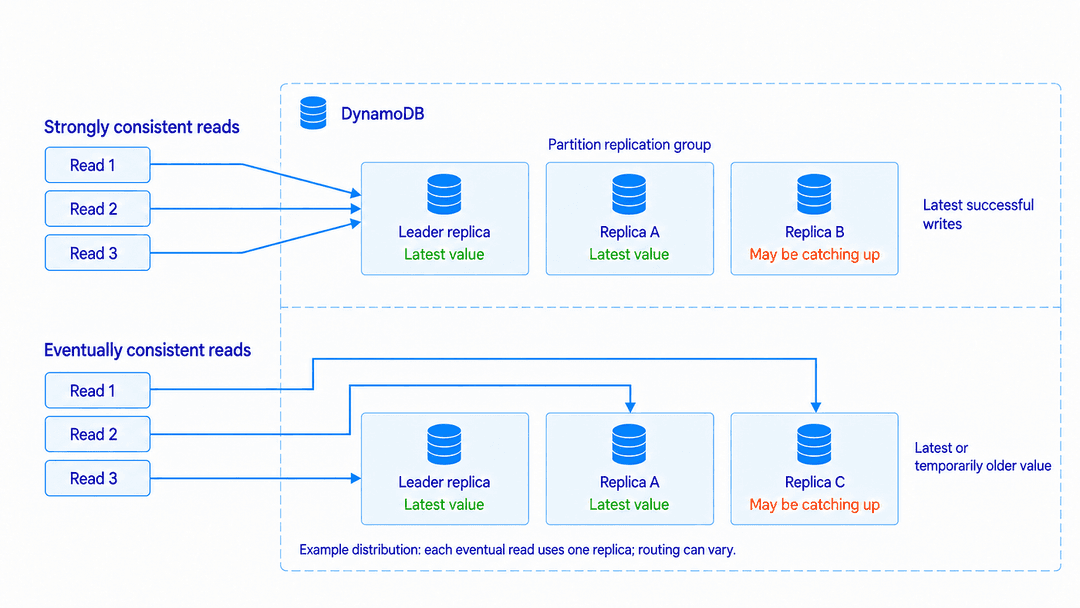
If your application needs the stronger guarantee, you can request it with ConsistentRead=True:
response = dynamodb.get_item(
    TableName="Orders",
    Key={
        "UserID": {"S": "USER#1001"},
        "OrderID": {"S": "ORDER#001"}
    },
    ConsistentRead=True
)
Strongly consistent reads are supported for tables and local secondary indexes, but not for global secondary indexes or DynamoDB Streams. Global tables also have separate cross-Region consistency behavior.
Eventual vs Strong Consistency: Pros and Cons
Once you understand how DynamoDB serves each read, the trade-off becomes easier to see.
With an eventually consistent read, DynamoDB can serve the request from any replica in the replication group. Because of that, read traffic can be distributed more flexibly instead of depending on a single replica. This can help DynamoDB keep read latency low and handle higher read traffic efficiently. It also consumes less read capacity. The downside is that the selected replica may still be catching up after a recent write, so the application can briefly receive an older value.
With a strongly consistent read, DynamoDB serves the request through the leader replica. This gives the application a stronger freshness guarantee because the read reflects the latest successful writes. However, DynamoDB has less flexibility in where the read can be served from, so strong reads can have slightly higher latency in some situations. They also consume more read capacity.
For data up to 4 KB, an eventually consistent read consumes half a read unit, while a strongly consistent read consumes one read unit. So the choice depends on what your application needs rather than one mode being better in every situation.
Choosing the Right Consistency Mode
So should you always use strong consistency? Not necessarily. The right choice depends on what the application actually needs.
Imagine a product catalog where someone changes a product description. If another user briefly sees the older description, it may not cause any real problem. In that case, eventual consistency may be perfectly acceptable.
Now imagine a workflow where a user updates an important value and immediately needs to read that exact value back. In that case, the application may need the stronger guarantee. So instead of asking, “Which consistency mode is better?”, a better question is, “What guarantee does this read actually need?”
Trying Both with boto3
The following example writes an order and then reads it twice, once using eventual consistency and once using strong consistency:
import boto3

dynamodb = boto3.client(
    "dynamodb",
    region_name="us-east-1"
)
TABLE_NAME = "Orders"
key = {
    "UserID": {"S": "USER#1001"},
    "OrderID": {"S": "ORDER#001"}
}
dynamodb.put_item(
    TableName=TABLE_NAME,
    Item={
        **key,
        "Status": {"S": "PROCESSING"},
        "Total": {"N": "149.99"}
    }
)
eventual = dynamodb.get_item(
    TableName=TABLE_NAME,
    Key=key,
    ConsistentRead=False
)
strong = dynamodb.get_item(
    TableName=TABLE_NAME,
    Key=key,
    ConsistentRead=True
)
print(eventual.get("Item"))
print(strong.get("Item"))
Both reads may return the same item. The example shows how to request each consistency mode, not how to force a stale read.
The Mental Model to Keep
At this point, several DynamoDB concepts are connected. The partition key influences where the data goes. That data is stored across replicated infrastructure. Reads and writes then operate on top of those replicas.
A simple mental model is enough:
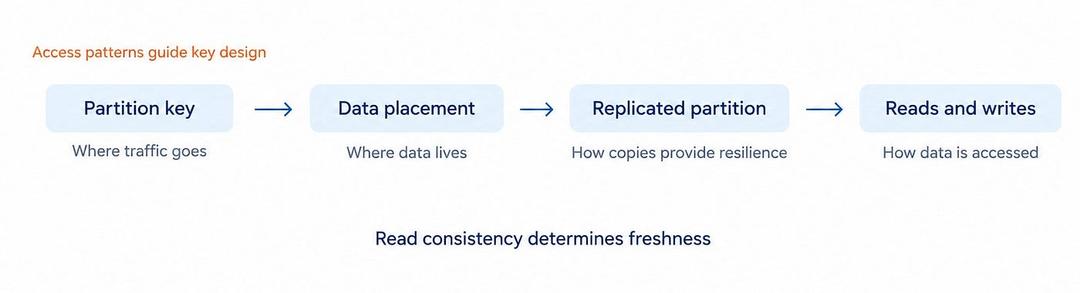
You do not need to remember every internal DynamoDB component. What matters is understanding the relationship between them. Partition keys influence data and traffic distribution, replication provides resilience, and consistency controls what guarantees you expect when reading that replicated data.
Access patterns sit on top of all of this. Because DynamoDB is designed around efficient key-based access, the way you design your keys directly affects how efficiently your application can reach the data.
Final Thoughts
You do not need to memorize DynamoDB’s internal architecture to use it well. What matters is understanding enough of it to see why the design rules exist.
Partition keys influence where data and traffic go. Replication gives DynamoDB resilience. Consistency determines what freshness guarantee your application receives when reading that replicated data.
Once those ideas connect, DynamoDB becomes easier to reason about. Instead of memorizing separate rules, you can start asking a better question: what does this design choice mean for where my data goes, how it is read, and how the workload will scale?
What’s Next?
In Part 2: DynamoDB Primary Keys, Partitioning, and Data Distribution, we will look more closely at partition keys and sort keys, how they affect item placement, and why some key designs scale better than others.
In DynamoDB, a key is not only an identifier. It is also part of the path your workload takes to reach the storage system.
References
AWS Developer Guide — Partitions and data distribution
https://docs.aws.amazon.com/amazondynamodb/latest/developerguide/HowItWorks.Partitions.html
AWS Developer Guide — DynamoDB read consistency
https://docs.aws.amazon.com/amazondynamodb/latest/developerguide/HowItWorks.ReadConsistency.html
AWS Developer Guide — Read and write operations
https://docs.aws.amazon.com/amazondynamodb/latest/developerguide/read-write-operations.html
Amazon Science — Lessons learned from 10 years of DynamoDB
https://www.amazon.science/blog/lessons-learned-from-10-years-of-dynamodb
USENIX — Amazon DynamoDB: A Scalable, Predictably Performant, and Fully Managed NoSQL Database Service
https://www.usenix.org/system/files/atc22-elhemali.pdf