Interested in building your own intelligent personal chatbot that’s fully under your control? With OpenAI’s Assistant API, you can develop a customized assistant tailored to your specific needs. Whether you’re aiming to review documents, answer questions, manage tasks, or support technical workflows, the Assistant API makes it easier than ever to create a feature-rich chatbot.
This guide walks you through how to build a personal chatbot using the Assistant API — from setting up its behavior to managing conversations and maintaining memory across sessions. By the end, you’ll understand the benefits of the Assistant API and how to use it effectively in your own projects.
Key Features of the Assistant API
1. Customizable Instructions
You can define system instructions to guide how your assistant behaves. These instructions can be dynamic — changing based on user context or use case.
Example: If you’re building a calculator assistant, set the instruction to “Only provide responses relevant to mathematical calculations.”
2. Streaming Responses
The Assistant API supports response streaming, similar to ChatGPT. This allows users to see replies as they are generated, improving the interactive experience without waiting for a full response.
3. Built-in Chat History (No Database Needed)
You don’t need to manage your own database to store chat history. The API allows you to retrieve and display previous messages in a thread, providing seamless conversation continuity.
Supported Tools
File Search
Allows the assistant to learn from user-uploaded files. Based on user prompts, the assistant can automatically decide when and how to use file content in its responses.
Code Interpreter
Also known as “Python” or “Advanced Data Analysis,” this tool enables the assistant to write, execute, and analyze code. It can process various data formats, generate visualizations, and manipulate files dynamically.
Function Calling
You can define custom functions or external APIs that the assistant can call. When appropriate, the assistant will generate a JSON object with the correct arguments to call the function automatically.
How to Create an Assistant
To use the Assistant API, you’ll need an OpenAI API key. You can generate one from your OpenAI dashboard.
There are two ways to create an assistant.
1. Using a manual form to create an assistant
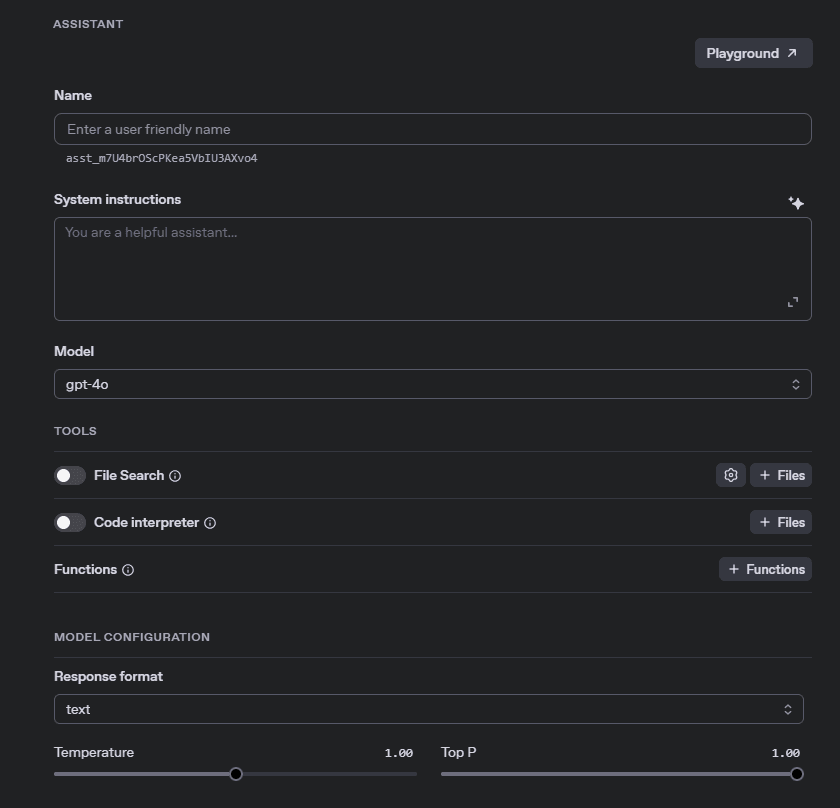
Use the OpenAI web interface to:
- Set a name for your assistant
- Add system instructions
- Choose tools (e.g., code interpreter, file search)
- Retrieve the Assistant ID (to use later in your application)
This method is quick and straightforward for static assistant configurations.
2. Using the OpenAI API key in your project
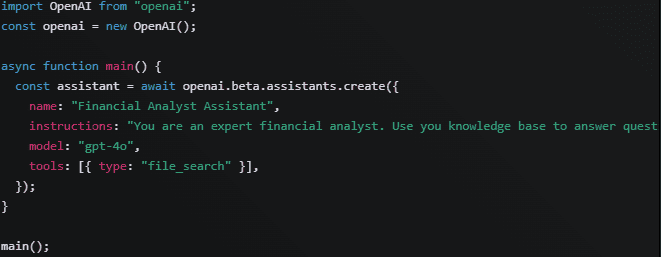
You can create assistants programmatically by sending a request using your API key. This approach offers greater flexibility, such as:
- Dynamically creating assistants based on user input
- Automating assistant creation for different use cases
- Instantly retrieving the Assistant ID to initiate chats
Understanding the Assistant Workflow
The assistant follows a three-step process:
Step 1: Thread Creation
Each conversation is encapsulated in a Thread. This ensures privacy and allows messages to be grouped for a specific session. A unique Thread ID is generated when a user initiates a chat.

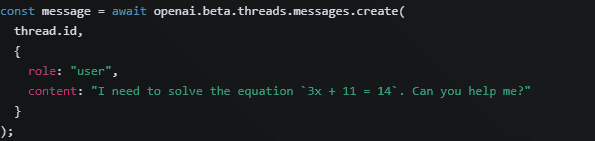
Step 2: Add Messages
Add messages to the thread, including text or files. These are structured as message objects and form the context of the conversation.
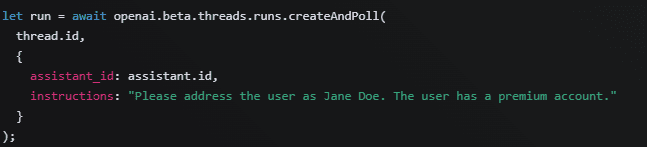
Step 3: Run the Assistant
Once the assistant, thread, and messages are set up, you can run the assistant using the Assistant ID and Thread ID. The assistant processes the thread, interprets the messages, and generates a response.
Final Thoughts
The Assistant API opens up powerful possibilities for developers to build smart, personal, and highly customizable chatbots. With built-in support for file analysis, code execution, dynamic memory, and custom tool integration, the Assistant API can serve use cases ranging from technical support bots to productivity companions.
Whether you’re building a tool for yourself or integrating it into a larger product, the Assistant API provides the flexibility and intelligence needed to create meaningful conversational experiences.