Notifications are a core part of modern applications — they guide users, drive engagement, and deliver critical updates in real time.
But designing a notification system that is fast, reliable, and scalable isn’t as simple as adding a database table and sending emails. Without the right architecture, you risk performance bottlenecks, missed deliveries, and code that’s painful to extend.
In this guide, I’ll walk you through the architecture and approach I use to build event-driven notifications with AWS Amplify, SQS, Lambda, DynamoDB, and SES.
The Problem: Direct Notification Handling Doesn’t Scale
A straightforward approach is to send notifications directly from your backend logic:
- Write the notification to the database
- Send the email in the same flow
- Push a real-time update to the UI
It works for small workloads — but quickly causes issues:
- Producers slow down waiting for email sends
- Failures in email can cause missed notifications
- Adding new notification types requires touching multiple services
We need a design that’s decoupled, fault-tolerant, and easy to extend.
The Solution: Event-Driven, Decoupled Notifications
The architecture I use is built around an event-driven pattern:
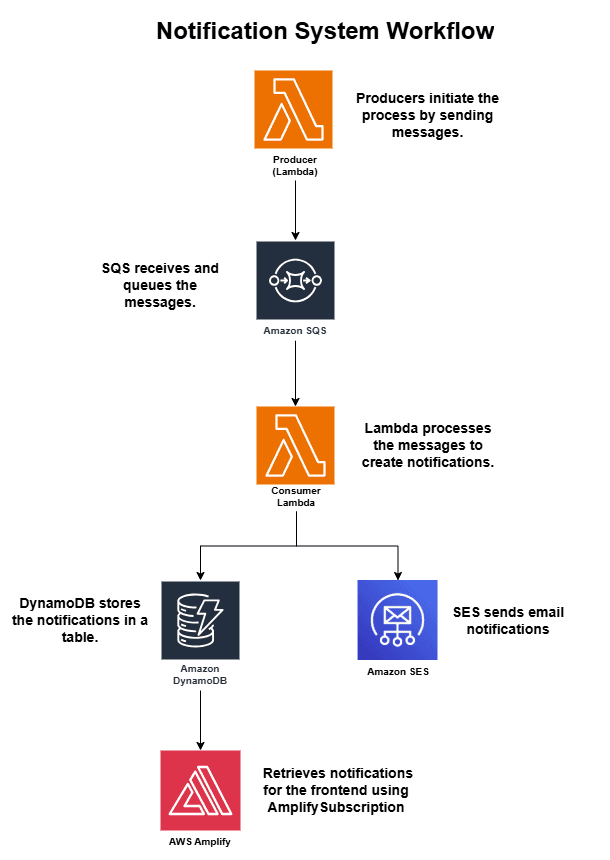
- Producers publish notification events to an SQS queue
- A Consumer Lambda processes events, saves them to DynamoDB, and sends emails via SES
- The frontend subscribes to real-time updates using Amplify
- A separate Lambda handles batch “mark all read” actions efficiently
Step 1: Define the Notification Model
In AWS Amplify, I define a Notification model with:
- User ID for scoping
- Type for notification category
- Read status for tracking unread messages
- Created timestamp for ordering
I also add a Global Secondary Index (GSI) on userId + readStatus so I can instantly query unread notifications.
Step 2: Decouple Producers with SQS
Instead of embedding notification logic inside each feature, producers simply publish a message to SQS.
Examples:
- New user created → welcome email + notification
- User invited to join → invite email + notification
This ensures:
- No delays in producer flows
- Reliable retries if the consumer is temporarily down
- Easy extensibility for new notification types
Step 3: Process Notifications with a Consumer Lambda
The Consumer Lambda is subscribed to the SQS queue.
- Creates a notification record in DynamoDB
- Sends an email via SES if required
- Logs email failures but continues to save the notification (no blocking)
Step 4: Deliver Emails with SES Templates
Using Amazon SES, I set up branded HTML and plain text templates for:
- Welcome messages
- Invites
- Generic notifications
Templates are easy to extend for new types, and the email sender address (the “From” field in outgoing emails) is set via an environment variable, so it can be changed without code updates.
Step 5: Enable Real-Time UX with Amplify Subscriptions
The frontend uses a React hook (useNotifications) that:
- Loads notifications from Amplify
- Subscribes to
Notification.onCreatescoped byuserId - Instantly updates the Notifications Drawer component with unread counts and new messages
Step 6: Handle Batch “Mark All Read” Actions
For marking all unread notifications as read in one click:
- A dedicated Lambda queries unread notifications via the GSI
- Updates them in a single batch write operation
Step 7: Make It Extensible
Adding a new notification type is simple:
- Add a new
notificationTypeto your event definition - Update the Consumer Lambda to handle it
- Add an SES template if an email is required
No changes are needed in the producers — they just publish the event.
Benefits of This Approach
- Performance — Real-time updates without slowing down business flows
- Reliability — SQS ensures message delivery, even during failures
- Scalability — Easily add new notification types or channels (SMS, push)
- Cost Efficiency — Only required attributes are indexed in the GSI
Final Thoughts
A well-designed notification system is more than just “alerts.”
It’s a communication bridge between your backend events and your users, delivering information at the right time and in the right way.
By using an event-driven approach with SQS, Lambda, DynamoDB, and SES, you get a system that’s fast, fault-tolerant, and ready to grow.