Setting up a new Gen 2 app usually goes smoothly. You run the sandbox, the backend deploys, the frontend picks it up, and the first screens come together quickly.
Then you add a component that needs the signed-in user, and the app stops with this:
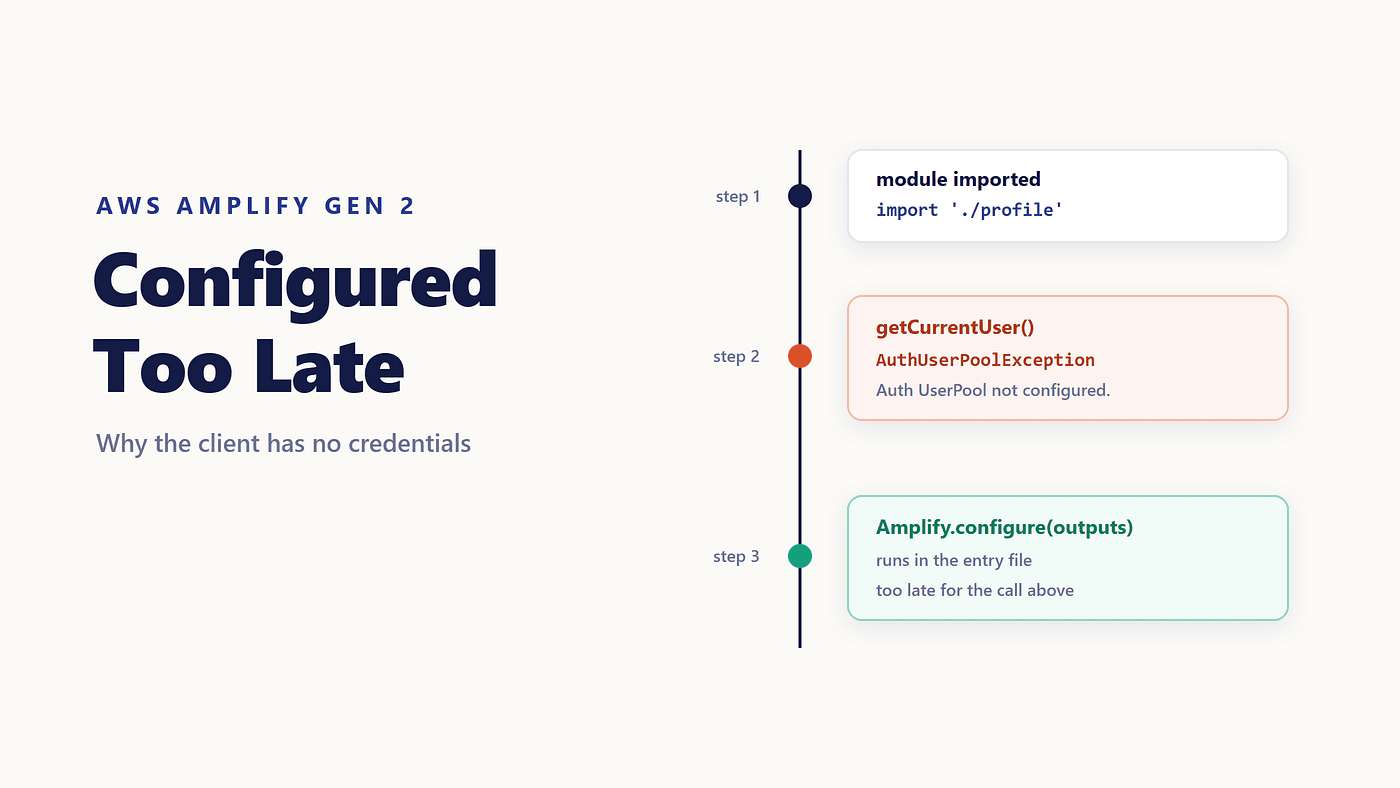
AuthUserPoolException: Auth UserPool not configured.
Which is strange, because the sandbox is still running, amplify_outputs.json is sitting in the project root, and the user pool is in your account. You watched it deploy a minute ago.
It is all there. The client has not been told about it yet, and the reason is ordinary JavaScript.
An Error That Moves Around
Two symptoms come from this one cause.
The first is a named exception on an auth call: Auth UserPool not configured., or Auth Token Provider not configured. The second is an Amplify NoCredentials error, which shows up when a request needs AWS credentials and the library has none to sign with.
What makes it confusing is that the error is intermittent. Save a file, let hot reload patch the module, and it goes away because by then the entry file has already run and the configuration is in memory. Restart the dev server, and it comes back.
The order of operations explains both. JavaScript evaluates a module when it is imported, so anything at the top level of a file runs during import, before your entry file reaches Amplify.configure. A call sitting at module level is simply earlier in the sequence.
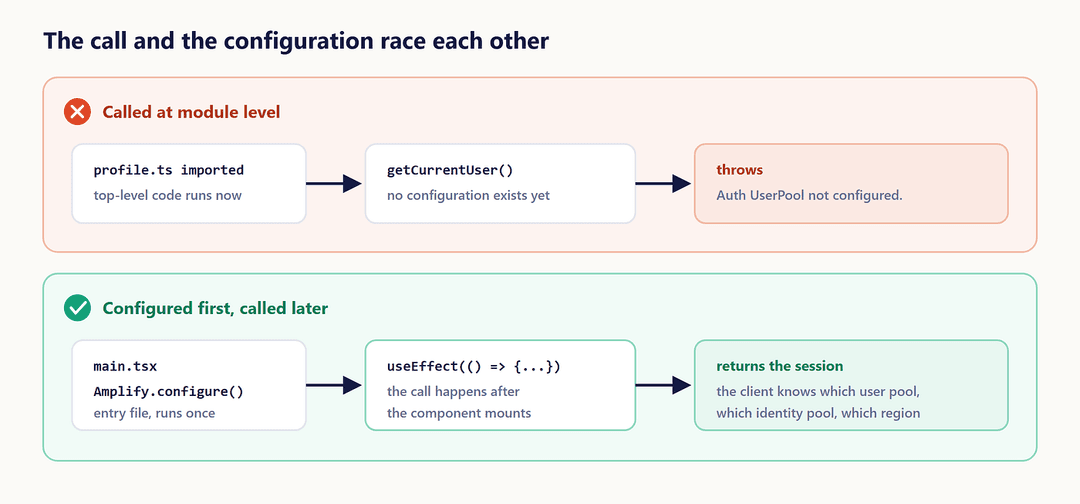
Both paths call the same function. Only the timing differs.
The Message You Searched For Is Not the Message You Got
Searching for this problem turns up years of results saying Amplify has not been configured correctly. That exact phrasing, with “correctly” on the end, is Amplify JS v3 to v5, and plenty of blog posts still carry it.
Version 6, which is what Gen 2 uses, splits the same situation in two. Reading the configuration with Amplify.getConfig() before it exists logs a console warning that says "Amplify has not been configured. Please call Amplify.configure() before using this service." Calling an actual API throws instead, with a named exception: AuthUserPoolException, AuthTokenConfigException, AuthUserPoolAndIdentityPoolException.
Each exception carries a recovery suggestion written into the library. AuthUserPoolException tells you to call Amplify.configure with userPoolId and userPoolClientId. The advice is in the error object, which is easy to miss when you only read the first line in the console.
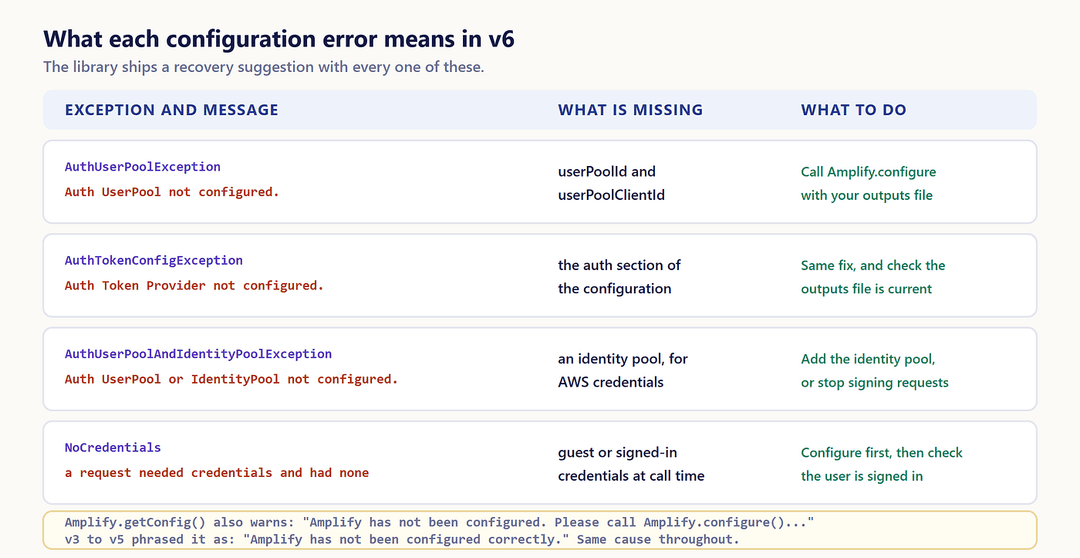
Same cause, newer words. If you landed here from the old phrase, you are in the right place.
Confirm It Before You Change Anything
One line separates “the client is unconfigured” from “the backend is wrong”, and it is worth running before editing files:
console.log(Amplify.getConfig());
An empty object, with that console warning beside it, means configuration never ran. A populated object with auth and data sections means the client knows about your backend, and the failure is somewhere else: the user is not signed in, the call needs credentials the identity pool does not grant, or the sandbox has moved on, and the outputs file is stale.
That second case is worth a glance at the file itself. If amplify_outputs.json has no auth section, no amount of configuring will produce a user pool.
The One-Line Fix
Configuration happens once, in the file that runs before anything else:
// src/main.tsx
import { Amplify } from 'aws-amplify';
import outputs from '../amplify_outputs.json';
Amplify.configure(outputs);
Three details matter in that Amplify.configure outputs call.
amplify_outputs.json is generated for you. The sandbox writes it while it runs, and for a deployed branch you download it from the Deployments page, under deployed backend resources. It holds endpoints, public API keys, and auth flow information, so it is the map the client needs.
The file it goes in depends on the framework. React uses src/main.tsx. Vue and Angular use src/main.ts. Next.js with the Pages Router uses pages/_app.tsx. Nuxt uses app.vue or a plugins file.
And it must be imported. An entry file that defines configuration but never gets imported is a common variant of this bug, particularly after a refactor that moves bootstrap code around.
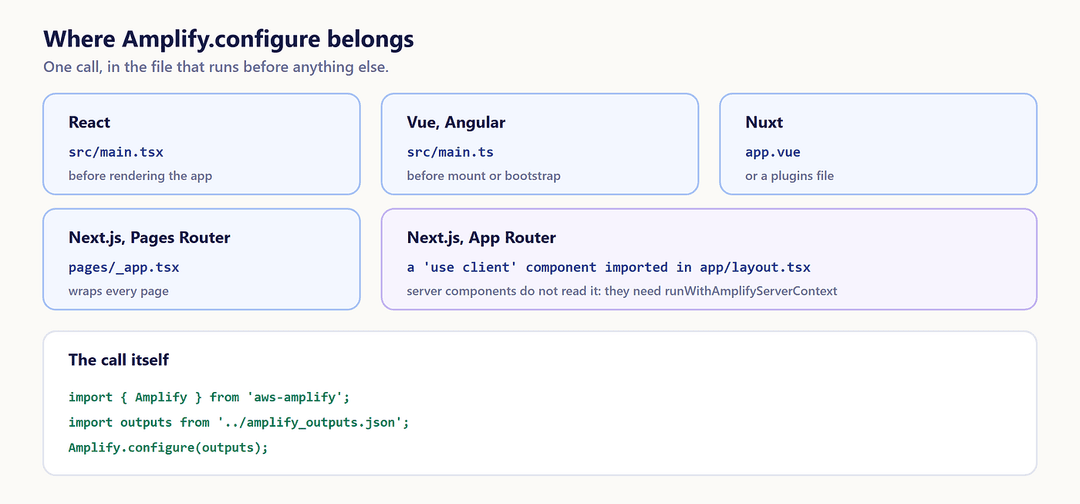
The App Router Needs Its Own Wiring
Next.js App Router is the case that catches people, because a root layout is a server component and cannot hold client configuration.
The pattern is a small client component that does nothing else:
'use client';
import { Amplify } from 'aws-amplify';
import outputs from '@/amplify_outputs.json';
Amplify.configure(outputs, { ssr: true });
export default function ConfigureAmplifyClientSide() {
  return null;
}
Import it in app/layout.tsx and render it, and every client component below is configured.
Server components are a separate conversation. They do not read this configuration at all; they need runWithAmplifyServerContext from the Next.js adapter, which is article 1.2 in this series.
Calls That Run Too Early
Fixing the entry file is usually enough. Two variants survive it.
A call at module level. If a file does its work at import time, configuration has not happened yet. Move it into the lifecycle:
useEffect(() => {
  const getSession = async () => {
    const session = await fetchAuthSession();
    // use the session
  };
  getSession();
}, []);
The same applies in a Next.js layout: a child component that calls an Amplify API at module level fails for exactly this reason, no matter how correct the layout is.
A multi-page app where only some pages configure. Put the call in one shared module and import that module from every page, so there is no page where the client starts unconfigured.
Configuration Is a Startup Step, Not an Import
The library has no implicit setup. Importing aws-amplify gives you functions that know nothing about your account. Amplify.configure is the moment they learn which user pool, which identity pool, and which region they are talking to, and any call that runs before it talks to a client that knows nothing.
Put the call as early as your framework allows, then let components assume it has already happened. That assumption is what makes the rest of the code readable.
A Thirty Second Check
When this error appears, five questions find it almost every time.
- Is
Amplify.configurein the entry file, and does something import that file? - Is the failing call at module level rather than inside a lifecycle hook?
- Is
amplify_outputs.jsonthe current one, and is the sandbox still running? - On the App Router, is the client config component rendered in the root layout?
- Is the failing call on the server, where it needs a server context instead?
Next in this series: the circular dependency error that appears when a function needs access to the data API it also serves.