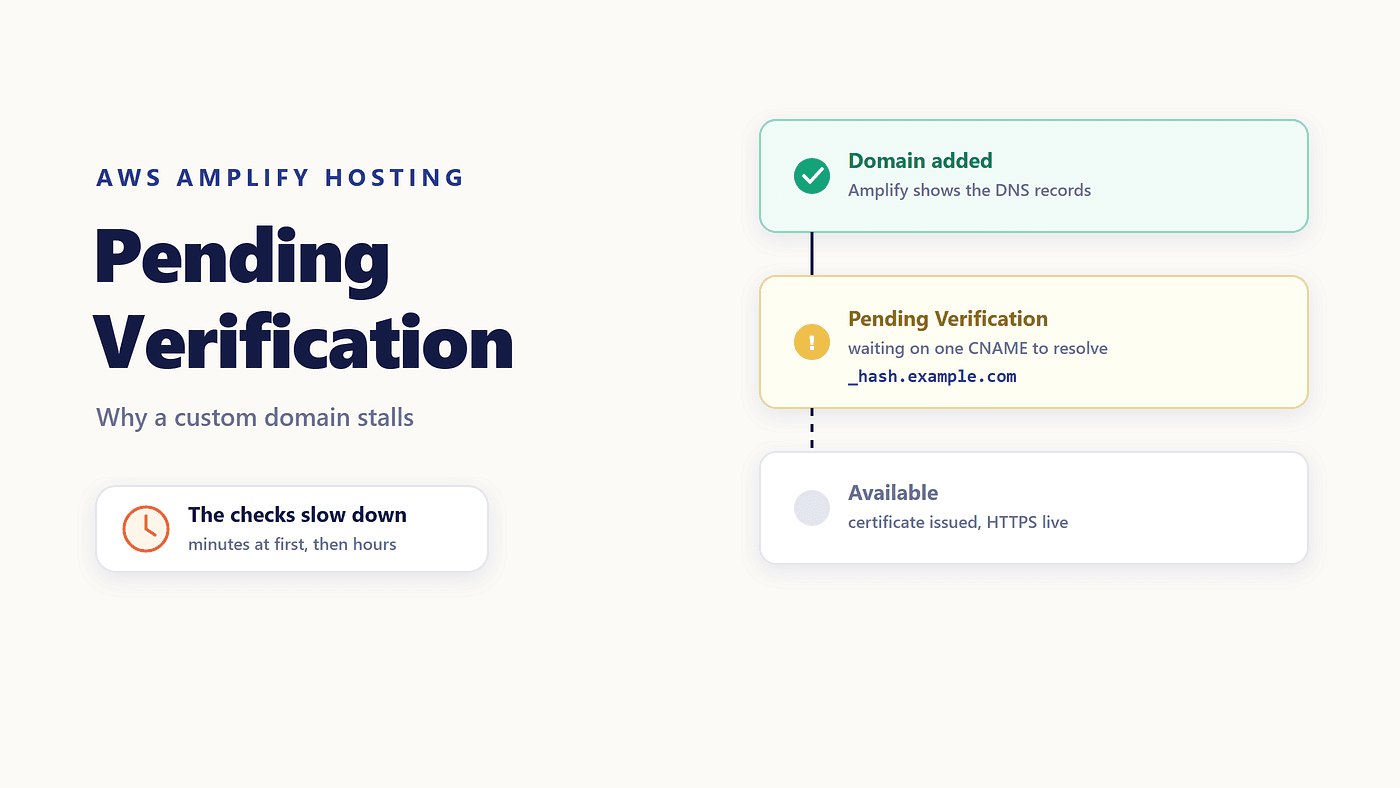
Maya had one task left before launch week: point example.com at the Amplify app. She opened the console, added the domain, and Amplify showed her a short list of DNS records to create.
Her registrar is not Route 53, and the DNS panel lives in a different account that someone else administers. She got access that evening and pasted the records in. Three hours later, the console still said Pending Verification. No error message. No detail. Just a status that would not move.
If your Amplify custom domain pending verification state has outlasted a coffee break, the cause is usually one of four things, and only one of them is a typo.
What Amplify Is Actually Waiting For
Connecting a domain is two separate jobs, and they fail for different reasons.
The first is proving you own the domain. Amplify gives you a verification CNAME, and AWS Certificate Manager checks for it before issuing the certificate that serves your site over HTTPS. Until that check passes, nothing else happens.
The second is routing traffic: a CNAME that points www at your app's CloudFront domain, and an ANAME or ALIAS record that points the apex at the same place.
Only the first one controls the status. The domain sits at Pending Verification while ACM looks for the ownership record, which means an Amplify SSL certificate pending forever is nearly always a DNS answer that never arrives. AWS allows up to 48 hours for third-party verification and propagation, so some patience is reasonable. Three hours of nothing is not.
The Backoff Nobody Warns You About
Here is the detail that explains most stuck domains, and it is easy to miss in the documentation.
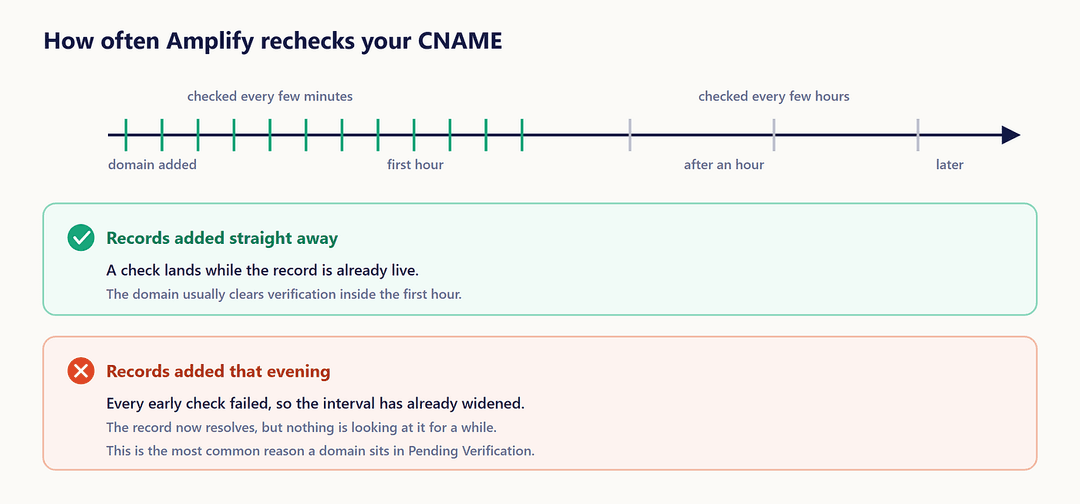
ACM starts checking the moment you add the domain. In the AWS docs’ own words, the CNAME record “is checked every few minutes to determine if it resolves. If it doesn’t resolve after an hour, the check is made every few hours, which can lead to a delay in your domain being ready to use.”
So the checks are not evenly spaced. They are dense at the start, when most people have not finished creating the records yet, and sparse later, when the records finally exist. Maya’s records went in after the checks had already slowed to a crawl. Nothing was broken. Nothing was looking, either.
Step One: Prove the Record Resolves
Before changing anything, find out whether the record answers. From a terminal:
dig +short _c3e2d7eaf1e656b73f46cd6980fdc0e.example.com CNAME
A correct result returns the ACM validation hostname. Empty output means the record does not resolve, whatever the registrar’s panel shows you. The AWS docs also suggest whatsmydns.net, which checks from several locations at once and is useful when a record works locally but not everywhere.
Step Two: The Three Ways the Record Goes In Wrong
Most Amplify domain CNAME problems come down to typing the right value into the wrong field.
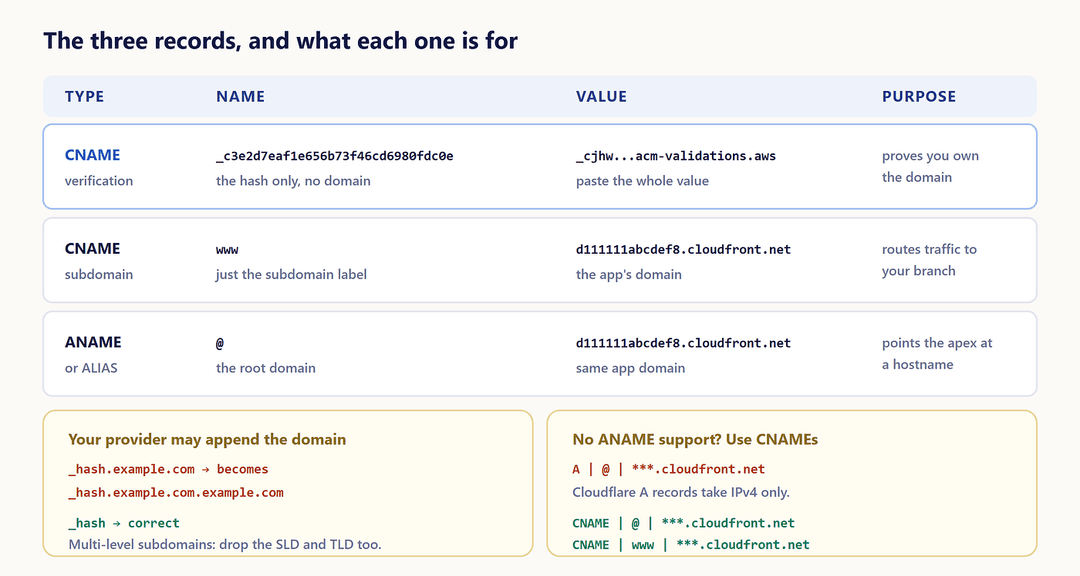
Your provider appends the domain for you. Many DNS panels add the zone name to whatever you type. Paste _c3e2d7eaf1e656b73f46cd6980fdc0e.example.com as the host, and you get _c3e2d7eaf1e656b73f46cd6980fdc0e.example.com.example.com. The docs are explicit: enter only _c3e2d7eaf1e656b73f46cd6980fdc0e as the record name.
The value gets trimmed instead. The ACM validation value, something like _cjhwou20vhu2exampleuw20vuyb2ovb9.j9s73ucn9vy.acm-validations.aws, goes in whole. It is not a hostname inside your zone, so nothing about it should be shortened.
Multi-level subdomains confuse the panel. For something like _hash.docs.backend.example.com, try the full name first. If it stays pending, remove the SLD and TLD and enter _hash.docs.backend. Wait 15 to 30 minutes for propagation, then check again.
Step Three: The Apex Record and Providers That Refuse It
The root domain needs an ANAME or ALIAS record, because a plain CNAME at the apex is not allowed by DNS. Some providers do not offer one. Cloudflare’s A records accept IPv4 addresses only, so they cannot hold a CloudFront hostname.
The documented workaround is to use CNAME records for both:
CNAME | @   | ***.cloudfront.net
CNAME | www | ***.cloudfront.net
If your provider supports neither, AWS recommends migrating DNS to Route 53. One more timing note from the docs, worth following if the site is already live: update the traffic records after the domain status reads AVAILABLE, not before.
Step Four: When the Domain Is on Route 53 and Still Stuck
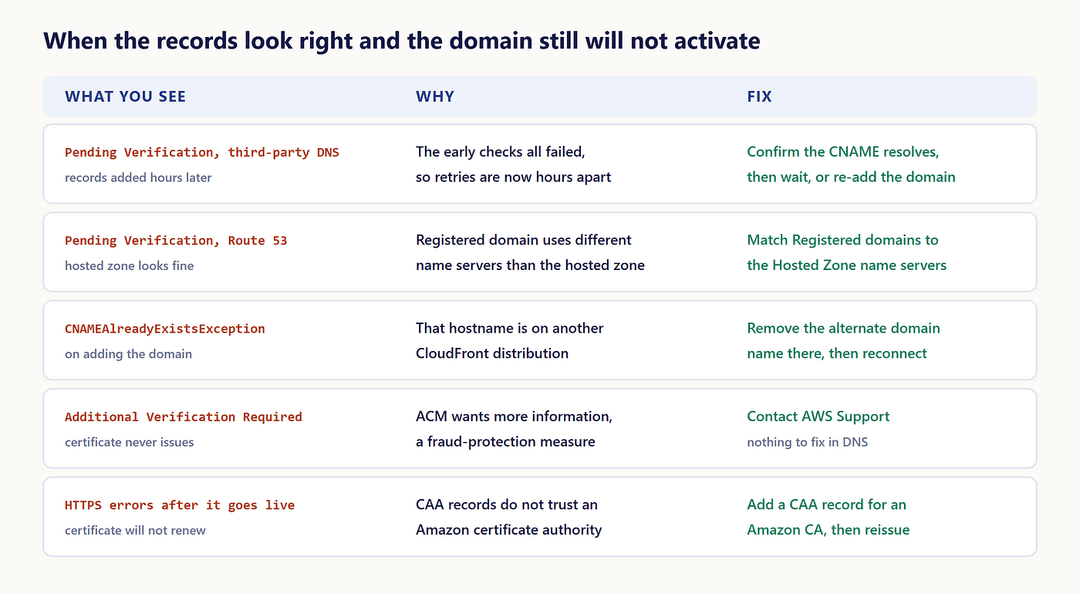
A Route 53 domain that will not verify usually has a name server mismatch. A transferred domain can keep name servers that differ from the ones in its hosted zone.
Open the Route 53 console, note the four name server values in Hosted Zone Details for the domain, then open Registered domains and compare. If they differ, edit the registered domain to match the hosted zone. The records you created are fine; the internet is simply asking a different set of servers about them.
Step Five: When It Is Not DNS at All
Three failures look like a DNS problem and are not.
CNAMEAlreadyExistsException means the hostname is already attached to another CloudFront distribution. A CNAME alias can belong to one distribution at a time, and that distribution might be in another AWS account, or an old Amplify app you forgot. Remove the alternate domain name there, clean up stale Route 53 records pointing at it, then connect again. If the domain was deleted from another app within the last hour, wait an hour before retrying.
Additional Verification Required means ACM wants more information before issuing the certificate, a fraud-protection step that affects high-profile domains. There is nothing to fix in DNS. Contact AWS Support.
A 400 on a cross-account association happens when the domain is, or was, associated with an Amplify app in another account in the same region. That path needs manual verification from AWS Support.
After It Goes Live: The Certificate Still Needs Those Records
Two things are worth knowing once the status finally flips.
The managed certificate is valid for 13 months and renews automatically while your app is hosted with Amplify. It cannot renew if the verification CNAME has been modified or deleted, and recovering from that means removing the domain and adding it again. Leave the record in place.
If you see HTTPS errors later, check your CAA records. When CAA records exist, and none of them trusts an Amazon certificate authority, ACM cannot reissue intermediate certificates. Add a CAA record for an Amazon CA, then update the certificate.
What Maya Would Do Differently
The fix in the end was sequencing, not configuration. Her records were correct. They simply arrived after the system had stopped paying close attention.
A domain switch goes smoothly when you have DNS access before you start, create the records within minutes of adding the domain, confirm the verification record resolves rather than assuming it does, and leave the traffic records until the status reads AVAILABLE. Verification is a conversation, and AWS stops listening closely after the first hour.
Next in this series: setting up pull request preview environments in Amplify Gen 2.