Ryan had shipped the internal reporting dashboard on a Friday. React with React Router, built by Vite, hosted on Amplify as a static site, connected to a Git branch so every merge deploys itself. He clicked through the whole app after the deploy finished, and every screen loaded.
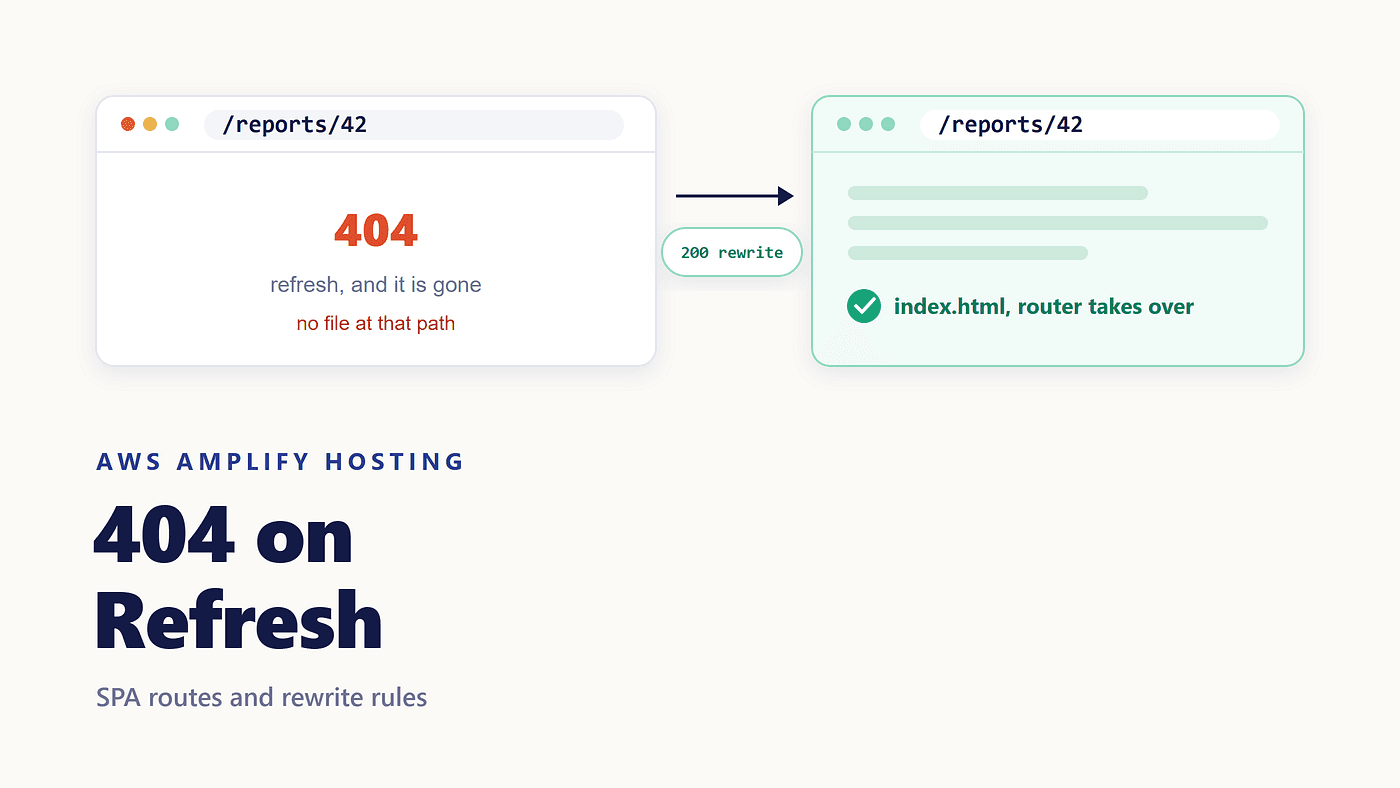
On Monday, QA filed the first bug. Open /reports/42 in a new tab, and the page returns 404. Clicking to the same screen from the dashboard, and it works.
Nothing in his code changed between those two cases. What changed is who did the routing.
Two Different Kinds of Navigation
Most SPA frameworks use HTML5 history.pushState() to change the URL in the address bar without asking the server for anything. React Router, Vue Router, and Angular's router all work this way.
So when Ryan clicked “Report 42”, the browser never made a request for /reports/42. The router matched the new URL against its route table, rendered the component, and updated the address bar. The whole exchange happened inside a page that was already loaded.
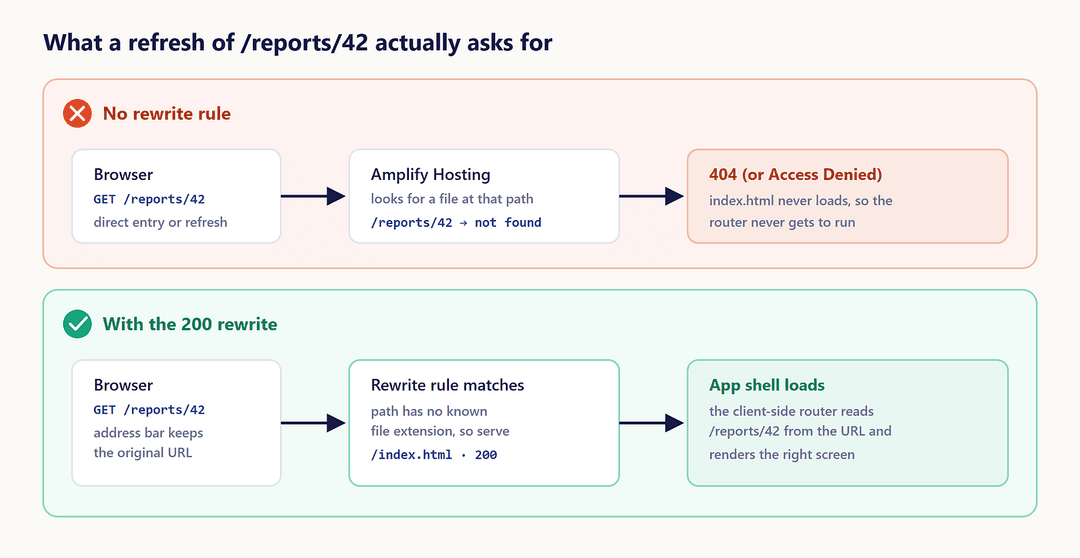
Opening that URL in a new tab is a different event. There is no app running yet. The browser asks the host for /reports/42, and the host has to answer with something before any JavaScript exists.
The Refresh Is a Real Request
Here is where an Amplify 404 on refresh comes from. The hosting layer serves files that your build produced. Vite wrote index.html, a couple of hashed assets, and nothing else. There is no file at /reports/42, because /reports/42 is not a file; it is a state your app can be in.
The host looks for a matching object, does not find one, and returns 404. Some setups return Access Denied instead, which is the same story in different words. Either way, the app shell never loads, so the router never gets a chance to rescue the route.
The chain is short and easy to miss: direct request → no matching file → 404 → index.html never loads → the router never runs.
Why It Survives Review
This bug hides well, and the reason is worth knowing.
Local development servers answer unknown paths with index.html by default, so npm run dev never shows the problem. A deploy preview does not show it either, as long as whoever checks the preview starts at the home page and clicks. It appears the first time someone opens a deep link cold: a QA engineer with a bookmark, a teammate following a shared URL, anyone hitting refresh on a screen they were already using.
That is also why searching for amplify react router 404 turns up so many people with working code. The code is fine. The hosting contract is missing.
The Fix: One Rewrite Rule
The app needs the host to hand back index.html for anything that is not a real file, while keeping the original URL so the router can read it. The Amplify rewrites and redirects SPA example in the AWS docs gives you a rule that does exactly that.
In the Amplify console, choose your app, then Hosting, then Rewrites and redirects, then Manage redirects. Add this rule in the JSON editor:
[
  {
    "source": "</^[^.]+$|\\.(?!(css|gif|ico|jpg|js|png|txt|svg|woff|woff2|ttf|map|json|webp)$)([^.]+$)/>",
    "status": "200",
    "target": "/index.html",
    "condition": null
  }
]
Three fields carry the whole fix. source decides which requests match. target is the file to serve. status is 200, a rewrite, and that choice matters more than it looks: a 301 or 302 tells the browser to go somewhere else, and the address bar changes to /index.html. A rewrite is server-side. The visitor keeps /reports/42 in the address bar; the router reads that path, and the right screen renders.
Save it, and the deep link works. No rebuild required, since this is hosting configuration rather than application code.
What That Regular Expression Actually Says
The source value looks worse than it is. It matches two kinds of paths.
The first half, ^[^.]+$, matches any path with no dot in it. /reports/42 and /settings/team qualify. Those are routes, so they get index.html.
The second half handles paths that do contain a dot. The negative lookahead excludes a list of file extensions: css, gif, ico, jpg, js, png, txt, svg, woff, woff2, ttf, map, json, webp. A request for /assets/app.js is left alone and served as the file it is. Anything else with a dot is treated as a route.
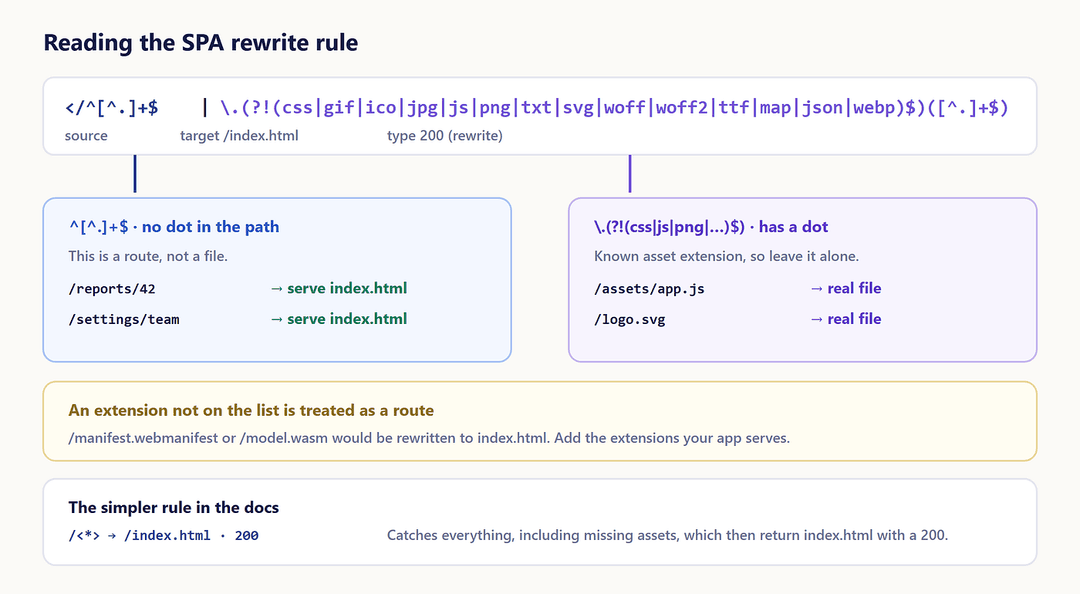
That last detail is the one that bites. If your app serves /manifest.webmanifest, an .avif image, or a .wasm module, those extensions are not in the list, so they match the rule and get index.html back instead. Add your extensions to the group.
The AWS docs also list a simpler rule: source /<*>, target /index.html, status 200. It catches everything, which includes genuinely missing assets, so a typo in an image path returns your app shell with a 200 instead of a 404. Fine for a prototype, confusing in production.
When the Rule Is There, and Routes Still Fail
A few things break this fix, and the symptoms point straight at the cause.
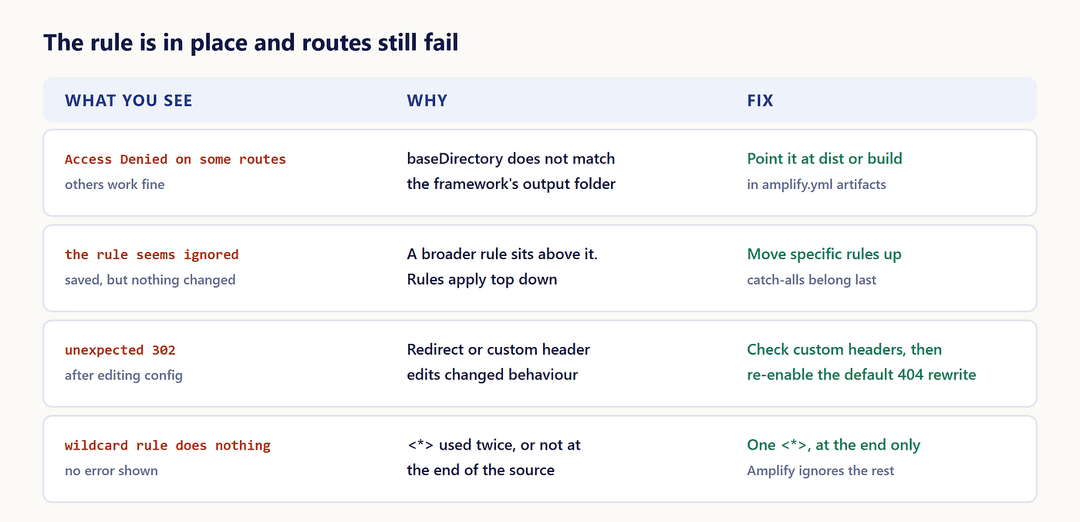
Access denied on some routes. Per the AWS troubleshooting guide, baseDirectory in your build settings probably does not match your framework's output folder. Vite writes to dist, Create React App writes to build. The amplify.yml has to agree:
frontend:
  artifacts:
    baseDirectory: dist
    files:
      - '**/*'
The rule looks ignored. Rules are applied from the top of the list down, and the first match wins. A broad rule sitting above the SPA rule takes the request first. Specific rules go up; catch-alls go last.
An unexpected 302. AWS attributes this to changes in redirect and custom header configuration. Verify your custom headers are valid, then re-enable the default 404 rewrite rule for the app.
A wildcard rule that does nothing. <*> has to appear once, at the end of the source. Amplify ignores addresses that use it twice or in the middle, and it does so silently.
The Boundary, Not the Rule
Ryan’s fix was four lines of JSON. The useful part is what it says about the architecture.
Client-side routing moves the route table into the browser, which is what makes an SPA feel fast. It does not move the first request. That one still goes to a server, and that server needs its own answer for every URL your router can produce. Every static host has some version of this contract. Amplify calls it a rewrite, Netlify calls it a redirect, Nginx calls it try_files. The mechanism differs; the boundary does not.
When Not to Use a Catch-All Rewrite
There is a cost worth naming. Once every unmatched path returns index.html with a 200, your host can no longer produce a real 404. A mistyped URL renders the app shell, monitoring stops seeing broken links, and crawlers get a 200 for pages that do not exist.
For an internal dashboard, that trade is easy. For a public site where search matters, handle it in the app with a catch-all route that renders a not-found screen, or move the routes that need real status codes to server-side rendering instead. The SSR articles earlier in this series cover what changes when you do.
Next in this series: custom domains that stay stuck on “pending verification”.