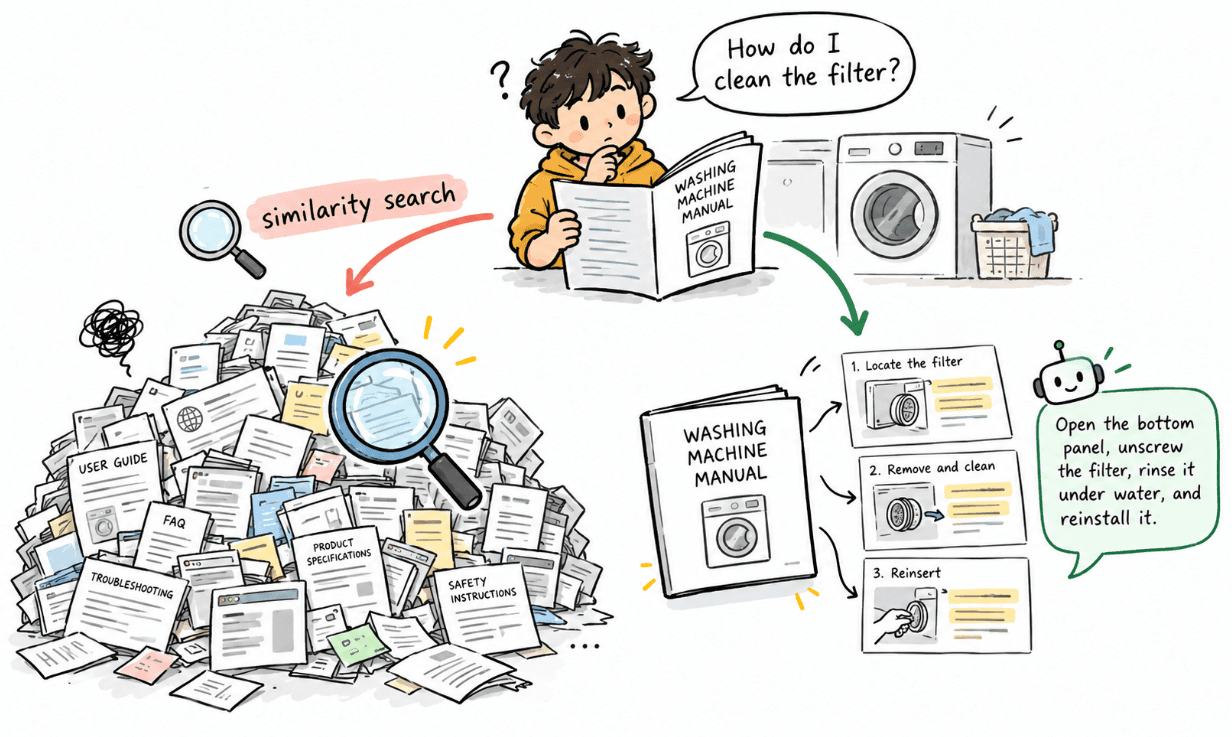
A RAG system can use a good embedding model and a reliable vector database, but the results can still feel less useful than expected. Sometimes the issue starts much earlier, when we prepare the document for search.
Before creating embeddings, we need to decide where the content should be split into smaller pieces. This process is called chunking. It may seem like a small step, but the way we do it can have a big effect on what the system is able to find later. In this article, we’ll take a closer look at that and see how better chunking can lead to better retrieval.
Why Do We Need Chunking?
Imagine we have a document called: developer-handbook.md
It contains sections about:
Authentication
Deployment
Logging
Incident Response
Database Access
We could take the entire document and generate one embedding. Technically, Amazon Titan Text Embeddings V2 can accept fairly large text inputs. But AWS recommends splitting larger documents into logical segments such as paragraphs or sections for retrieval use cases. The reason becomes clearer when we think about what an embedding represents.
Suppose the document contains:
Authentication
Developers must use approved IAM roles.
Deployment
Production deployments require approval.
Incident Response
Critical incidents must be reported immediately.
If we create one embedding for the entire document, that single vector has to represent:
Handbook
   ↓
(authentication + deployment + incident response) chunk
When a user asks: “What should I do when a critical incident happens?”
the embedding represents the whole handbook rather than the specific incident-response information.
A better approach is:
Handbook
   ↓
Authentication chunk
Deployment chunk
Incident Response chunk
Now each embedding represents a much more focused idea.
That gives vector search a better chance of finding the exact information we need.
But Why Not Just Split Every “n” Characters?
This is one of the easiest chunking strategies to implement.
For example:
function splitText(text: string, size = 1000) {
  const chunks = [];
for (let i = 0; i < text.length; i += size) {
    chunks.push(text.slice(i, i + size));
  }
  return chunks;
}
It works. But it knows absolutely nothing about the document. Imagine the original text says:
“Developers must not store credentials directly inside
source code. Instead, approved IAM roles should be used
for access to AWS resources.”
A character-based split could accidentally produce:
Chunk 1:
Developers must not store credentials directly inside
source code. Instead, approved
and:
Chunk 2:
IAM roles should be used for access to AWS resources.
Both chunks are valid text. But neither contains the complete idea. The first chunk loses what should be used instead. The second loses the explanation of why IAM roles were mentioned. This is the main problem with blind chunking, the text size does not always match meaning.
Let the Document Structure Help Us
Most well-written documents already contain useful boundaries. For Markdown, we might have:
# Developer Handbook
## Authentication
Developers must use approved IAM roles.
Credentials must never be committed to source control.
## Deployment
Production deployments require approval.
### Pre-deployment Checks
Run security and integration tests before deployment.
## Incident Response
Critical incidents must be reported immediately.
The headings already tell us something important:
Authentication
Deployment
Pre-deployment Checks
Incident Response
Instead of ignoring those boundaries, we can use them. Our first step becomes:
Document
   ↓
Identify H2 / H3 headings
   ↓
Create logical sections
For example:
Section 1
Authentication
Section 2
Deployment
Section 3
Deployment > Pre-deployment Checks
Section 4
Incident Response
Each section is already much more meaningful than an arbitrary character range.
Step 1: Split the Document into Sections
Let’s create a small TypeScript helper.
type Section = {
  title: string;
  path: string;
  content: string;
};
function splitIntoSections(markdown: string): Section[] {
  const lines = markdown.split("\n");
  const sections: Section[] = [];
  let currentTitle = "Introduction";
  let parentTitle = "";
  let buffer: string[] = [];
  const saveSection = () => {
    const content = buffer.join("\n").trim();
    if (!content) return;
    sections.push({
      title: currentTitle,
      path: parentTitle
        ? `${parentTitle} > ${currentTitle}`
        : currentTitle,
      content,
    });
  };
  for (const line of lines) {
    const h2 = line.match(/^##\s+(.+)/);
    const h3 = line.match(/^###\s+(.+)/);
    if (h2) {
      saveSection();
      parentTitle = h2[1].trim();
      currentTitle = parentTitle;
      buffer = [];
      continue;
    }
    if (h3) {
      saveSection();
      currentTitle = h3[1].trim();
      buffer = [];
      continue;
    }
    buffer.push(line);
  }
  saveSection();
  return sections;
}
We are not doing anything related to AI yet. We are simply using the structure that already exists in the document. The output could look like:
{
  title: "Authentication",
  path: "Authentication",
  content: "Developers must use approved IAM roles..."
}
and:
{
  title: "Pre-deployment Checks",
  path: "Deployment > Pre-deployment Checks",
  content: "Run security and integration tests..."
}
That path becomes useful later because it preserves where the information originally came from.
Step 2: Split Sections by Paragraphs
A section can still be large. Imagine the Authentication section is several pages long. We still need to create smaller chunks. But instead of cutting it at a random character, we can respect paragraph boundaries.
function getParagraphs(text: string): string[] {
  return text
    .split(/\n\s*\n/)
    .map((paragraph) => paragraph.trim())
    .filter(Boolean);
}
Now:
Authentication Section
        ↓
Paragraph 1
Paragraph 2
Paragraph 3
Paragraph 4
The next step is to combine paragraphs until we reach approximately the chunk size we want.
Step 3: Build Chunks Around a Target Size
For this example, let’s use approximately: 1000 tokens per chunk This is a starting point, not a universal rule. The right size depends on the type of document, the embedding model, the questions users ask, and how much context we eventually want to retrieve.
Amazon Bedrock itself supports configurable token limits and overlap when fixed-size chunking is used in Knowledge Bases, which reflects the same general idea: chunk size and overlap are parameters that should be chosen for the workload rather than treated as fixed constants.
For our custom pipeline, we’ll estimate tokens simply.
function estimateTokens(text: string): number {
  return Math.ceil(text.length / 4);
}
This is only an approximation. If exact token counts are important, use the tokenizer that matches the model. For normal document chunking, however, an estimate can be enough to keep chunks around a reasonable size.
Now we can pack paragraphs together.
type Chunk = {
  text: string;
  sectionTitle: string;
  sectionPath: string;
};
function buildChunks(
  section: Section,
  targetTokens = 1000
): Chunk[] {
  const paragraphs = getParagraphs(section.content);
  const chunks: Chunk[] = [];
  let buffer: string[] = [];
  for (const paragraph of paragraphs) {
    const candidate = [...buffer, paragraph].join("\n\n");
    if (
      estimateTokens(candidate) > targetTokens &&
      buffer.length > 0
    ) {
      chunks.push({
        text: buffer.join("\n\n"),
        sectionTitle: section.title,
        sectionPath: section.path,
      });
      buffer = [paragraph];
    } else {
      buffer.push(paragraph);
    }
  }
  if (buffer.length > 0) {
    chunks.push({
      text: buffer.join("\n\n"),
      sectionTitle: section.title,
      sectionPath: section.path,
    });
  }
  return chunks;
}
Now our chunk boundaries follow the document more naturally.
Instead of:
1000 characters -> CUT
1000 characters -> CUT
we have:
Section
   ↓
Paragraph
   ↓
Paragraph
   ↓
Target size reached
   ↓
Create chunk
That already gives us better semantic consistency.
Step 4: Add a Small Amount of Overlap
There is still one problem.
Imagine two related paragraphs happen to fall on opposite sides of a chunk boundary.
Chunk 1
Paragraph A
Paragraph B
Paragraph C

Chunk 2
Paragraph D
Paragraph E
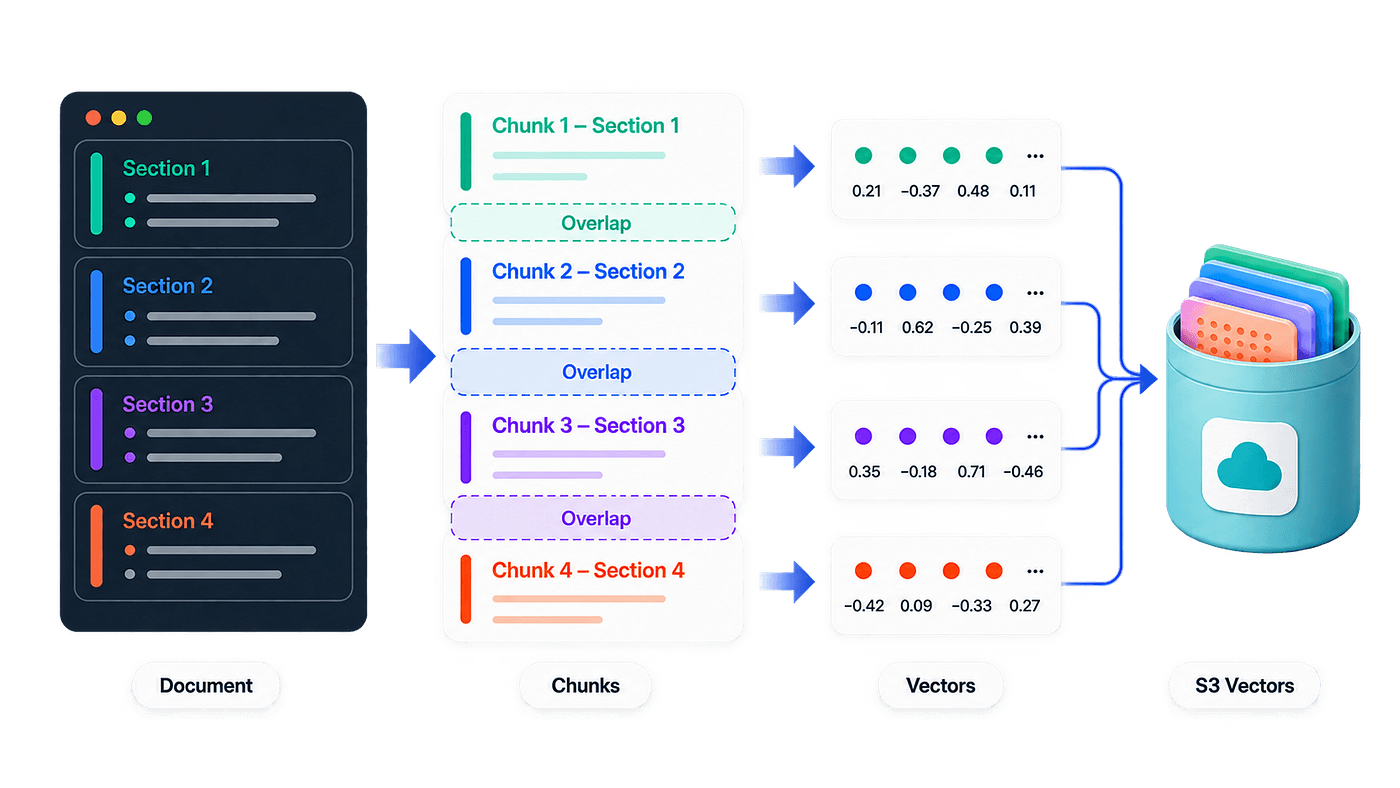
What if Paragraph C introduces an idea and Paragraph D explains it? The relationship may be weakened when the chunks are embedded independently. This is where overlap can help.
For example, with roughly 15% overlap:
Chunk 1
Paragraph A
Paragraph B
Paragraph C

Chunk 2
Paragraph C
Paragraph D
Paragraph E
Paragraph C appears in both chunks. That small repetition helps preserve context across the boundary. We can extend our chunker:
function buildChunksWithOverlap(
  section: Section,
  targetTokens = 1000,
  overlapTokens = 150
): Chunk[] {
  const paragraphs = getParagraphs(section.content);
  const chunks: Chunk[] = [];
  let buffer: string[] = [];
  for (const paragraph of paragraphs) {
    const candidate = [...buffer, paragraph].join("\n\n");
    if (
      estimateTokens(candidate) > targetTokens &&
      buffer.length > 0
    ) {
      chunks.push({
        text: buffer.join("\n\n"),
        sectionTitle: section.title,
        sectionPath: section.path,
      });
      const overlap: string[] = [];
      for (let i = buffer.length - 1; i >= 0; i--) {
        const candidateOverlap = [
          buffer[i],
          ...overlap,
        ].join("\n\n");
        if (
          estimateTokens(candidateOverlap) <=
          overlapTokens
        ) {
          overlap.unshift(buffer[i]);
        } else {
          break;
        }
      }
      buffer = [...overlap, paragraph];
    } else {
      buffer.push(paragraph);
    }
  }
  if (buffer.length > 0) {
    chunks.push({
      text: buffer.join("\n\n"),
      sectionTitle: section.title,
      sectionPath: section.path,
    });
  }
  return chunks;
}
Again, 15% is not a magic number. Too little overlap can lose context. Too much overlap creates many nearly identical vectors, increases storage, and can cause retrieval results to repeat the same information.
The useful goal is:
Preserve enough surrounding context without duplicating the document unnecessarily.
What About Small Documents?
Not every document needs to be chunked.
Imagine a short policy containing only 300 tokens. Splitting it into three tiny chunks may actually make the content less useful. A simple check is enough:
function shouldChunk(
  text: string,
  targetTokens = 1000
): boolean {
  return estimateTokens(text) > targetTokens;
}
Then:
if (!shouldChunk(documentText)) {
  // Treat the complete document as one chunk.
}
This gives us a useful principle:
Large document → split into meaningful chunks
Small focused document → keep it together
Chunking should solve a problem. We should not chunk simply because our pipeline contains a chunking function.
Keep Section Information with the Chunk
Once we generate an embedding, the vector itself does not know that its text came from Deployment or Pre-deployment Checks or anything else. Unless we preserve that information. This is where metadata helps.
For example:
const metadata = {
  document_name: "Developer Handbook",
  section_title: chunk.sectionTitle,
  section_path: chunk.sectionPath,
  chunk_index: index,
  chunk_text: chunk.text,
};
Now a stored chunk carries both that the actual content + where that content came from. Amazon S3 Vectors supports metadata alongside vectors, and metadata can be returned with vector operations.
we can also know:
Document:
Developer Handbook
Section:
Deployment > Pre-deployment Checks
That can make the context given to the LLM much clearer.
From Chunks to Embeddings
Once the document has been prepared, the rest of the pipeline becomes familiar.
Chunk
   ↓
Amazon Titan Text Embeddings V2
   ↓
Embedding
   ↓
Amazon S3 Vectors
For example:
import {
  BedrockRuntimeClient,
  InvokeModelCommand,
} from "@aws-sdk/client-bedrock-runtime";
const bedrock = new BedrockRuntimeClient({
  region: process.env.AWS_REGION,
});
async function createEmbedding(
  text: string
): Promise<number[]> {
  const response = await bedrock.send(
    new InvokeModelCommand({
      modelId: "amazon.titan-embed-text-v2:0",
      contentType: "application/json",
      accept: "application/json",
      body: JSON.stringify({
        inputText: text,
        dimensions: 1024,
        normalize: true,
      }),
    })
  );
  const body = JSON.parse(
    new TextDecoder().decode(response.body)
  );
  return body.embedding;
}
Titan Text Embeddings V2 supports 1024, 512, and 256-dimensional output, with 1024 as the default. Then each chunk can be embedded separately.
const sections = splitIntoSections(documentText);
const chunks = sections.flatMap((section) =>
  buildChunksWithOverlap(section, 1000, 150)
);
for (let i = 0; i < chunks.length; i++) {
  const embedding = await createEmbedding(
    chunks[i].text
  );
  // Store embedding + metadata in S3 Vectors.
}
The important thing is the order:
Understand document structure
        ↓
Build meaningful chunks
        ↓
Generate embeddings
Not:
Generate embeddings
        ↓
Hope the text was split well
Storing the Chunks in Amazon S3 Vectors
A simplified PutVectors request could look like:
await s3Vectors.send(
  new PutVectorsCommand({
    vectorBucketName: "rag-demo-vectors",
    indexName: "company-documents",
    vectors: [
      {
        key: `developer-handbook-${i}`,
        data: {
          float32: embedding,
        },
        metadata: {
          document_name: "Developer Handbook",
          section_title: chunks[i].sectionTitle,
          section_path: chunks[i].sectionPath,
          chunk_index: i,
          chunk_text: chunks[i].text,
        },
      },
    ],
  })
);
S3 Vectors requires raw content to be converted into embeddings before it is inserted, and PutVectors can store metadata alongside those vectors.
At this point, our original document has become something more useful for retrieval.
Instead of:
Developer Handbook
       ↓
one giant vector
we have:
Developer Handbook
├── Authentication
│     ├── Chunk 1
│     └── Chunk 2
│
├── Deployment
│     ├── Chunk 3
│     └── Chunk 4
│
└── Incident Response
      ├── Chunk 5
      └── Chunk 6
Every chunk has its own embedding, but it still remembers where it came from.
Why This Can Improve Retrieval
Imagine a user asks: “What should I check before a production deployment?” With a large mixed chunk, the embedding might represent:
authentication
+
deployment
+
logging
+
incident response
The deployment information is there, but it is mixed with many unrelated ideas. With structure-aware chunks, we may instead have:
Section:
Deployment > Pre-deployment Checks
Content:
Run security and integration tests before production deployment.
That chunk is much more focused. Its embedding represents the idea the user is actually asking about. So when the query vector is compared with the stored vectors:
"What should I check before deployment?"
                 ↓
        similarity search
                 ↓
Deployment > Pre-deployment Checks
the vector database has better units of knowledge to search. This is why chunking is not just preprocessing.
Chunking defines what your retrieval system is capable of finding.
Is Structure-Aware Chunking Always Better?
Actually, not necessarily. There is no single chunking strategy that is best for every document.
AWS Bedrock Knowledge Bases itself supports several approaches, including fixed-size, hierarchical, semantic, and no chunking. Different content may need different strategies.
A FAQ may work well with one question and answer per chunk. A legal document may need larger sections to preserve context. A technical handbook may benefit from headings and paragraph boundaries. Short records may not need chunking at all. So rather than asking:
“What is the best chunk size?”
a more useful question is:
“What information should stay together so that it still makes sense when retrieved on its own?”
That question usually leads to better chunks.
The Complete Pipeline
Our final chunking flow looks like this:
Document
   ↓
Extract Text
   ↓
Detect H2 / H3 Sections
   ↓
Keep Related Content Together
   ↓
Split Sections by Paragraph
   ↓
Pack Paragraphs Around Target Size
   ↓
Carry a Small Overlap
   ↓
Attach Section Metadata
   ↓
Generate Titan Embeddings
   ↓
PutVectors
   ↓
Amazon S3 Vectors
The embedding model and vector database are important. But by the time they receive the data, an important decision has already been made:
What exactly does each vector represent?
That is the job of the chunking pipeline.
A Few Practical Things to Keep in Mind
- A useful chunk should make sense when read by itself.
- Avoid breaking sentences simply to satisfy an exact size.
- Use headings, paragraphs, or other natural document boundaries when they are available.
- Treat chunk size and overlap as starting values that should eventually be evaluated against real questions from your application.
- And keep useful structural information — such as the document name and section path — alongside the chunk instead of throwing it away during preprocessing.
The goal is not to create perfectly equal chunks, it is to create meaningful units of knowledge.
Conclusion
RAG retrieval does not begin when QueryVectors runs. It begins much earlier. It begins when we decide how the original document becomes searchable pieces. A simple fixed-size split can be enough for a prototype, but real documents already contain structure that we can use:
- Headings
- Paragraphs
- Sections
- Natural boundaries
By respecting those boundaries, keeping chunks around a sensible size, and preserving a small amount of overlap, we give our embedding model cleaner information to represent.
And we give our vector search better information to retrieve. So before spending too much time tuning similarity thresholds or changing embedding models, it is worth looking at something much simpler:
Are the chunks themselves actually good?
Because good RAG retrieval starts before the vector is ever created.