When I first learned about Retrieval-Augmented Generation (RAG), the architecture looked simple:
Store some documents → create embeddings → search for relevant information → give it to an LLM.
And conceptually, that really is RAG.
But once you start building the pipeline yourself, a few interesting questions appear:
- Where should the original documents live?
- How do we turn a large document into useful searchable pieces?
- Where do we store the embeddings?
- How does a user’s question get matched with the right information?
- And how does that retrieved information finally reach the LLM?
In this article, we are going to build that flow using:
- Amazon S3 for our original documents
- AWS Lambda for processing
- Amazon Titan Text Embeddings V2 through Amazon Bedrock
- Amazon S3 Vectors for storing and searching embeddings
Instead of using Amazon Bedrock Knowledge Bases to manage the complete RAG workflow for us, we will work directly with S3 Vectors.
That gives us a chance to understand what is actually happening behind a RAG pipeline.
What Are We Building?
Let’s imagine we are building a simple internal documentation assistant.
A user should be able to ask:
“What security steps should I follow before deploying an application?”
The application should find the relevant parts of those documents and use them as context for an LLM.
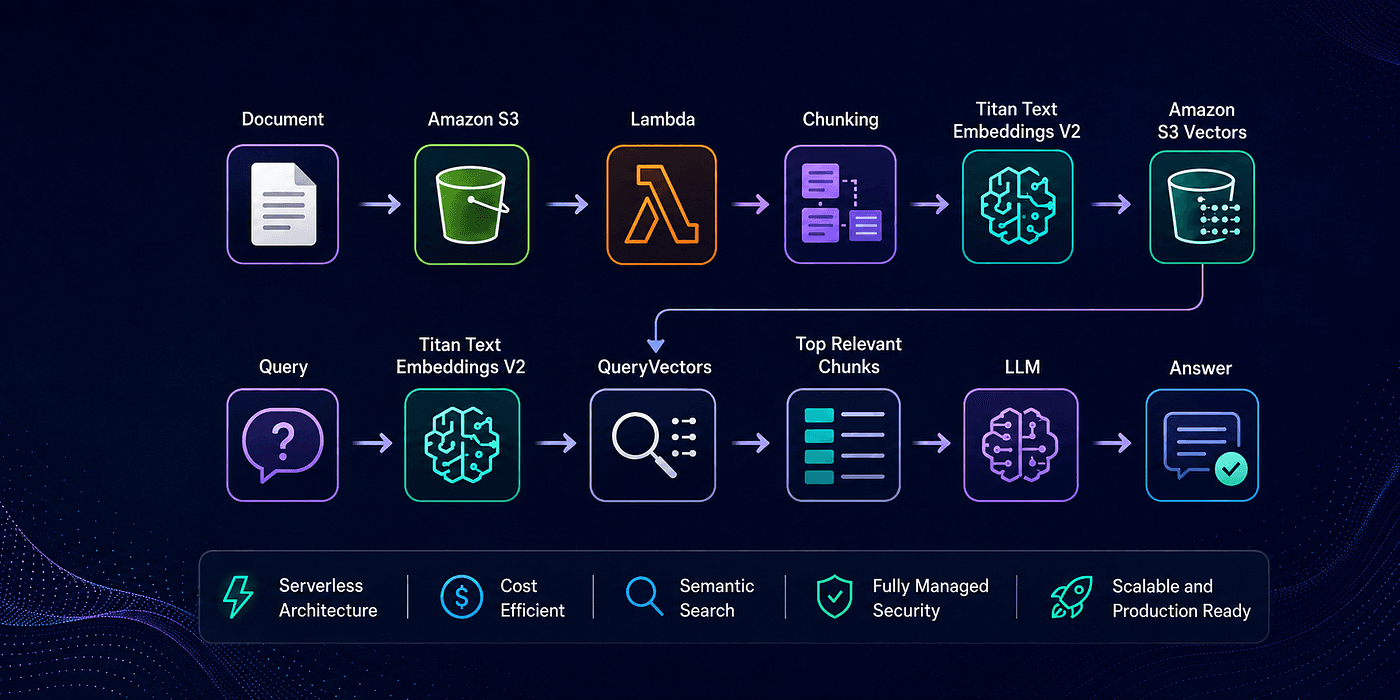
At a high level, our architecture looks like this:
INGESTION

Document
   ↓
Amazon S3
   ↓
AWS Lambda
   ↓
Chunking
   ↓
Amazon Titan Text Embeddings V2
   ↓
Amazon S3 Vectors
RETRIEVAL
User Question
   ↓
Titan Text Embeddings V2
   ↓
Query Vector
   ↓
Amazon S3 Vectors
   ↓
Relevant Chunks
   ↓
Build Context
   ↓
LLM
   ↓
Grounded Answer
There are really two separate processes here.
Ingestion prepares our knowledge.
Retrieval finds the right knowledge when someone asks a question.
Let’s build them one piece at a time.
What Is Amazon S3 Vectors?
Most AWS developers are already familiar with Amazon S3.
We usually think of S3 as something that stores files:
my-document-bucket/
├── security-policy.md
├── deployment-guide.md
└── developer-handbook.md
S3 Vectors solves a different problem.
Instead of storing files as objects, it provides purpose-built vector buckets and vector indexes for storing and searching vector embeddings.
So we can think about the two services like this:
- Normal Amazon S3 -> Stores the original document
- Amazon S3 Vectors -> Stores searchable vector representations
of pieces of that document
Inside an S3 vector bucket, we create a vector index.
rag-demo-vectors
      │
      └── documents
              │
              ├── vector-001
              ├── vector-002
              ├── vector-003
              └── ...
The index defines things such as the vector dimension and the distance metric used for similarity search.
AWS also lets us attach metadata to vectors and mark selected metadata keys as non-filterable. Non-filterable metadata is still returned with retrieval results, but it isn’t used as a query filter. That makes it useful for storing something like the original chunk text.
Creating the Vector Bucket and Index
For this example, we’ll use the AWS SDK.
First, create the clients.
import {
  S3VectorsClient,
  CreateVectorBucketCommand,
  CreateIndexCommand,
} from "@aws-sdk/client-s3vectors";
const region = process.env.AWS_REGION!;
const s3Vectors = new S3VectorsClient({
  region,
});
Now create a vector bucket.
await s3Vectors.send(
  new CreateVectorBucketCommand({
    vectorBucketName: "rag-demo-vectors",
  })
);
Then create an index inside it.
await s3Vectors.send(
  new CreateIndexCommand({
    vectorBucketName: "rag-demo-vectors",
    indexName: "documents",  dimension: 1024,
    dataType: "float32",
    distanceMetric: "cosine",  metadataConfiguration: {
      nonFilterableMetadataKeys: ["chunk_text"],
    },
  })
);
There are a few important things happening here.
Why 1024 dimensions?
We’ll use Amazon Titan Text Embeddings V2.
Titan Text Embeddings V2 supports 256, 512 and 1024-dimensional embeddings, with 1024 as the default. Every vector written to an S3 vector index must match the dimension configured for that index.
So if our embedding contains 1024 values:
[0.018, -0.291, 0.725, ...]
our vector index must also expect:
dimension = 1024
This is an easy detail to overlook.
Why chunk_text is non-filterable?
Later, each vector will contain the original text that produced the embedding.
We want:
Find vectors by meaning -> Return their original text
We don’t need queries like:
chunk_text = "some exact sentence"
So storing the text as non-filterable metadata is a good fit.
Also choose your index configuration carefully: AWS documents that properties such as dimension, distance metric, and non-filterable metadata keys can’t simply be changed on an existing index, changing them requires creating a new index.
Preparing the Document
Suppose our security-policy.md contains:
# Security Policy

All production accounts must use multi-factor authentication.

Developers must not store credentials directly inside source code.

Production deployments must use approved IAM roles and follow
the principle of least privilege.

Security incidents must be reported to the security team.
We could technically generate one embedding for this entire document.
But imagine doing that with a 50-page handbook.
A single embedding would need to represent many unrelated ideas at once.
Instead, RAG systems normally break documents into smaller chunks.
Large Document
      ↓
Chunk 1
Chunk 2
Chunk 3
Chunk 4
For this introductory example, we can keep our chunking logic simple.
function chunkText(text: string, targetSize = 3500): string[] {
  const paragraphs = text.split(/\n\s*\n/);
  const chunks: string[] = [];
  let current = "";
  for (const paragraph of paragraphs) {
    const next = current
      ? `${current}\n\n${paragraph}`
      : paragraph;
    if (next.length > targetSize && current) {
      chunks.push(current.trim());
      current = paragraph;
    } else {
      current = next;
    }
  }
  if (current.trim()) {
    chunks.push(current.trim());
  }
  return chunks;
}
This isn’t meant to be the perfect chunking algorithm.
It simply keeps paragraphs together instead of cutting text randomly in the middle of a sentence.
In a real RAG system, chunk size, overlap, headings and document structure can have a major impact on retrieval quality.
For now, the important idea is simply:
Document
   ↓
Smaller meaningful pieces
   ↓
One embedding per piece
Generating Embeddings with Amazon Bedrock
Now we need to convert each chunk into an embedding.
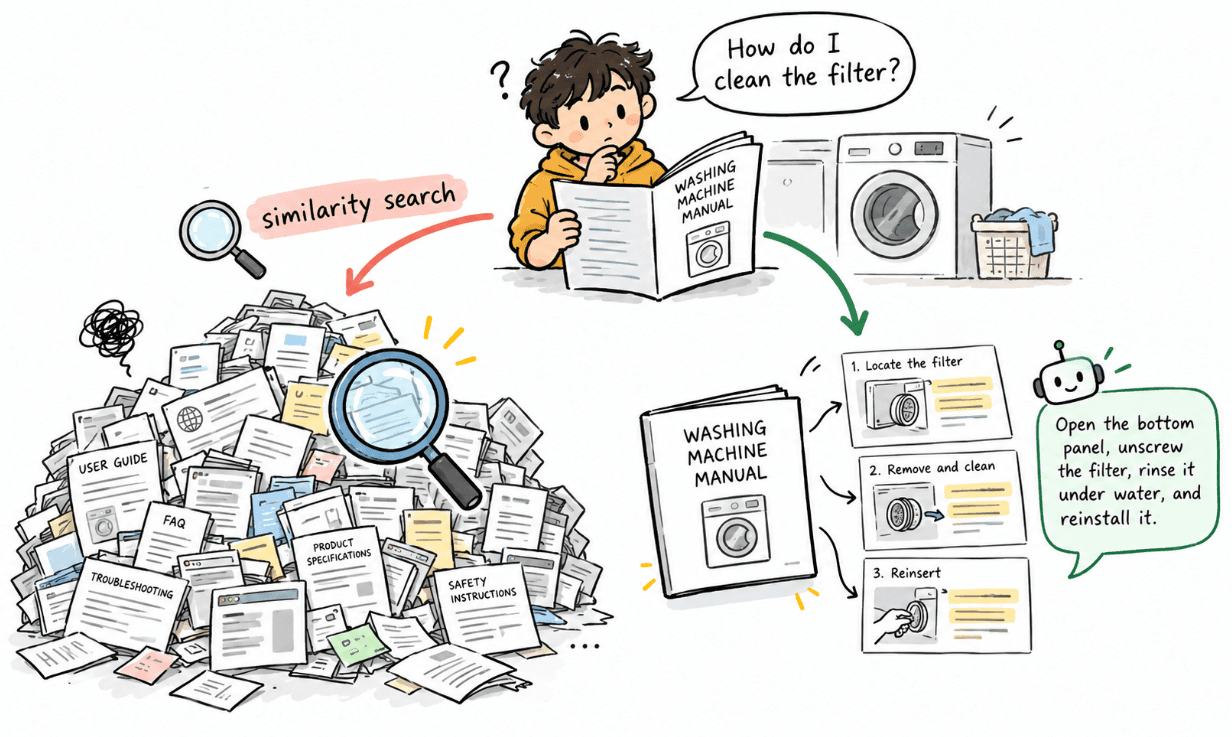
An embedding is simply a numerical representation of meaning.
For example:
"Developers must not store credentials in source code."
                 ↓
        Titan Text Embeddings V2
                 ↓
       [0.021, -0.183, 0.734, ...]
Texts with similar meanings should end up closer together in vector space.
Create a Bedrock Runtime client:
import {
  BedrockRuntimeClient,
  InvokeModelCommand,
} from "@aws-sdk/client-bedrock-runtime";
const bedrock = new BedrockRuntimeClient({
  region,
});
Then create a helper:
async function createEmbedding(text: string): Promise<number[]> {
  const response = await bedrock.send(
    new InvokeModelCommand({
      modelId: "amazon.titan-embed-text-v2:0",
      contentType: "application/json",
      accept: "application/json",
      body: JSON.stringify({
        inputText: text,
        dimensions: 1024,
        normalize: true,
      }),
    })
  );
const body = JSON.parse(
    new TextDecoder().decode(response.body)
  );
  return body.embedding;
}
AWS recommends splitting larger documents into logical segments such as paragraphs or sections before embedding them, even though Titan Text Embeddings V2 can accept much larger inputs.
Storing the Chunks with PutVectors
Now we can connect the two pieces.
For every chunk:
Chunk
  ↓
Titan
  ↓
Embedding
  ↓
S3 Vectors
Let’s generate the vectors:
const chunks = chunkText(documentText);
const vectors = [];
for (let i = 0; i < chunks.length; i++) {
  const embedding = await createEmbedding(chunks[i]);
  vectors.push({
    key: `security-policy-${i}`,
    data: {
      float32: embedding,
    },
    metadata: {
      document_name: "Security Policy",
      document_type: "policy",
      chunk_index: i,
      chunk_text: chunks[i],
    },
  });
}
Then store them using PutVectors.
import {
  PutVectorsCommand,
} from "@aws-sdk/client-s3vectors";
await s3Vectors.send(
  new PutVectorsCommand({
    vectorBucketName: "rag-demo-vectors",
    indexName: "company-documents",
    vectors,
  })
);
Now our document is no longer just a file sitting in S3.
It has become searchable knowledge.
Conceptually:
security-policy.md
      ↓ chunk
    Chunk 1
    Chunk 2
    Chunk 3
      ↓ embed
    Vector 1
    Vector 2
    Vector 3
      ↓ store
 S3 Vector Index
Asking a Question (RETRIEVAL)
Now imagine the user asks:
“How should developers manage credentials?”
We don’t search that sentence as normal text.
We create an embedding for the question using the same embedding model.
const queryEmbedding = await createEmbedding(
  "How should developers manage credentials?"
);
Why the same model?
Because both the document chunks and the question need to exist in the same vector space.
Now we can search S3 Vectors.
Searching with QueryVectors
import {
QueryVectorsCommand,
} from "@aws-sdk/client-s3vectors";
const result = await s3Vectors.send(
  new QueryVectorsCommand({
    vectorBucketName: "rag-demo-vectors",
    indexName: "company-documents",
    queryVector: {
      float32: queryEmbedding,
    },
    topK: 5,
    returnMetadata: true,
    returnDistance: true,
  })
);
QueryVectors performs an approximate nearest-neighbor search and returns the vectors closest to our query. It can also return their distance and metadata.
The result might conceptually look like:
Security Policy
Distance: 0.18
"Developers must not store credentials directly
inside source code."
Deployment Guide
Distance: 0.31
"Production deployments must use approved IAM roles..."
With cosine distance, a smaller distance means the vectors are closer.
In other words:
Question meaning
       ↓
compare
       ↓
Document chunk meanings
       ↓
return closest matches
That is the retrieval part of RAG.
Building the RAG Context
Because we stored chunk_text with each vector, the matching text comes back with the search result.
We can turn those results into a context block.
const context = (result.vectors ?? [])
.map((vector) => {
    const metadata = vector.metadata as Record<string, unknown>;
    return `
    Document: ${metadata.document_name}
    Content:
    ${metadata.chunk_text}
   `;
  })
  .join("\n---\n");
Now we have something like:
Document: Security Policy
Developers must not store credentials directly inside
source code.
---
Document: Deployment Guide
Production deployments must use approved IAM roles
and follow the principle of least privilege.
Then our final prompt can look like:
Answer the user's question using only the provided context.
Context:
<retrieved information>
Question:
How should developers manage credentials?
That prompt can be sent to whichever generation model your application uses.
And now the LLM is no longer answering only from what it learned during training.
It has relevant information from our own documents.
That is the augmentation part of Retrieval-Augmented Generation.
The Complete Flow
We have now built the full pipeline.
Ingestion
Document
   ↓
Amazon S3
   ↓
Lambda
   ↓
Chunk document
   ↓
Titan Text Embeddings V2
   ↓
PutVectors
   ↓
Amazon S3 Vectors
Retrieval
User Question
   ↓
Titan Text Embeddings V2
   ↓
QueryVectors
   ↓
Relevant Chunks
   ↓
Build Context
   ↓
LLM
   ↓
Grounded Answer
And that’s the important part:
S3 Vectors doesn’t generate the answer.
Bedrock’s embedding model doesn’t generate the answer either.
Each component has a specific responsibility:
Amazon S3
→ stores the original knowledge
Amazon Bedrock Embeddings
→ converts meaning into vectors
Amazon S3 Vectors
→ stores and searches those vectors
LLM
→ turns retrieved knowledge into a useful answer
Why Not Just Use Amazon Bedrock Knowledge Bases?
At this point, you might reasonably ask:
“Doesn’t Amazon Bedrock Knowledge Bases already do most of this?”
Yes.
And for many applications, that’s exactly what you should consider using.
When S3 Vectors is used with Bedrock Knowledge Bases, Bedrock can manage the end-to-end RAG workflow: reading the source data, converting it into text blocks, generating embeddings, storing them in the vector index, and exposing retrieval through APIs such as Retrieve and RetrieveAndGenerate.
So why work directly with S3 Vectors?
Because sometimes you want more control.
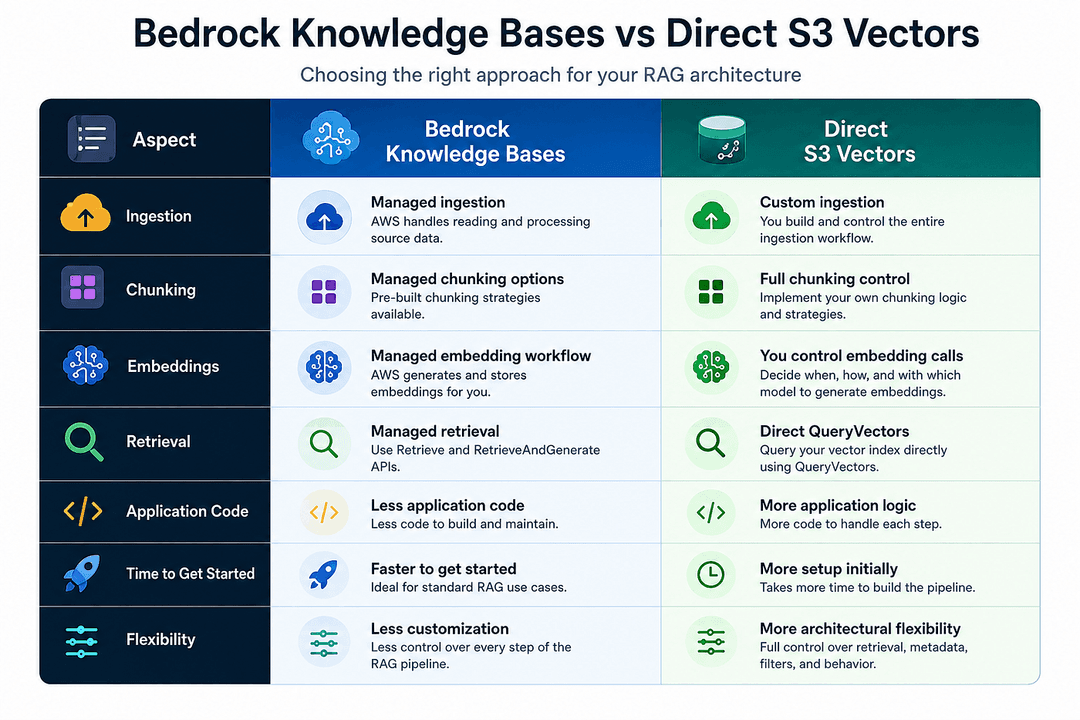
Neither approach is always better.
If you want AWS to manage most of the RAG lifecycle, Bedrock Knowledge Bases can remove a lot of work.
If you need more control over how documents are processed, how vectors are organized, what metadata is stored, or how retrieval behaves, working directly with S3 Vectors gives you that flexibility.
A few things to keep in mind
After understanding the basic flow, there are four details worth remembering.
1. Your embedding dimension and vector index dimension must match.
If Titan produces 1024 values, your index needs to expect 1024 values.
2. Use the same embedding model for ingestion and retrieval.
The document chunks and user queries need to live in the same vector space.
3. Think about metadata early.
Something like document_type may later become useful for filtering, while large text such as chunk_text may only need to be returned with results.
4. Chunking.
A powerful model and a good vector store cannot fully compensate for badly structured chunks.
The quality of retrieval starts before the embedding is ever created.
Conclusion
What I like about building RAG this way is that the architecture becomes much easier to understand.
There is no magic “knowledge base” box hiding everything.
You can see the complete journey:
Text
 ↓
Chunks
 ↓
Embeddings
 ↓
Vectors
 ↓
Similarity Search
 ↓
Relevant Context
 ↓
LLM
Amazon Bedrock gives us the embedding model.
Amazon S3 Vectors gives us serverless vector storage and semantic search.
And our application controls how those pieces are connected.
Once you understand this basic pipeline, RAG stops feeling like one large AI feature.
It becomes a collection of smaller engineering decisions that how you chunk information, what metadata you keep, how you retrieve it, and what context you eventually give to the model.
And those decisions are where a simple RAG demo starts becoming a real AI system.