A pull request changes an API route and the two screens that call it. The diff looks right. Two people approve it because reading a diff is what review usually means, and the problem shows up after the merge, on the branch everyone shares.
The team has a staging branch, but it is a queue of one. Whoever merges first owns it, and anybody else waits. So most changes get reviewed by reading rather than by using.
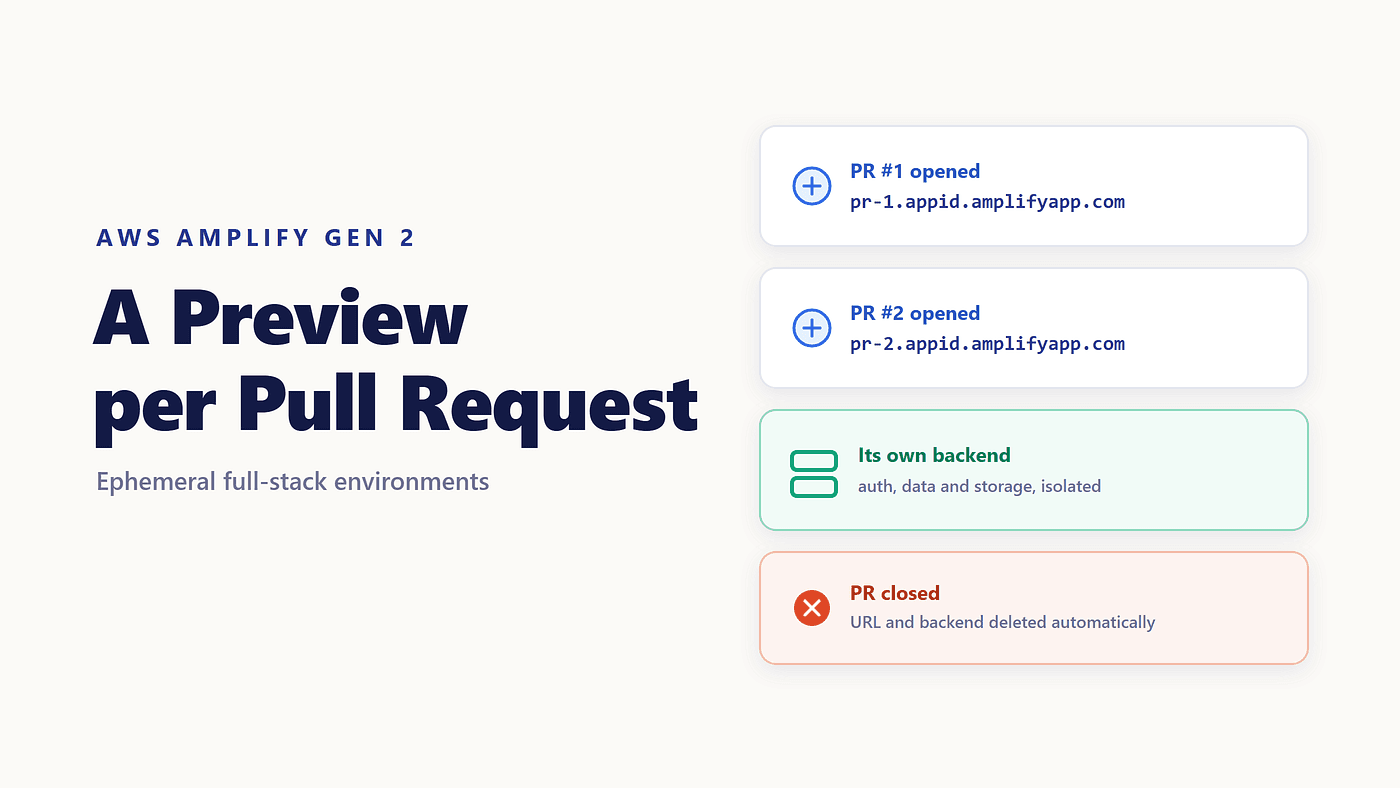
Amplify pull request previews remove that queue. Every PR gets its own URL, and for a full-stack app, its own backend. When the PR closes, all of it disappears.
Amplify Already Thinks in Branches
Gen 2 ties a backend to a branch. Connect a branch in the console, and that branch gets its own backend resources and its own amplify_outputs.json, generated during the build. Your main branch has one set of tables and user pools; a dev branch has another.
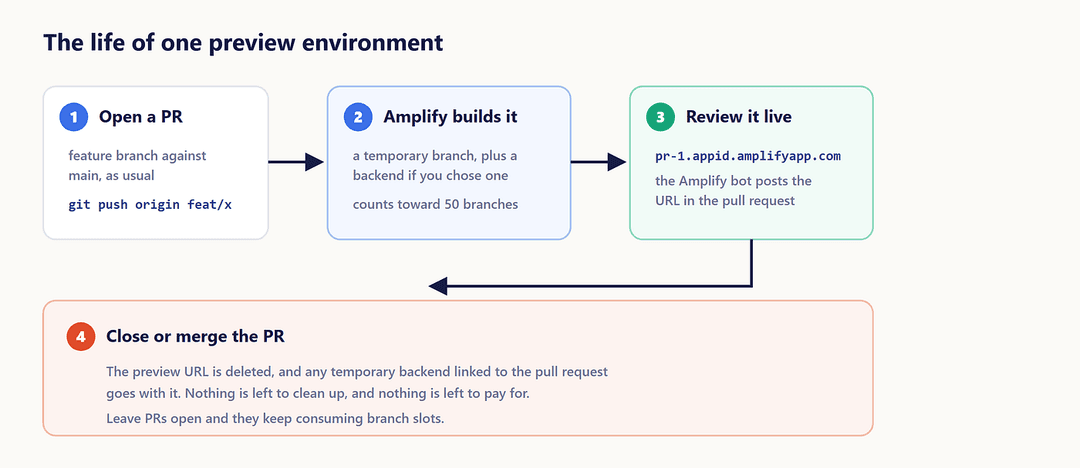
Amplify branch deployments are the foundation here, and a preview is the same idea with an expiry date. A pull request is a temporary branch that builds like any other, is served at its own URL, and is deleted when the request is closed or merged.
That framing is worth holding onto, because every limit later in this article comes from previews being branches.
Turning Previews On
There are two prerequisites to address first.
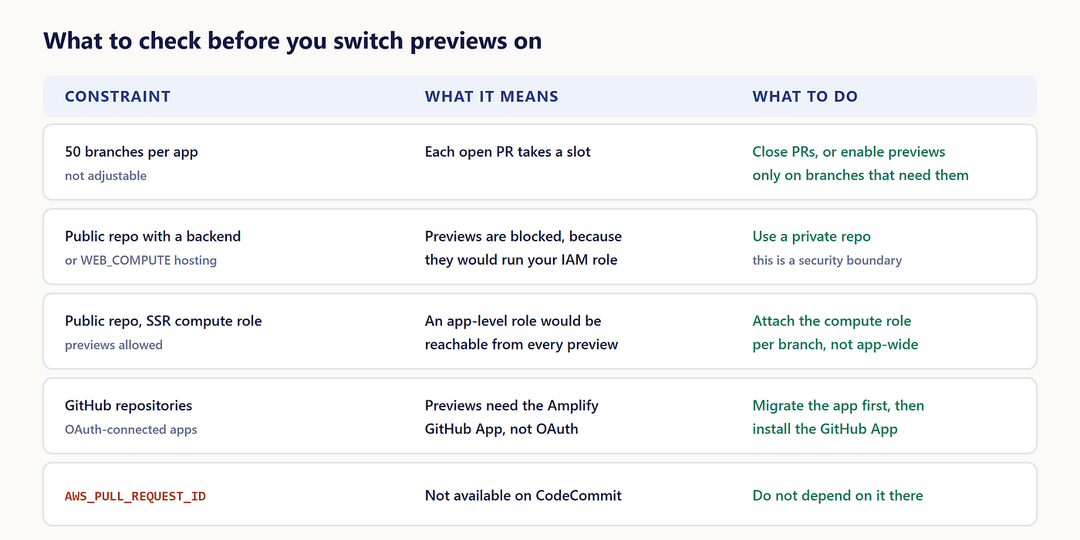
- The repository must be private if your app has a backend. For public repositories, Amplify blocks previews for anything that needs an IAM service role, which includes full-stack apps and apps on the
WEB_COMPUTEplatform. The reasoning is in the docs: it would let a third party submit arbitrary code that runs with your app's role permissions. - GitHub repositories need the Amplify GitHub App. If your app was connected with OAuth, migrate it before previews will work.
Then, in the Amplify console:
- Choose Hosting, then Previews.
- Install and authorize the Amplify GitHub App if you are prompted, either for all repositories or just the one.
- Select the branch previews should apply to, then Edit settings.
- Turn on Pull request previews and confirm.
- For a full-stack app, choose between Create new backend environment for every Pull Request and Point all Pull Requests for this branch to an existing environment.
The next PR against that branch builds to a URL of the form pr-1.appid.amplifyapp.com, where the number is the pull request number. On GitHub, the preview link is posted on the pull request itself, so reviewers do not have to go looking for it.
What a Preview Actually Contains
For a full-stack app with per-PR backends, an Amplify preview environment is not a static copy of the frontend. It is a running application: its own auth, its own tables, its own storage, built from the branch in the pull request.
That is what makes schema changes reviewable. A migration that drops a column can be run against real infrastructure that nobody else is using, which a shared staging branch does not allow. When the PR closes, the preview URL is deleted, and the temporary backend linked to it is removed as well.
When a Backend per PR Is the Wrong Default
Isolation has a price, and it shows up in two ways.
Every preview provides real resources, and each one starts empty. A reviewer opens the URL, finds a sign-up screen and no data, then creates an account and manually enters enough records to see the feature. That is a slow way to review a small change.
The documented alternative is to point previews at an existing branch’s backend. In the build settings for the backend phase, generate the outputs file from that branch instead of deploying new resources:
npx ampx generate outputs --branch dev --app-id $AWS_APP_ID
New preview branches then use the dev backend, with its seed data and test users already in place, and skip provisioning entirely.
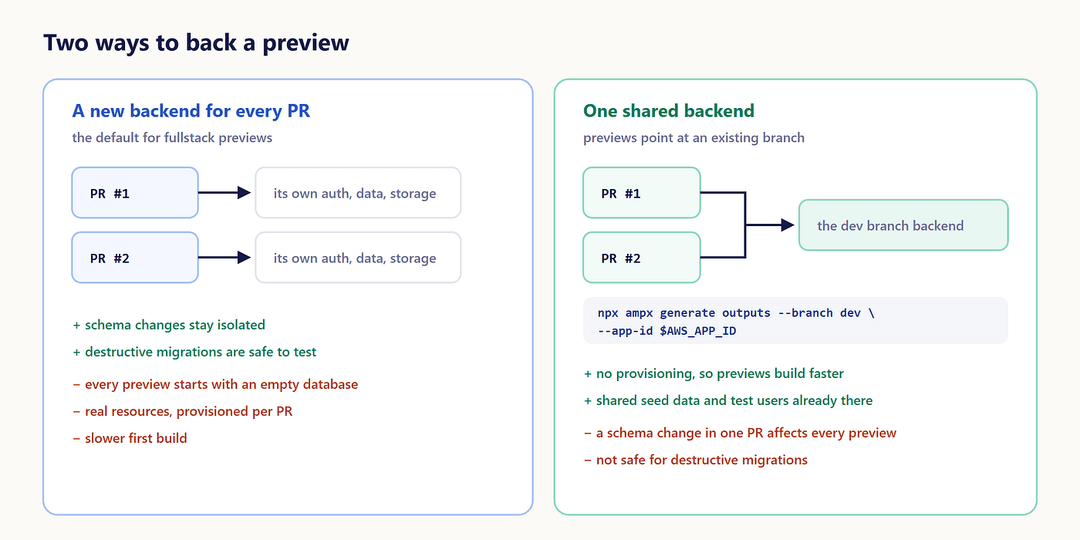
The trade-off is straightforward. Shared backends make previews fast and realistic, and they are the wrong choice the moment a pull request changes the schema, because every other preview sees that change too.
The Limits Worth Knowing Before You Enable It
Four constraints matter in practice, and three of them come straight from previews being branches.
Each open PR counts toward the quota of 50 branches per app. That quota is not adjustable, so a repository with a long tail of open pull requests can run out. Closing merged PRs is the whole fix.
Public repositories with a backend cannot use previews at all. If you are using an SSR compute role on a public repository, attach the role at the branch level rather than the app level, so a preview branch cannot access permissions it should not have.
Concurrent jobs default to 5 per Region. Open six pull requests at once, and the sixth build waits.
AWS_PULL_REQUEST_ID is not available on AWS CodeCommit, so any build logic keyed to the PR number needs another source there.
What Changes About Review
The useful part is not the URL. It is that reviewing stops being an act of imagination.
A reviewer can sign in, click the thing, and watch it fail, which catches a class of problems that reading a diff never will: a broken redirect, an empty state nobody designed, a form that works until you submit it twice. Approval starts meaning “I used this” rather than “the code looks reasonable”.
The other half is that nobody maintains these environments. They are created by opening a pull request and destroyed by closing one, so there is no long-lived staging box slowly drifting away from production.
When to Skip Them
A frontend-only change rarely justifies provisioning a backend. If most of your pull requests touch components rather than schemas, a shared preview backend gives you the benefits of review at a fraction of the build time.
If your repository is public and your app has a backend, previews are off the table, and that is a deliberate security boundary rather than a gap to work around.
This is the last article in the hosting and deployment group. Next in the series: the sandbox and backend workflow, starting with the configuration errors that stop ampx sandbox before it begins.