AWS EC2 is one of the most used could services around the world. However, most new developers aren’t aware of the cost of maintaining an EC2 instance and end up paying unnecessarily.
So, in this article, I will compare all the EC2 instance purchasing options and discuss how to use spot instances to reduce the cost even for your production environments.
AWS EC2 Instances Purchasing Options
Although many developers are only aware of On-Demand EC2 instances, AWS provides 5 purchasing options for EC2 instances. Which are,
- On-Demand Instances.
- Reserved Instances.
- Spot Instances.
- Dedicated Instances.
- Dedicated Hosts.
These options have their features and suitabilities. SO, before getting into cost comparisons, let’s see when each of them suits the most.
On-Demand Instances
On-Demand instances are the most common EC2 instance type used among developers. You can set up a new instance as you prefer and pay for your usage.
Although it is easy to set up and use, this is the most costly EC2 purchasing option.
If you are using a Linux instance, you would have to pay per second, and all the other OS types are billed per hour.
For example, t2.small Linux EC2 instance with 1 vCPU and 2 GB memory will cost you 0.023 USD, while windows instance with the same spec will cost 0.032 USD per hour.
On-Demand Instances are most suited for short-term and uninterrupted workloads.
Reserved Instances
In reserved instances, you have to reserve your resources for a certain period. For example, AWS provides 2 reservation periods, 1 year and 3 years.
Based on your reservation period, the discount you receive will increase and go up to 70%.
Also, there are 3 payment options. You can pay full cost upfront, partial of no upfront payment at all. But the discount will be higher if you pay the cost upfront.
In addition to that, there are 2 other reserved instance options named Convertible and Scheduled.
Convertible reserved instance allows you to change the EC2 instance type and is most suitable for long workloads with flexible instances. Scheduled reserved instances are suitable if you have a specific period to run your instance daily or weekly.
Spot Instances
Spot instances are the most cost-effective EC2 purchase option, and you can get discounts up to 90%.
AWS EC2 Spot instances allow you to use unused EC2 capacities. You can configure it as a normal EC2 instance, but there is a risk of losing it anytime.
Before initializing the instance, you have to define the maximum cost you are paying for that instance. Based on the usage demand, Spot price increases, and if it passes your max price limit, you will lose your instance. You will get a 2 minutes window to terminate or shut down your instance.
Or else, you can purchase Spot blocks. These instances can be allocated for a specific period from 1 hour to 6 hours, and the chance of losing the instance is very low.
Spot instances are best for work like batch jobs, image processing, and distributed workloads.
Dedicated Instances & Hosts
Dedicated hosts are physical servers with EC2 instances that you can reserve for yourself. These instances are best suited to address compliance requirements, and they are allocated for a duration of 3 years.
Dedicated instances are also similar to dedicated hosts. But, it doesn’t give you control over the instance placement.
I think now you understand the EC2 purchasing options provided by AWS. So, let’s compare the prices of each option.
EC2 Instances Cost Comparison
In the above section, I explained the uses and how AWS charges for each EC2 purchase option. Now, let’s take an instance with the same specification and see how the cost changes based on the purchase option.
Note: I will be using a m4.xlarge Linux EC2 instance with 4vCPUs and 16GB RAM for these comparisons.
First, I will compare the prices of dedicated hosts since it is the most expensive instance purchasing option.
EC2 Dedicated Host Price Comparison
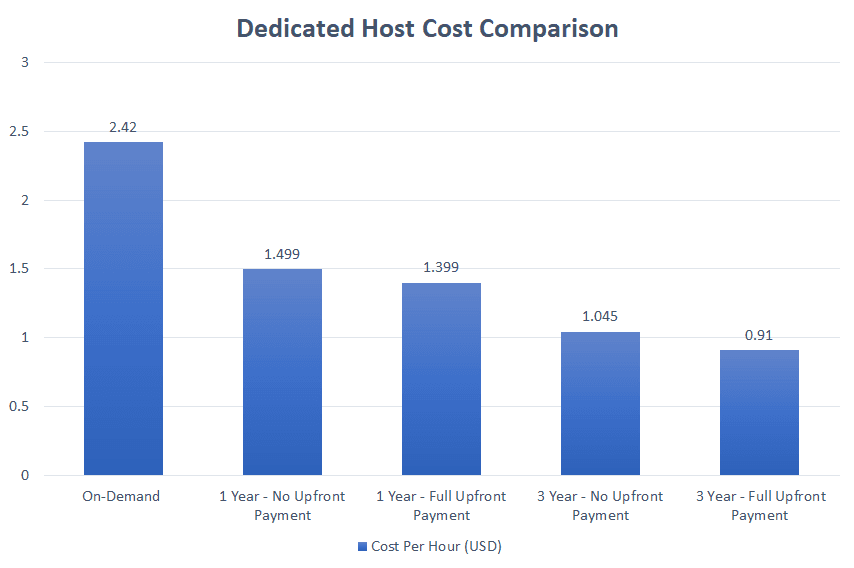
As you can see, purchasing a dedicated host for 3 years with full upfront payment is the most cost-effective way.
Purchasing a dedicated host for 3 years will save around 60% of your cost compared to on-demand dedicated host instances.
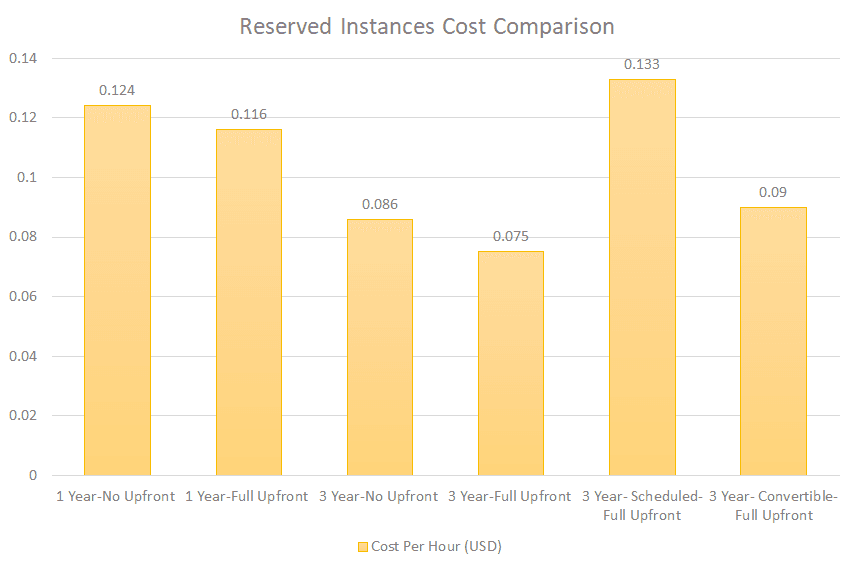
Reserved EC2 Instances Price Comparison
The cost of purchasing reserved instances is a bit cheaper compared to dedicated hosts.
Similar to dedicated instances, reserving for 3 years with full payment upfront is the most cost-effective method.
Spot EC2 Instances Price Comparison
Spot instances are the most cost-effective EC2 instance purchase option.
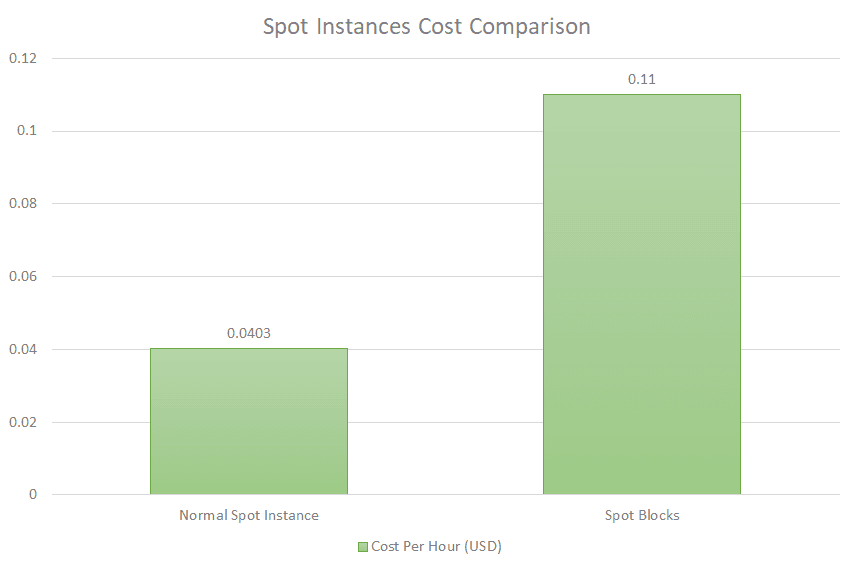
I think now you can understand the cost-effectiveness of spot instances. To better understand, let’s compare the cheapest options of a dedicated host, reserved instances, and on-demand pricing with spot instance price.
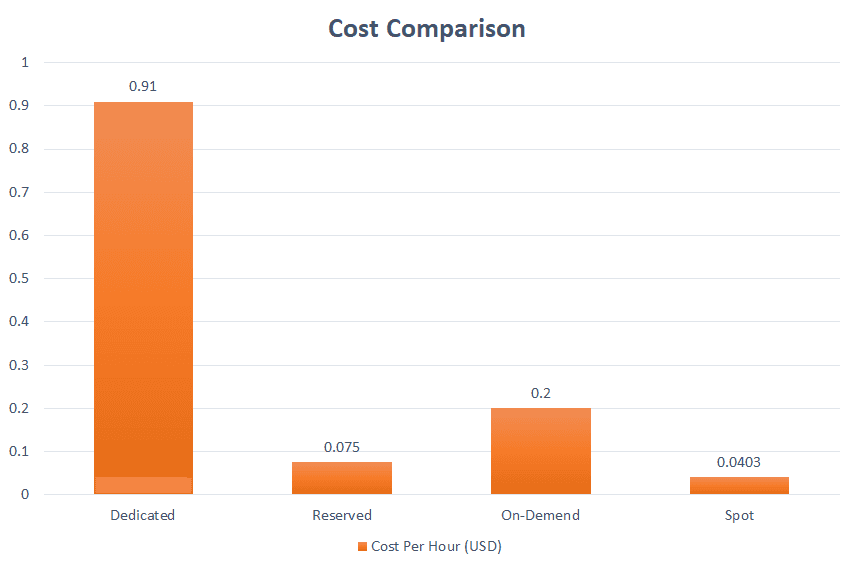
As you can see, spot instances are the most cost-effective option, and you can save more than 75% compared to on-demand instances.
But, spot instances don’t guarantee 100% availability. As I explained, it can be taken away from you when your max price is lower than the spot price. So can we use it in production environments? Let’s find out.
Can We Use Spot Instances in Production?
Yes. We can use EC2 spot instances for production environments.
But, we can’t use them for any production environments, and there are few things you need to consider before using spot instances for your production.
Maximum price limit
If your maximum price limit is considerably high, you have a good chance of keeping your instances without been taken away. However, we can’t be 100% sure about this.
Suitable for Batch Jobs
If your application is running batch jobs activities like image processing, data analysis, or any other work that is resilient for failures, you can use spot instances.
Combine with Other Instance Purchasing Options
Also, you can use a combination of instances like half from on-demand and a half from spot instances. So, if you lose your spot instances, on-demand instances will still run your application, and you can restart new spot instances within a few minutes.
Conclusion
Spot instances are the most cost-effective AWS EC2 purchasing option. Although it is suitable for production usage, we can’t always use them.
Therefore, we need to think about our requirements and choose the best instance.
That’s why we need to be aware of all the purchasing options, and I hope you will be able to reduce your AWS bill drastically with the things I discussed.
Thank you for Reading !!!
Learn More
Continuous Deployment with AWS Amplify
5 Step guide to maintaining your development, test, and production environments separately. enlear.academy
How to Avoid Lambda Cold Starts
Using Lambda Pings and Provision Concurrency to prevent Cold Start. enlear.academy