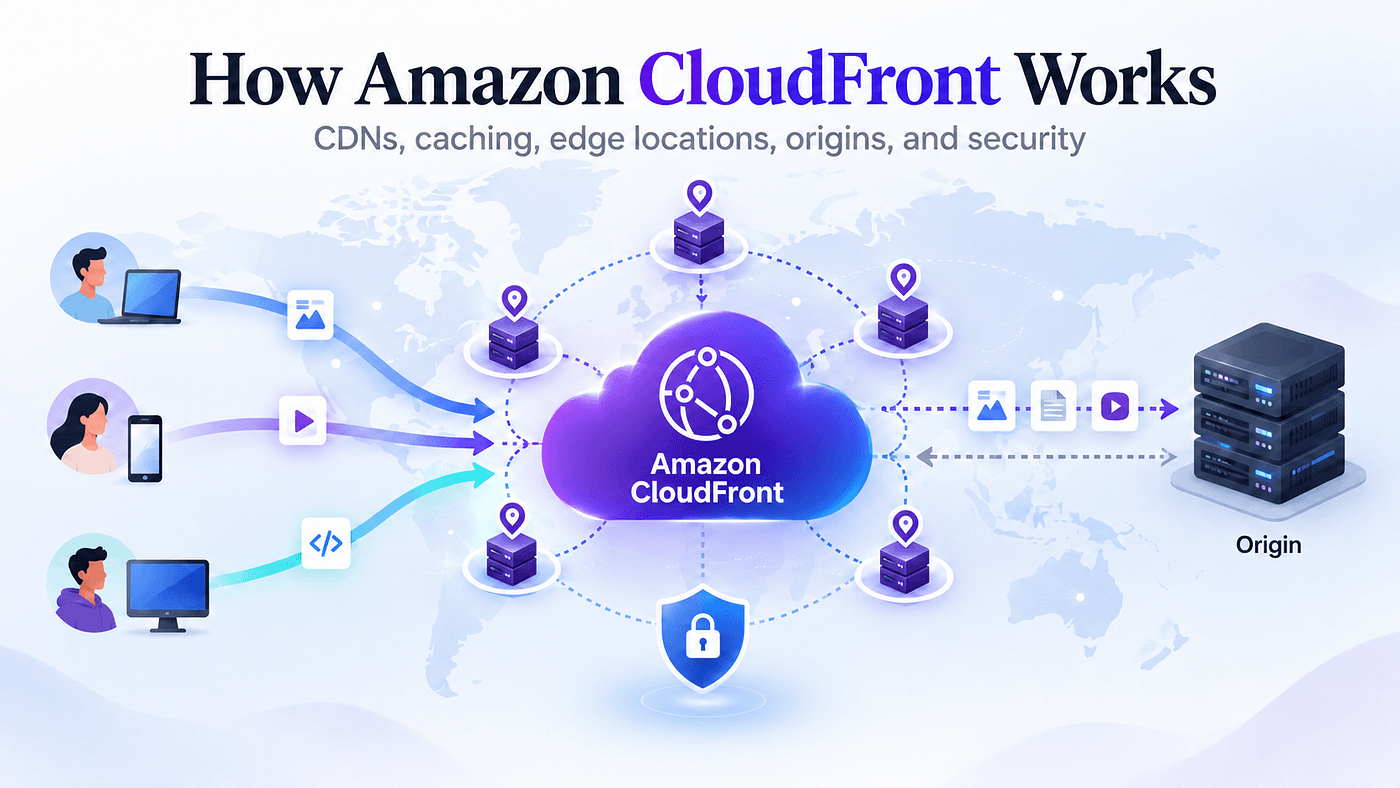
Imagine you have deployed a website in an AWS Region, but your users are spread across the world. A user located close to your server may get a fast response, while someone thousands of kilometers away still has to send requests all the way to your server and wait for the response to travel back.
For images, JavaScript files, CSS, videos, downloads, and other frequently requested content, repeating that journey for every user is inefficient. This is where Amazon CloudFront comes in.
CloudFront is AWS’s Content Delivery Network, or CDN. Instead of forcing every request to travel directly to your origin, CloudFront can deliver cached content from locations closer to your users. But CloudFront is more than simply placing a cache in front of a website. Understanding what happens when a request reaches CloudFront makes the rest of the service much easier to understand.
What Is a CDN?
A Content Delivery Network (CDN) is a distributed network designed to deliver content efficiently to users from geographically distributed locations.
Without a CDN, the request might look like this:
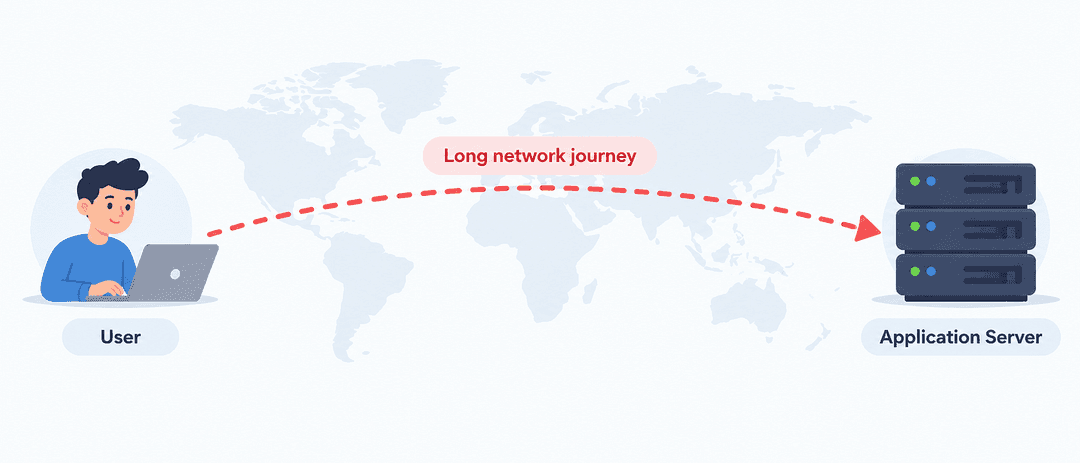
Every request has to travel toward the server hosting the content.
Imagine your application is hosted in Europe and someone accesses it from Asia.
Without a CDN, requests for your images, CSS, JavaScript, and other resources may need to travel a significant distance to reach your infrastructure.
Now place CloudFront in front of the application:
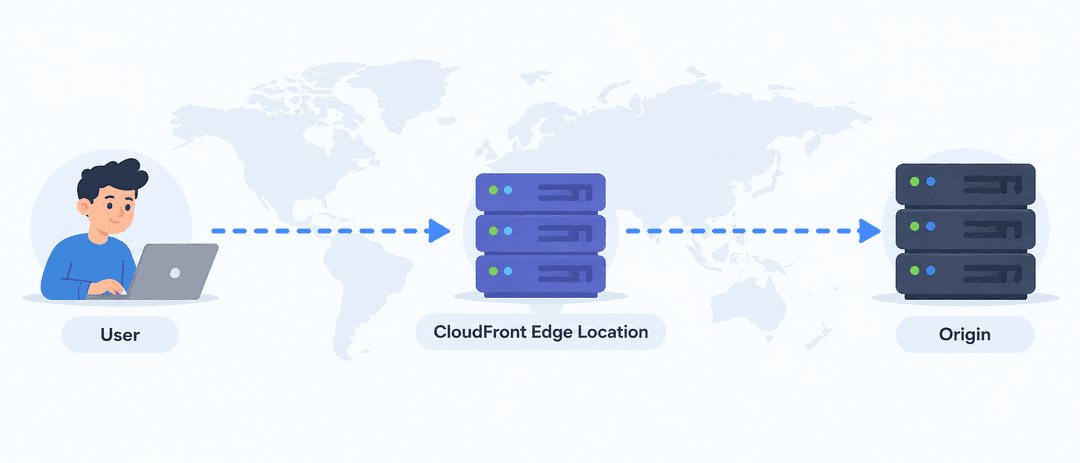
CloudFront operates a globally distributed network of Points of Presence, which include edge locations.
When users request content through a CloudFront distribution, their requests are routed to CloudFront infrastructure designed to serve them efficiently.
If CloudFront already has the requested content cached, it can return that content without contacting your origin.
This is one of the main reasons CloudFront can reduce both latency and load on your backend.
What Is an Origin?
CloudFront still needs somewhere to retrieve the original content. That location is called the origin.
An origin could be something like:
- An Amazon S3 bucket
- An Application Load Balancer
- An Amazon EC2-hosted application
- An API or HTTP server
- Another supported AWS service
- An external HTTP server outside AWS
For example, imagine that an S3 bucket contains your application’s files:
index.html
styles.css
app.js
logo.png
In this case, the S3 bucket is the origin.
Instead of users accessing that bucket directly, they access your CloudFront distribution.
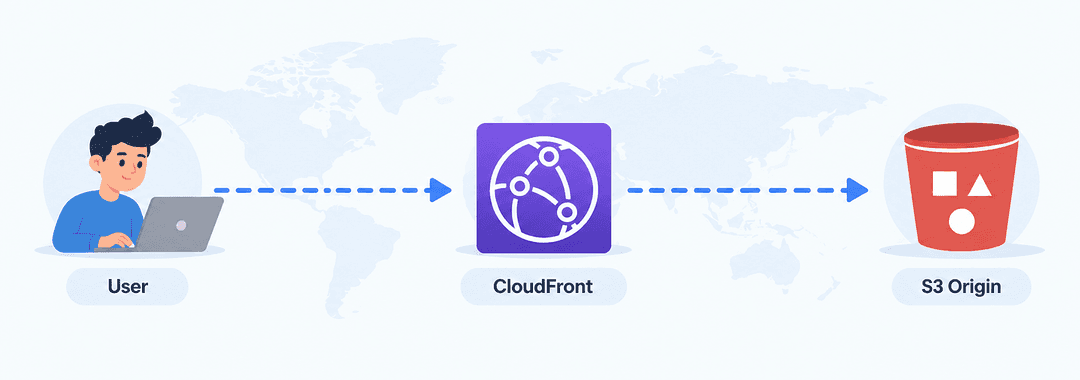
CloudFront becomes the delivery layer between users and the original content.
In that setup, users access the content through CloudFront, while CloudFront is authorized to retrieve the objects from S3.
What Happens When a User Requests a File?
Suppose a user requests this image:
https://example.com/images/product.png
There are two important situations to understand.
Scenario 1: CloudFront Already Has the File
CloudFront first checks whether product.png is already available in its cache.
If the object is cached and still valid, CloudFront can return it directly to the user.
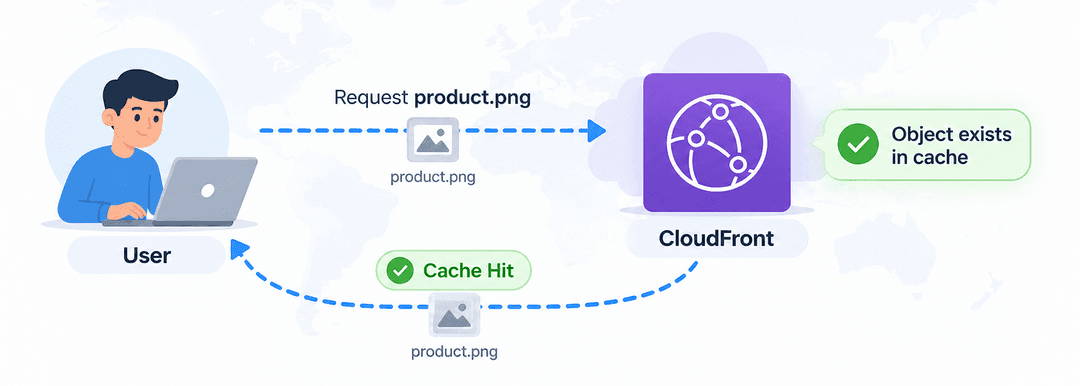
This is called a cache hit.
The origin does not need to process the request. The user receives the content through CloudFront, while the origin handles fewer requests. That is useful for both performance and backend efficiency.
Scenario 2: The File Is Not Cached
Now imagine CloudFront does not currently have a valid cached copy of product.png at that location.
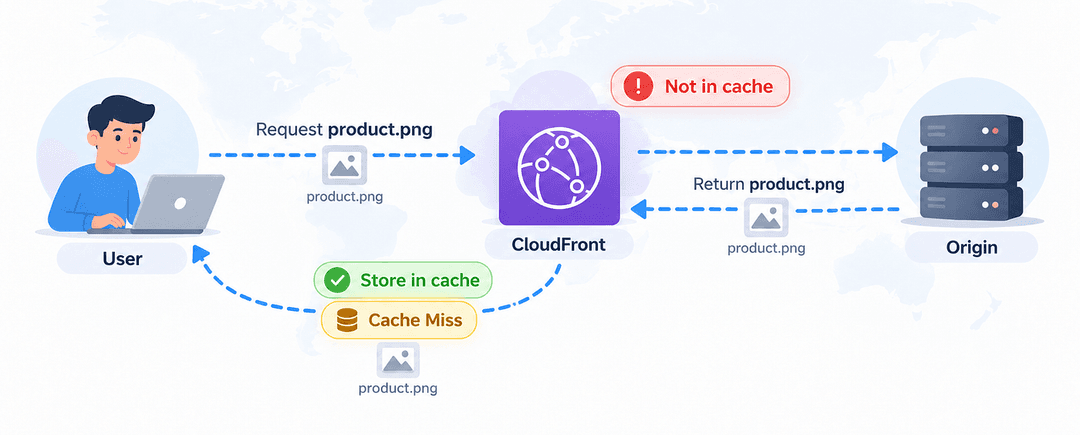
This is a cache miss.
A cache miss does not always mean that the file has never been requested before. The cached object may have expired, been removed, or simply not be available at that CloudFront location.
When a cache miss happens, CloudFront forwards the request to the configured origin.
The origin returns the file. CloudFront then sends the file back to the user and, depending on the caching configuration, stores it so future requests can potentially be served directly from the cache.
How Long Does CloudFront Keep Something in the Cache?
Cached objects do not stay in CloudFront forever.
Imagine your application contains logo.png.
You update the file at the origin, but CloudFront may still have the previous version cached. How long CloudFront continues using that cached version depends on your caching configuration.
CloudFront uses TTL, or Time to Live, to control how long cached content remains valid.
A cache policy can define:
- Minimum TTL
- Default TTL
- Maximum TTL
CloudFront can also use HTTP caching headers from your origin, such as Cache-Control and Expires
Once the cached object expires, the next request may cause CloudFront to contact the origin to validate or retrieve the content again.
For content that rarely changes, a longer TTL can improve caching efficiency.
For content that changes frequently, a shorter TTL or a different caching strategy may be more suitable.
Why Cache Keys Matter
CloudFront uses a cache key to decide whether two requests can use the same cached response.
For example:
/products?id=100
/products?id=200
If the id changes the response, CloudFront should treat them as different cache entries.
A cache key can include:
- Query strings
- Headers
- Cookies
The main idea is simple:
Only include values in the cache key when they actually change the response.
This helps CloudFront keep the cache efficient while still returning the correct content.
What Are Cache Behaviors?
A CloudFront distribution can handle different URL paths in different ways.
These rules are called cache behaviors.
For example:
/images/*  → S3
/api/*     → Application Load Balancer
/videos/*  → Video origin
CloudFront checks the requested path, matches it to a behavior, and then applies the rules configured for that behavior.
Each behavior can define things like:
- Which origin receives the request
- Which HTTP methods are allowed
- How the content is cached
- Whether HTTPS is required
This allows one CloudFront distribution to handle different parts of an application with different rules.
What About Security?
CloudFront can also be an important part of your application’s security.
It integrates with services such as:
- AWS WAF to inspect and filter web requests
- AWS Shield to help protect against DDoS attacks
- AWS Certificate Manager to provide HTTPS certificates
A simple architecture might look like:
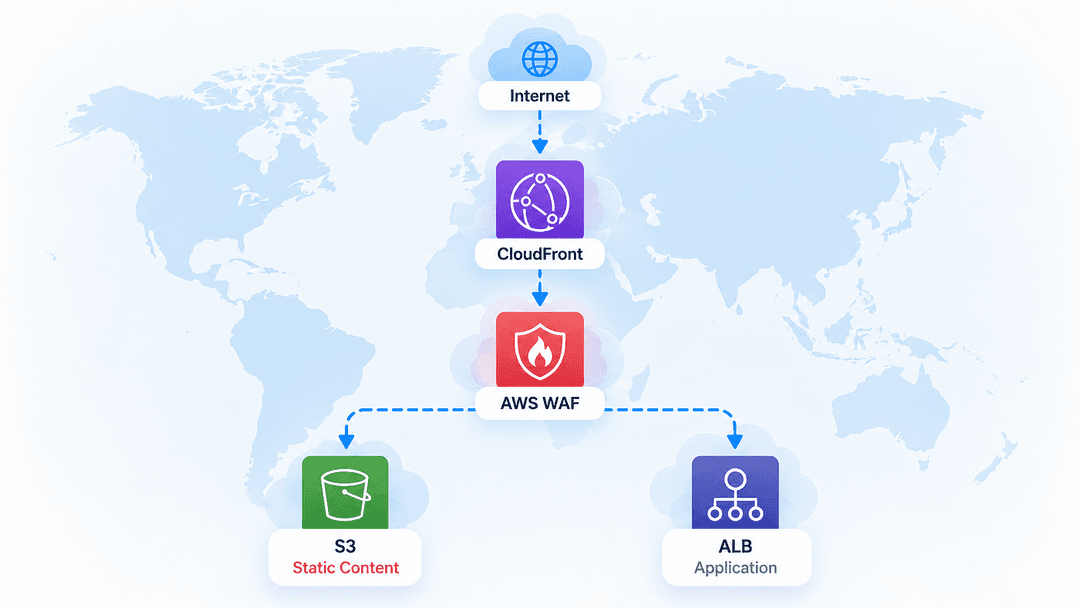
AWS WAF checks requests at CloudFront before they are forwarded to your backend.
CloudFront also supports signed URLs and signed cookies when access to content needs to be restricted.
For better security, the origin should also be configured so users cannot bypass CloudFront and access it directly.
This way, CloudFront helps improve both performance and security.
A Simple Way to Think About CloudFront
The easiest way to understand CloudFront is to follow the request flow:
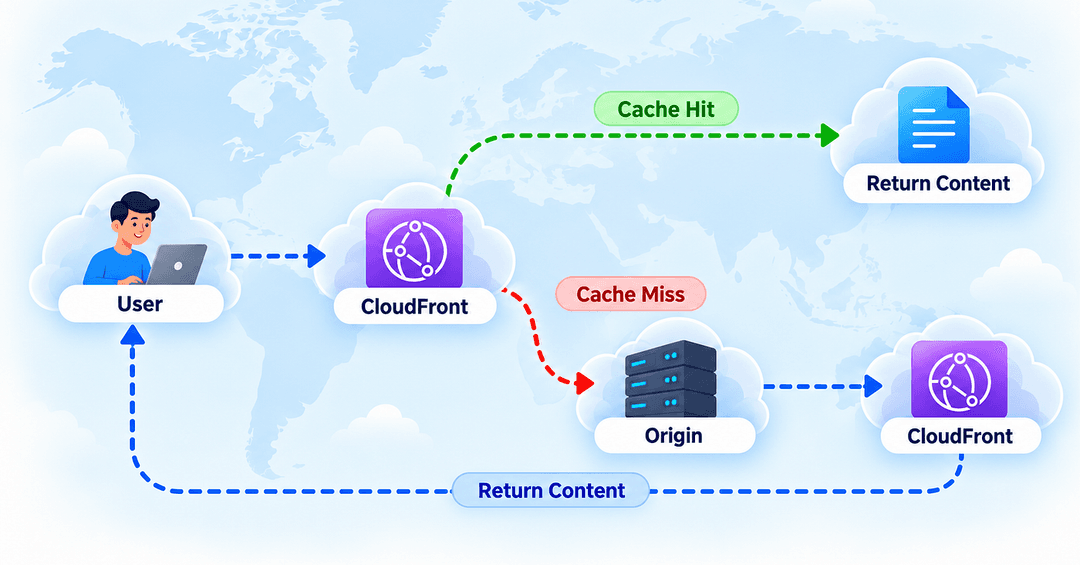
Then remember these key ideas:
- Origin : where the original content lives
- Cache : stores reusable content closer to users
- Cache Key : decides whether requests can share the same cached response
- Cache Behavior : decides how different URL paths are handled
- AWS WAF : filters unwanted web traffic
Once this request flow is clear, CloudFront becomes much easier to understand.
Final Thoughts
CloudFront can look complicated at first because it includes many settings for origins, caching, behaviors, security, and request handling.
But the basic idea is simple.
CloudFront sits between your users and your origin. When a request arrives, it checks whether it can return a valid cached response. If it can, the user gets the content quickly without another request reaching the origin.
If the content is not available in the cache, CloudFront retrieves it from the origin and can cache it for future requests.
From there, you can decide:
- What content should be cached
- How long it should stay in the cache
- Which origin should handle each type of request
- How CloudFront should protect and route traffic
Once you understand this basic request flow, concepts such as cache keys, behaviors, TTLs, and security settings become much easier to understand.
That request lifecycle is the best foundation for learning the more advanced parts of CloudFront.